


Embedded Service for Web Developer Guide
 j
jNewer Version Available
Add Mobile Accessibility for Chat
Most browsers don’t support hiding background content for screen readers on mobile phones when the Chat modal opens. By adding hooks to the code, you streamline the experience for these users to focus on Chat. Once the window is closed, the full web page content returns.
The phone on the left shows what the screen reader accesses when the modal opens. The one on the right demonstrates the experience with the inert function added.
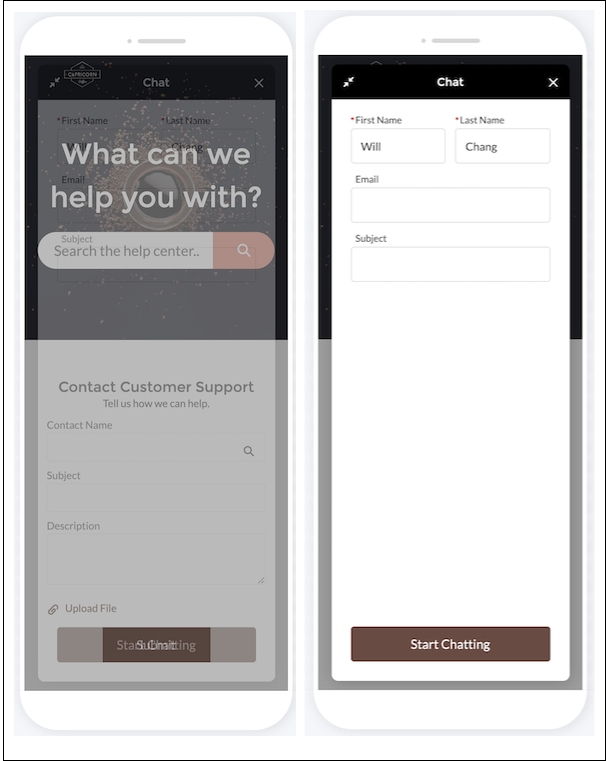
This solution provides code that temporarily hides document body children and keep only the Embedded Service Web widget accessible and visible to assistive technology.
Start with a base page and our code snippet with an empty onBodyLoaded JavaScript method. The body page content is wrapped with a div with the id #body-content and the body has an onload handler specified. You’ll use the CSS selector div.#body-content and implement the JavaScript method onBodyLoaded() after adding your snippet.
Base Page Code with Embedded Chat Code Snippet
1<html>
2
3<head>
4   <meta name="viewport" content="width=device-width, initial-scale=1, minimum-scale=1, maximum-scale=1, user-scalable=0">
5   <script type='text/javascript'>
6        function onBodyLoaded() {
7            // You’ll fill in this function during the next step.
8        }
9   </script>
10</head>
11
12<body onload="onBodyLoaded()">
13   <div id="body-content">
14       <h1>Welcome to the best website!</h1>
15
16       <style type='text/css'>
17           .embeddedServiceHelpButton .helpButton .uiButton {
18               background-color: #A70BA5;
19               font-family: "Comic Sans MS", sans-serif;
20           }
21           .embeddedServiceHelpButton .helpButton .uiButton:focus {
22               outline: 1px solid #A70BA5;
23           }
24           .previews img {
25               max-width: 100%;
26               border-radius: 10px;
27           }
28           .chat-content a {
29               color: #fff;
30           }
31       </style>
32   </div>
33
34   <script type='text/javascript' src='https://service.force.com/embeddedservice/5.0/esw.min.js'></script>
35   <script type='text/javascript'>
36       var initESW = function (gslbBaseURL) {
37           embedded_svc.settings.displayHelpButton = true; //Or false
38           embedded_svc.settings.language = ''; //For example, enter 'en' or 'en-US'
39           embedded_svc.settings.enabledFeatures = ['LiveAgent'];
40           embedded_svc.settings.entryFeature = 'LiveAgent';
41
42           embedded_svc.init(
43               // params for your org
44           );
45       };
46
47       if (!window.embedded_svc) {
48           var s = document.createElement('script');
49           s.setAttribute('src', 'https://<yourCoreURL>/embeddedservice/5.0/esw.min.js');
50           s.onload = function () {
51               initESW(null);
52           };
53           document.body.appendChild(s);
54       } else {
55           initESW('https://service.force.com');
56       }
57   </script>
58</body>
59
60</html>
onBodyLoaded Code
Next implement the JavaScript method onBodyLoaded to disable the div with id body-content whenever Embedded Chat is opened and re-enable body-content whenever Embedded Chat is minimized/closed. Define the JavaScript method onBodyLoaded in this step. For more help on adding event handlers for maximize, destroy, and minimize, see “Get Chat Event Notifications.”
1function onBodyLoaded() {
2   /**
3     * Toggles the inert attribute on background content for the page.
4     * The inert attribute needs to be set on parent level DOM
5     * nodes. Inert will set the DOM node aria-hidden attribute and
6     * and set tab-index="-1" on all children so that screen readers
7     * can’t access the content.
8     */
9   function toggleInert(disabled) {
10       let bodyElem = document.getElementById("body-content");
11       if(bodyElem) {
12           bodyElem.inert = disabled;
13       }
14   }
15
16   // Add hooks to toggle inert on our page when Embedded Chat
17   // changes state.
18   function addA11yHooks() {
19       embedded_svc.addEventHandler('afterMaximize', function() {
20           toggleInert(true);
21       });
22       embedded_svc.addEventHandler('afterDestroy', function() {
23           toggleInert(false);
24       });
25       embedded_svc.addEventHandler('afterMinimize', function() {
26           toggleInert(false);
27       });
28   }
29
30   // Early out for desktop.
31   if(embedded_svc.isDesktop()) {
32       return;
33   }
34
35   // Add hooks for mobile.
36   addA11yHooks();
37}
Mobile Accessible Embedded Chat Example Code
Here’s the combined code for the steps you completed.
1<html>
2
3<head>
4   <meta name="viewport" content="width=device-width, initial-scale=1, minimum-scale=1, maximum-scale=1, user-scalable=0">
5   <script type='text/javascript'>
6       function onBodyLoaded() {
7           /**
8             * Toggles the inert attribute on background content for the page.
9             * The inert attribute just needs to be set on parent level DOM
10             * nodes. Inert will set the DOM node aria-hidden attribute and
11             * and set tab-index="-1" on all children so that screen readers
12             * can't access the content.
13             */
14           function toggleInert(disabled) {
15               let bodyElem = document.getElementById("body-content");
16               if(bodyElem) {
17                   bodyElem.inert = disabled;
18               }
19           }
20
21           // Add hooks to toggle inert on our page when Embedded Chat
22           // changes state.
23           function addA11yHooks() {
24               embedded_svc.addEventHandler('afterMaximize', function(data) {
25                   toggleInert(true);
26               });
27               embedded_svc.addEventHandler('afterDestroy', function(data) {
28                   toggleInert(false);
29               });
30               embedded_svc.addEventHandler('afterMinimize', function(data) {
31                   toggleInert(false);
32               });
33           }
34
35           // Early out for desktop.
36           if(embedded_svc.isDesktop()) {
37               return;
38           }
39
40           // Add hooks for mobile.
41           addA11yHooks();
42       }
43   </script>
44</head>
45
46<body onload="onBodyLoaded()">
47   <div id="body-content">
48       <h1>Welcome to the best website!</h1>
49
50       <style type='text/css'>
51           .embeddedServiceHelpButton .helpButton .uiButton {
52               background-color: #A70BA5;
53               font-family: "Comic Sans MS", sans-serif;
54           }
55           .embeddedServiceHelpButton .helpButton .uiButton:focus {
56               outline: 1px solid #A70BA5;
57           }
58           .previews img {
59               max-width: 100%;
60               border-radius: 10px;
61           }
62           .chat-content a {
63               color: #fff;
64           }
65       </style>
66   </div>
67
68   <script type='text/javascript' src='https://service.force.com/embeddedservice/5.0/esw.min.js'></script>
69   <script type='text/javascript'>
70       var initESW = function (gslbBaseURL) {
71           embedded_svc.settings.displayHelpButton = true; //Or false
72           embedded_svc.settings.language = ''; //For example, enter 'en' or 'en-US'
73           embedded_svc.settings.enabledFeatures = ['LiveAgent'];
74           embedded_svc.settings.entryFeature = 'LiveAgent';
75
76           embedded_svc.init(
77               // params for your org
78           );
79       };
80
81       if (!window.embedded_svc) {
82           var s = document.createElement('script');
83           s.setAttribute('src', 'https://<yourCoreURL>/embeddedservice/5.0/esw.min.js');
84           s.onload = function () {
85               initESW(null);
86           };
87           document.body.appendChild(s);
88       } else {
89           initESW('https://service.force.com');
90       }
91   </script>
92</body>
93
94</html>