


Lightning Aura Components Developer Guide
 j
jNewer Version Available
Secure Wrappers
Lightning Locker also replaces instances of other objects, such as components and events, with secure wrapped versions. Here’s a list of the most common wrappers that you encounter.
- SecureAura
- Secure wrapper for $A, which is the entry point for using the framework in JavaScript code.
- SecureComponent
- Secure wrapper for the Component object inside the same namespace.
- SecureComponentRef
- SecureComponentRef is a subset of SecureComponent that provides the external API for a component in a different namespace.
- When you’re in a controller or helper, you have access to a SecureComponent, essentially the this object. If you reference a component in a different namespace, you get a SecureComponentRef instead. For example, if your markup includes a lightning:button and you call cmp.find("buttonAuraId"), you get a SecureComponentRef as lightning:button is in a different namespace from the component containing the button markup.
- SecureDocument
- Secure wrapper for the document object, which represents the root node of the HTML document or page. The document object is the entry point into the page’s content, which is the DOM tree.
- SecureElement
- Secure wrapper for the Element object, which represents various HTML elements. SecureElement is wrapped in a Proxy object as a performance optimization so that its data can be lazily filtered when it’s accessed. Therefore, a Proxy object represents the HTML element if you’re debugging in the browser console.
- SecureObject
- Secure wrapper for an object that is wrapped by Lightning Locker. When you see a SecureObject, it typically means that you don’t have access to the underlying object and its properties aren’t available.
- SecureWindow
- Secure wrapper for the window object, which represents a window containing a DOM document.
Use the Locker API Viewer to quickly see the difference between the DOM APIs exposed by Lightning Locker versus the standard DOM APIs for the most complex wrappers: SecureDocument, SecureElement, and SecureWindow.
Example
Let’s look at a sample component that demonstrates some of the secure wrappers.
1<!--c:secureWrappers-->
2<aura:component >
3    <div id="myDiv" aura:id="div1">
4        <p>See how Lightning Locker uses secure wrappers</p>
5    </div>
6    <lightning:button name="myButton" label="Peek in DOM"
7        aura:id="button1" onclick="{!c.peekInDom}"/>
8</aura:component>
The c:secureWrappers component creates a <div> HTML element and a lightning:button component.
Here’s the client-side controller that peeks around in the DOM.
1({ /* secureWrappersController.js */
2    peekInDom : function(cmp, event, helper) {
3        console.log("div1: ", cmp.find("div1").getElement());
4
5        console.log("button1: ", cmp.find("button1"));
6        console.log("button name: ", event.getSource().get("v.name"));
7        // add debugger statement for inspection
8        // always remove this from production code
9        debugger;
10    }
11})
We use console.log() to look at the <div> element and the button. The <div> SecureElement is wrapped in a Proxy object as a performance optimization so that its data can be lazily filtered when it’s accessed.
We put a debugger statement in the code so that we could inspect the elements in the browser console.
Type these expressions into the browser console and look at the results.
1cmp
2cmp+""
3cmp.find("button1")
4cmp.find("button1")+""
5window
6window+""
7$A
8$A+""
We add an empty string to some expressions so that the object is converted to a String. You could also use the toString() method.
Here’s the output.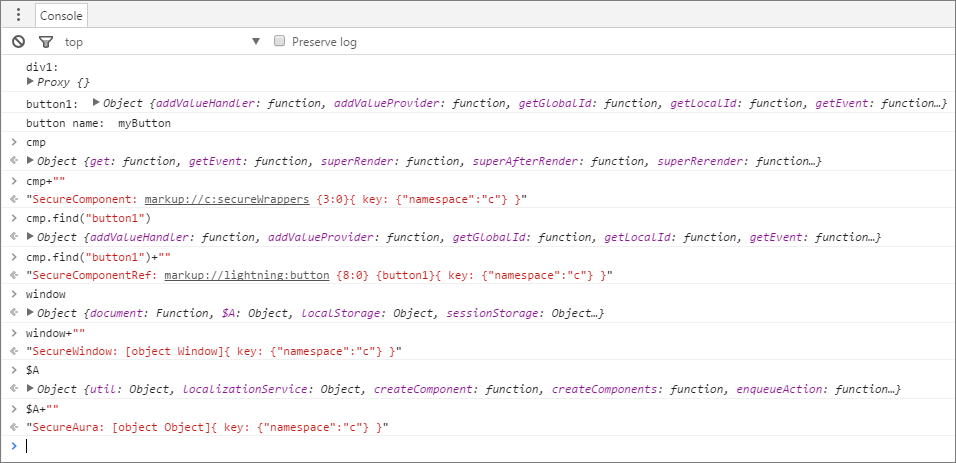
Let’s examine some of the output.
- cmp+""
- Returns a SecureComponent object for cmp, which represents the c:secureWrappers component.
- cmp.find("button1")+""
- Returns a SecureComponentRef, which represents the external API for a component in a different namespace. In this example, the component is lightning:button.
- window+""
- Returns a SecureWindow object.
- $A+""
- Returns a SecureAura object.