


Visualforce Developer Guide
 j
jNewer Version Available
Best Practices for Using Component Facets
A facet consists of content in an area
of a Visualforce component that provides contextual information about the data
that is presented in the component. For example, <apex:dataTable> supports facets
for the header, footer, and caption of a table, while <apex:column> only supports facets
for the header and footer of the column. The <apex:facet> component allows
you to override the default facet on a Visualforce component with your own content. Facets only allow a single child
within the start and close tags.
When defining an <apex:facet>, it is always used as the child of another Visualforce component. The name attribute on the facet determines which area of the parent component is overridden.
Example: Using Facets with <apex:dataTable>
The following markup shows how the <apex:dataTable> component can
be modified with <apex:facet>:
1<apex:page standardController="Account">
2    <apex:pageBlock>
3        <apex:dataTable value="{!account}" var="a">
4            <apex:facet name="caption"><h1>This is
5              {!account.name}</h1></apex:facet>
6            <apex:facet name="footer"><p>Information
7              Accurate as of {!NOW()}</p></apex:facet>
8            <apex:column>
9                <apex:facet name="header">Name</apex:facet>
10                <apex:outputText value="{!a.name}"/>
11            </apex:column>
12
13            <apex:column>
14                <apex:facet
15              name="header">Owner</apex:facet>
16                <apex:outputText value="{!a.owner.name}"/>
17            </apex:column>
18        </apex:dataTable>
19    </apex:pageBlock>
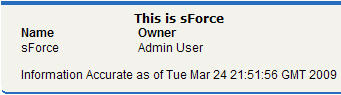
20</apex:page>The page displays as follows:
Extending <apex:dataTable> with a Facet
Using Facets with <apex:actionStatus>
Another component that can use a facet is <apex:actionStatus>. The <apex:actionStatus> component
can be extended to display an indicator whenever a page is being refreshed.
For example, you can define a progress wheel with the following markup:
1<apex:page controller="exampleCon">
2    <apex:form >
3        <apex:outputText value="Watch this counter: {!count}" id="counter"/>
4        <apex:actionStatus id="counterStatus">
5            <apex:facet name="start">
6                 <img src="{!$Resource.spin}"/> <!-- A previously defined image -->
7            </apex:facet>
8        </apex:actionStatus>
9        <apex:actionPoller action="{!incrementCounter}" rerender="counter"
10            status="counterStatus" interval="7"/>
11    </apex:form>
12</apex:page>
The associated controller updates
the counter:
1public class exampleCon {
2    Integer count = 0;
3
4    public PageReference incrementCounter() {
5            count++;
6            return null;
7    }
8
9    public Integer getCount() {
10        return count;
11    }
12}
The page displays as follows:
Extending <apex:actionStatus> with a Facet
