


Lightning Aura Components Developer Guide
 j
jNewer Version Available
Events Fired During the Rendering Lifecycle
Component Creation
The component lifecycle starts when the client sends an HTTP request to the server and the component configuration data is returned to the client. No server trip is made if the component definition is already on the client from a previous request and the component has no server dependencies.
Let’s look at an app with several nested components. The framework instantiates the app and goes through the children of the v.body facet to create each component. First, it creates the component definition, its entire parent hierarchy, and then creates the facets within those components. The framework also creates any component dependencies on the server, including definitions for attributes, interfaces, controllers, and actions.
The following image lists the order of component creation.
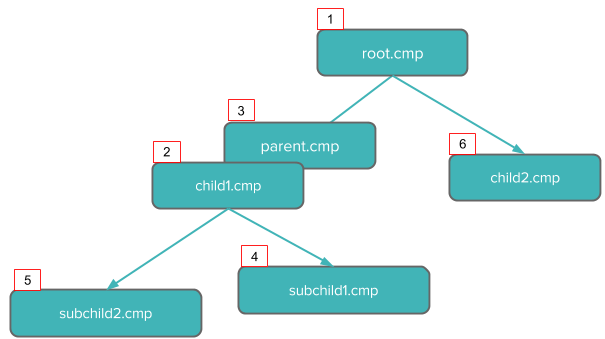
After creating a component instance, the framework sends the serialized component definitions and instances down to the client. Definitions are cached but not the instance data. The client deserializes the response to create the JavaScript objects or maps, resulting in an instance tree that’s used to render the component instance. When the component tree is ready, the init event is fired for all the components, starting from the child components and finishing in the parent component.
Component Rendering
The rendering lifecycle happens once in the lifetime of a component unless the component gets explicitly unrendered. When you create a component:
- The component service that constructs the components fires the init event to signal that initialization has completed.
You can customize the init handler and add your own controller logic before the component starts rendering. For more information, see Invoking Actions on Component Initialization.
1<aura:handler name="init" value="{!this}" action="{!c.doInit}"/> - For each component in the tree, the base implementation of render() or your custom renderer is called to start component rendering. For more information, see Create a Custom Renderer. Similar to the component creation process, rendering starts at the root component, its child components and their super components, if any, and finally the subchild components.
- After your components are rendered to the DOM, afterRender() is called to signal that rendering is completed for each of these component definitions. It enables you to interact with the DOM tree after the framework rendering service has created the DOM elements.
- To indicate that the client is done waiting for a response to the server request XHR, the aura:doneWaiting event is fired. You can handle this event by adding a handler wired to a client-side controller action.
- The framework fires a render event, enabling you to interact with the DOM tree after the framework’s rendering service has inserted DOM elements. Handling the render event is preferred to creating a custom renderer and overriding afterRender(). For more information, see Handle the render Event.
- Finally, the aura:doneRendering event is fired at the end of the rendering lifecycle.
Rendering Nested Components
Let’s say that you have an app myApp.app that contains a component myCmp.cmp with a nested component.
During initialization, the init() event is fired in this order: the nested component, myCmp.cmp, and myApp.app.