


ISVforce Guide
 j
jNewer Version Available
Top AppExchange Searches
See the 10 search terms that result in the most activity on your listing. Only searches
performed with the search bar on the AppExchange website are included. Search terms from external
search engines aren’t available.
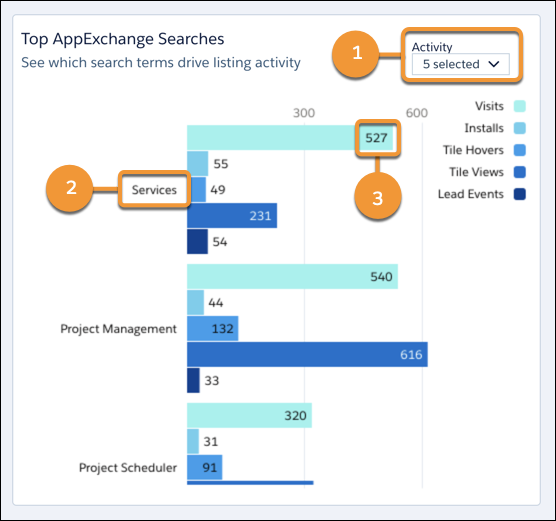
Select the activities that you want to view (1). The search term (2) associated with the activities appears on the left of the chart. Activity metric values appear on the right (3).
Depending on your filter selections, some search terms might not be visible. To see all available search terms, position your pointer over the visualization and scroll down.
If the visualization doesn’t display data, try filtering by different metrics, or change the time period.
Definitions
Here’s how we define the metrics that appear in this visualization.
| Metric | Description |
|---|---|
| Installs | Installs of your solution initiated on AppExchange, your website, or from a code repository. For AppExchange installs, we count the number of successful completions of the Get It Now installation flow. Includes installs in production and sandbox orgs. |
| Lead Events | Lead events on your listing. Events include: demos, test drives, chat interactions, Learn More clicks, and Get It Now clicks or installs. A customer who clicks Get It Now and installs your solution is counted as a single lead event. |
| Tile Hovers | Hovers over your listing tile. To qualify as a hover, the customer must pause long enough over the tile to display the listing detail popover. Includes any repeat hovers by the customer. |
| Tile Views | Views of your listing tile. To qualify as a view, the entire tile must be visible in the customer's browser. Includes any repeat views by the customer. |
| Visitors | Unique listing visitors. If a customer visits your listing more than once in a 30-day period, only a single visitor is counted. |