


Restriction Rules Developer Guide
 j
jNewer Version Available
Restriction Rules
| Available in: Lightning Experience in Enterprise, Performance, Unlimited, and Developer Editions |
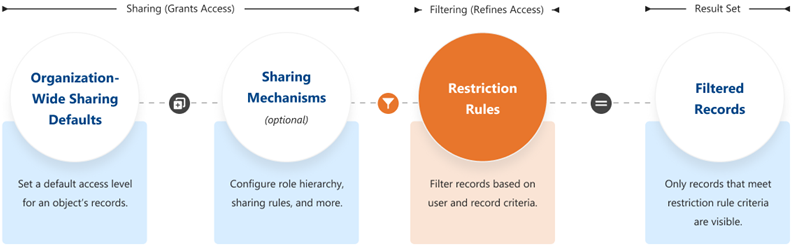
When a restriction rule is applied to a user, the data that the user has access to via org-wide defaults, sharing rules, and other sharing mechanisms is filtered by criteria that you specify. For example, if users navigate to the Today’s Tasks tab or to a list view for activities, they see only the records that meet the restriction rule’s criteria. If a user has a link to a record that is no longer accessible after a restriction rule is applied, the user sees an error message.
When Do I Use Restriction Rules?
Use restriction rules when you want certain users to see only a specific set of records. Restriction rules can simplify controlling access to records with sensitive or confidential information. Access to contracts, tasks, and events can be difficult to make truly Private using organization-wide defaults, making restriction rules the best way to configure this visibility.
For example, you have competing sales teams that can’t see each other’s activities, even though these activities are on the same account. With restriction rules, you can make sure that sales teams see only activities that belong to them and are relevant to their work. Or, if you provide confidential services to various individuals, use restriction rules so that only team members responsible for supporting these individuals can see related tasks.
Before creating restriction rules, turn off Salesforce Classic for your org. Find instructions at Turn Off Salesforce Classic for Your Org.
How Do Restriction Rules Affect Other Sharing Settings?
Users get access to records based on your organization-wide defaults and other sharing mechanisms, such as sharing rules or enterprise territory management.
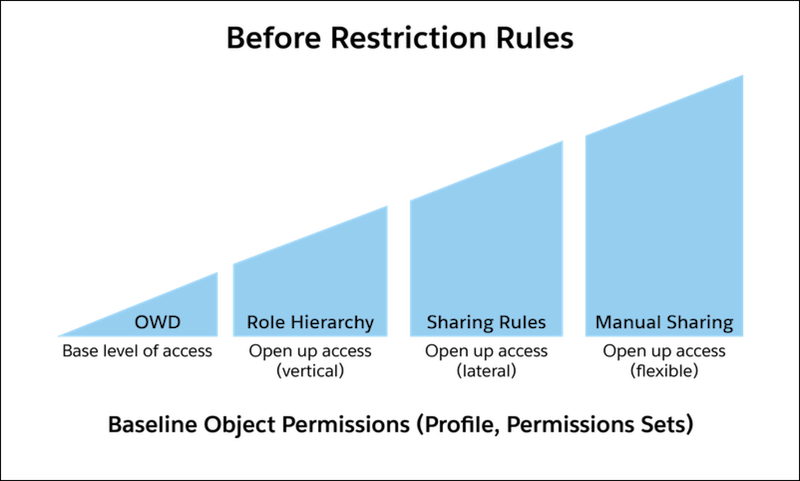
When a restriction rule is applied to a user, the data that they had read access to via your sharing settings is further scoped to only records matching the recordFilter. This behavior is similar to how you can filter results in a list view or report, except that it’s permanent. The number of records visible to the user can vary greatly depending on the value that you set in the recordFilter.

How Do I Configure Restriction Rules?
You can create and manage restriction rules in Setup or using either the Tooling API or Metadata API. You can create up to two restriction rules per object in Enterprise and Developer Editions and up to five restriction rules per object in Performance and Unlimited Editions.
Where Are Restriction Rules Available?
- List Views
- Lookups
- Related Lists
- Reports
- Search
- SOQL
- SOSL