


ISVforce Guide
 j
jNewer Version Available
Business Plans for AppExchange Listings
To publish a listing on AppExchange, we ask you to provide a business plan for your app,
Lightning component, or other product. A business plan tells us about your company and the product
you’re building. It helps us verify that you meet our standards for ethics and integrity.
Salesforce must approve your business plan before you can submit your product for security review.
If you recently joined the AppExchange Partner Program, you can sign your partnership agreement
after we approve your business plan.
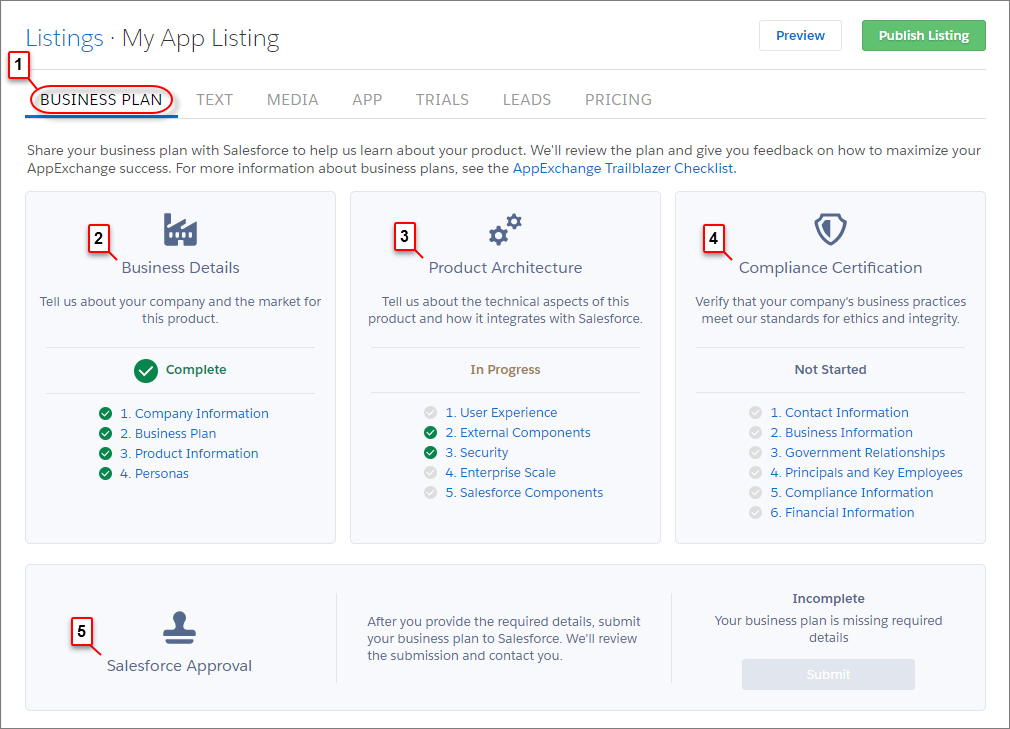
You can create and manage the business plan for your listing on the Business Plan tab (1) in
the AppExchange publishing console. A business plan has these sections.
| Section | Purpose |
|---|---|
| Business Details (2) | Share information about your company, the market for your product, and its target users. We use this information to understand how your company fits into the Salesforce product ecosystem. |
| Product Architecture (3) | Share technical information about your product, such as how it stores credentials, passwords, and other sensitive data. We use this information to verify that your product follows Salesforce best practices for architecture and design. |
| Compliance Certification (4) | Share information about your company’s business practices. We use this information to verify that you meet our standards for ethics and integrity. |
After you finish your business plan, submit it for review. We contact you to discuss your partnership and then either approve the plan or return it to you with comments. If your plan is returned, you can resubmit it when you’ve addressed our comments. To check the status of your plan, go the Salesforce Approval section (5).
After your business plan is approved, we contact you with instructions for signing your partnership agreement. To check the status of the agreement, go to the AppExchange Partner Agreement section (6). If you’re an existing partner, you’ve already signed an agreement, so this section doesn’t display.
