AJAX Toolkit Developer Guide
 j
jNewer Version Available
Sample Visualforce Page Using the AJAX Toolkit
This example demonstrates using the AJAX Toolkit in a Visualforce page.
To add JavaScript to a Visualforce page, use this procedure:
- Create the Visualforce page. For more information, see the Visualforce Developer's Guide.
- Cut and paste the following sample code into your Visualforce page.
The JavaScript code queries your organization and returns every account ID, account name, and industry type, if any:
1<apex:page >
2    <script type="text/javascript">
3    var __sfdcSessionId = '{!GETSESSIONID()}';
4    </script>
5    <script src="../../soap/ajax/56.0/connection.js"
6          type="text/javascript"></script>
7    <script type="text/javascript">     window.onload = setupPage;
8    function setupPage() {
9      //function contains all code to execute after page is rendered
10
11      var state = { //state that you need when the callback is called
12          output : document.getElementById("output"),
13          startTime : new Date().getTime()};
14
15      var callback = {
16          //call layoutResult if the request is successful
17          onSuccess: layoutResults,
18
19          //call queryFailed if the api request fails
20          onFailure: queryFailed,
21          source: state};
22
23      sforce.connection.query(
24          "Select Id, Name, Industry From Account order by Industry",
25           callback);
26  }
27
28  function queryFailed(error, source) {
29    source.output.innerHTML = "An error has occurred: " + error;
30  }
31
32  /**
33  * This method will be called when the toolkit receives a successful
34  * response from the server.
35  * @queryResult - result that server returned
36  * @source - state passed into the query method call.
37  */
38  function layoutResults(queryResult, source) {
39    if (queryResult.size > 0) {
40      var output = "";
41
42      //get the records array
43      var records = queryResult.getArray('records');
44
45      //loop through the records and construct html string
46      for (var i = 0; i < records.length; i++) {
47        var account = records[i];
48
49        output += account.Id + " " + account.Name +
50            " [Industry - " + account.Industry + "]<br>";
51      }
52
53    //render the generated html string
54    source.output.innerHTML = output;
55    }
56  }
57  </script>
58
59    <div id="output"> </div>
60
61</apex:page>
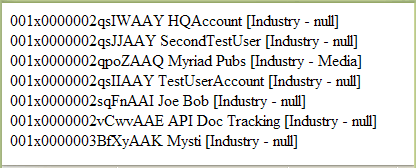
After you created and navigated to the Visualforce page, you see text similar to this image: