


ISVforce Guide
 j
jNewer Version Available
What’s the Difference Between Lead Events and Leads in Marketplace Analytics?
- Watches a demo
- Takes a test drive
- Interacts with AppExchange Chat
- Clicks Get It Now
- Clicks Learn More (applies only to consultant listings)
- Installs your solution
If you configured Web-to-Lead and enabled lead collection for the listing, each of these activities also creates a lead in your org. However, custom lead routing rules, customer contact preferences, and Web-to-Lead reCaptcha can cause the number of leads in your org to differ from the number of lead events shown in Marketplace Analytics.
Custom Lead Routing Rules
| Lead Routing Rule | Example | Marketplace Analytics | Your Org |
|---|---|---|---|
|
An employee at your company watches your listing’s demo video and uses a company
email address when AppExchange asks for contact information. In this scenario, Marketplace Analytics records a lead event, but the lead routing rule filters the lead in your org. |
A lead event is recorded. | A lead isn’t recorded. The lead routing rule filters out the lead. |
|
A new customer goes to your listing and watches a video, takes a test drive, and
installs your solution. For each activity, the customer provides the same email
address. In this scenario, Marketplace Analytics records three lead events: one for each activity. In your org, the lead routing rule creates a lead for the first activity. The others are marked as duplicates because they’re associated with the same email address. |
Three lead events are recorded, one for each activity. | A lead is created for the first activity only. The others are marked as duplicates because they’re associated with the same email address. |
Trailblazer.me Contact Preferences
In a customer’s Trailblazer.me settings, the customer can choose to share their contact info with, and allow contact from, AppExchange providers. Their choices impact lead creation in your org. For customers who allow provider contact, AppExchange lead events are recorded in Marketplace Analytics and propagate to your org as leads. Here are common examples of how contact preferences impact lead creation.
| Trailblazer.me Contact Preference | Example | Marketplace Analytics | Your Org |
|---|---|---|---|
| Allow | A prospect who allows provider contact watches your listing’s demo video. | A lead event is recorded. | If custom lead routing rules don’t filter out the lead, then a lead is created in your org. |
| Prohibit | A prospect who prohibits provider contact takes a test drive of your solution. | A lead event is recorded. | If custom lead routing rules don’t filter out the lead, then a lead is created in your org. The lead is flagged as contact prohibited. |
Customers can override their default Trailblazer.me contact preferences when interacting with AppExchange listings. AppExchange recognizes when a customer interacts with your listing in a way that you chose to collect leads for. These customers are prompted to fill out the AppExchange lead sign-up form.
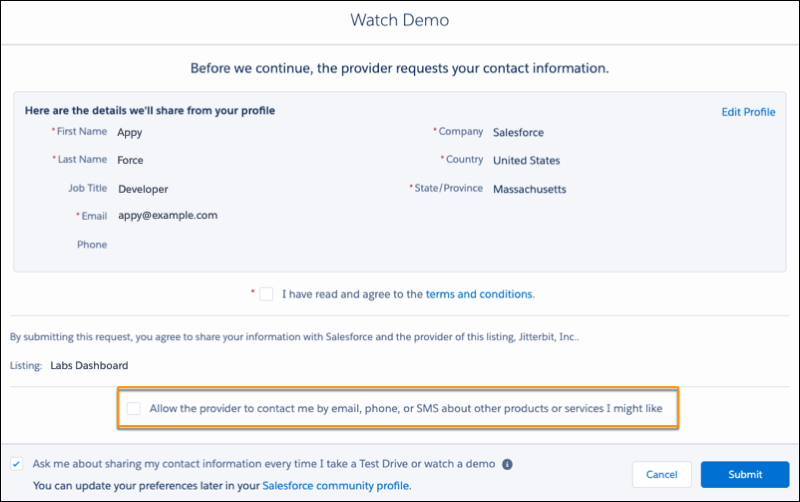
The form prepopulates with the customer’s contact info and preferences from their Trailblazer.me settings. On the form, the customer can choose to allow or prohibit provider contact, effectively overriding the contact preference that they set in their Trailblazer.me profile.
Web-to-Lead reCaptcha Verification
To receive AppExchange leads, disable Require reCaptcha Verification in your org’s Web-to-Lead settings.