


Experience Cloud Developer Guide
 j
jNewer Version Available
Configure Swappable Search and Profile Menu Components
- search, which contains the Search Publisher component
- profileMenu, which contains the Profile Header component
- navBar, which contains the Navigation Menu component
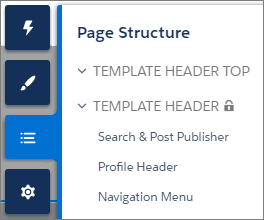
- Swap search and profile components in the default theme layout component or a custom theme layout component.
- Swap theme layout components while persisting existing customizations, such as the selected search component.
1<aura:attribute name="search" type="Aura.Component[]" required="false" />forceCommunity:profileMenuInterface
Add the forceCommunity:profileMenuInterface interface to an Aura component to allow it to be used as a custom profile menu component for the template. After you create a custom profile menu component, admins can select it in Experience Builder in to replace the template’s standard Profile Header component.
This code is for a simple profile menu component.
1<aura:component implements="forceCommunity:profileMenuInterface" access="global">
2    <aura:attribute name="options" type="String[]" default="Option 1, Option 2"/>
3    <ui:menu >
4        <ui:menuTriggerLink aura:id="trigger" label="Profile Menu"/>
5        <ui:menuList class="actionMenu" aura:id="actionMenu">
6            <aura:iteration items="{!v.options}" var="itemLabel">
7                <ui:actionMenuItem label="{!itemLabel}" click="{!c.handleClick}"/>
8            </aura:iteration>
9        </ui:menuList>
10    </ui:menu>
11</aura:component>
forceCommunity:searchInterface
Add the forceCommunity:searchInterface interface to an Aura component to allow it to be used as a custom search component for the template. After you create a custom search component, admins can select it in Experience Builder in to replace the template’s standard Search & Post Publisher component.
This code is for a simple search component.
1<aura:component implements="forceCommunity:searchInterface" access="global">
2    <div class="search">
3        <div class="search-wrapper">
4            <form class="search-form">
5                <div class="search-input-wrapper">
6                    <input class="search-input" type="text" placeholder="My Search"/>
7                </div>
8                <input type="hidden" name="language" value="en" />
9            </form>
10        </div>
11    </div>
12</aura:component>