Configure Swappable Search and Profile Menu Components
Create custom components to replace the template’s standard Profile Header and Search & Post Publisher components in Experience Builder.
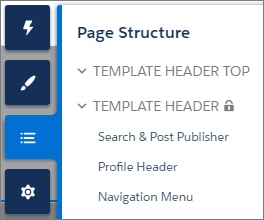
In Customer Service, for example, the Template Header consists of these locked regions:
search, which contains the Search Publisher component
profileMenu, which contains the Profile Header component
navBar, which contains the Navigation Menu component
These designated region names let you easily:
Swap search and profile components in the default theme layout component or a custom theme layout component.
Swap theme layout components while persisting existing customizations, such as the selected search component.
When a component implements the correct interface—forceCommunity:searchInterface or forceCommunity:profileMenuInterface, in this case—it’s identified as a candidate for these regions. They therefore appear as swappable components in a theme layout component, such as the default Customer Service theme layout component, which declares search or profileMenu as an attribute name value.
Add the forceCommunity:profileMenuInterface interface to an Aura component to allow it to be used as a custom profile menu component for the template. After you create a custom profile menu component, admins can select it in Experience Builder in Settings | Theme to replace the template’s standard Profile Header component.
Add the forceCommunity:searchInterface interface to an Aura component to allow it to be used as a custom search component for the template. After you create a custom search component, admins can select it in Experience Builder in Settings | Theme to replace the template’s standard Search & Post Publisher component.


 j
j