


Service Cloud Voice for Partner Telephony Developer Guide
 j
jNewer Version Available
Associate Partner Telephony Users and Groups with Queues
Overview
We enhanced the Queue Management behavior so that it’s easy for partners and their customers to associate users and groups to an associated Voice queue.
To use this feature, implement these Apex interfaces from the service_cloud_voice namespace.
-
QueueManager. This class
describes whether Service Cloud Voice supports queue
management. It contains this method.
- supportsQueueUserGrouping. Indicates whether your implementation supports the queue user grouping feature.
-
QueueSetup. This class
performs all the work so that your partner telephony
implementation stays in sync with Salesforce. It contains
these methods.
- listQueues. Lists all existing queues.
- createQueue. Creates a queue.
- removeQueue. Removes an existing queue.
- associateUsersAndGroupsWithQueue. Associates partner telephony users and groups with a Service Cloud Voice queue.
-
GroupSetup. This
class performs all the work so that your
implementation stays in sync with Salesforce. It
contains the following methods.
- listGroups. Lists all the existing groups.
- createGroup. Creates a group.
- associateUsersWithGroup. Associates users with a group.
The sample code describes how to implement these methods.
Set Up Queue Management for Partner Telephony
To enable the BYOT queue management feature, follow these instructions.
- Contact your Salesforce representative to opt-in to this feature and turn on the org permission.
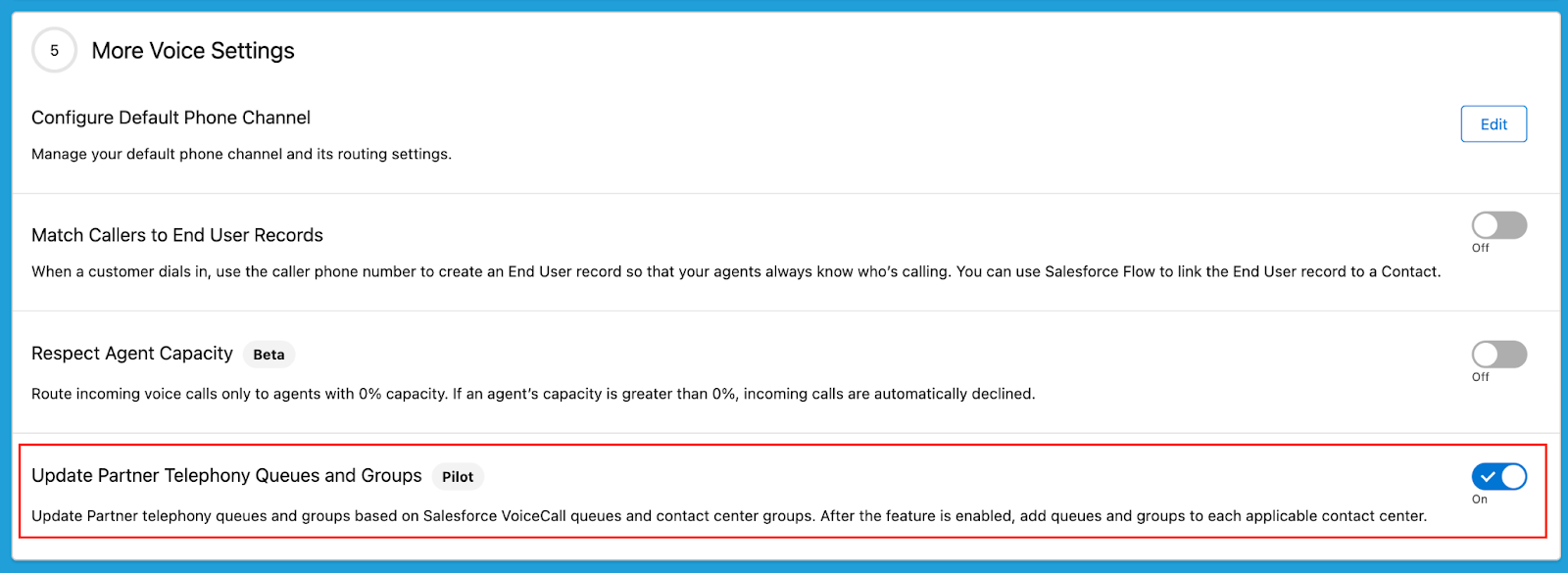
- When your org permission is enabled, visit
Partner Telephony in Setup
and turn on Update Partner Telephony Queues and
Groups.
- When the vendor imports the ConversationVendorInfo record, they must set the
following fields.
- CapabilitiesSupportsQueueManagement. Set this value to true.
- IntegrationClassId. This value contains the ID of Apex implementation class. For example, 01pxx000000wxyzABC.

You must follow all these instructions. Otherwise, the new feature isn’t available and Salesforce falls back to no syncing behavior.
In addition to these instructions, customers still have to implement the Apex class using the sample code in the next section. Customers must specify the IntegrationClassId field in the ConversationVendorInfo record shown in the screenshot. If this value isn’t set, an error message appears when trying to set up queue mapping.
Implement the Apex Class
Implement the Apex class using the sample code. Specify the class ID in the IntegrationClassId field of the ConversationVendorInfo record. If this value isn’t set, an error message appears when trying to set up a queue mapping.
This code block contains a sample implementation of all interface methods. To interact with your queues, update the “TO DO” comments with your own implementation.
1/**
2* Sample code that implements QueueManager, QueueSetup, and GroupSetup in order to handle
3* queue and group management requests.
4*/
5public class PartnerQueueManagementSampleClass implements service_cloud_voice.QueueManager,
6                        service_cloud_voice.QueueSetup, service_cloud_voice.GroupSetup {
7
8
9   /** ========== Sample code for methods defined in interface QueueManager ========== */
10
11
12   /**
13    * @description Returns whether the contact center supports user grouping.
14    *              (Implementation for QueueManager.)
15    * @param contactCenterInfo Info about the contact center.
16    * @return QueueUserGroupingResponse Response containing whether the queue
17    *                                   supports user grouping.
18    */
19   public service_cloud_voice.QueueUserGroupingResponse supportsQueueUserGrouping(service_cloud_voice.ContactCenterInfo contactCenterInfo) {
20       // Grab information from the request
21       String contactCenterId = contactCenterInfo.getContactCenterId();
22
23
24       // Returns whether contact center supports user grouping.
25       // * @param boolean Indicates whether the method execution was successful.
26       // * @param String Contains any error info that occurred during the
27       // *               method execution.
28       // * @param boolean Indicate if user grouping is supported.
29       return new service_cloud_voice.QueueUserGroupingResponse(true, null, false);
30   }
31
32   /** ========== Sample code for methods defined in interface QueueSetup ========== */
33
34
35   /**
36    * @description Gets the list of queues. (Implementation for QueueSetup.)
37    * @param queueListRequest Request containing information about retrieving queue list.
38    * @return ListQueuesResponse Response containing the desired queues.
39    */
40   public service_cloud_voice.ListQueuesResponse
41       listQueues(service_cloud_voice.ListQueuesRequest queueListRequest) {
42
43
44       // TO DO: Call vendor's list queue API to retrieve the vendor queue list.
45       //        The code below creates a dummy queue list.
46       Map<String, String> queues = new Map<String, String>
47         {'CustomerSupport' => 'External Customer Support',
48           'ITSupport' => 'External IT Support',
49           'FinancialSupport' => 'External Financial Support',
50           'TechSupport' => 'External Tech Support'};
51
52       // Returns the list of queues (for a successful response).
53       // * @param boolean Indicates whether the method execution was successful.
54       // * @param Map<String, String> Map of queues with queueKey <=> queue label pairs.
55       // * @param String Contains any customer error message that occurred during the
56       // *               method execution.
57       return new service_cloud_voice.ListQueuesResponse(true, queues, null);
58
59
60       // ERROR HANDLING
61       // If an error occurs, you can return the error by passing false
62       // in the response with an error message.
63       //
64       // Error Example (false response):
65       //     return new service_cloud_voice.ListQueuesResponse(false,
66       //            null, '<customized error message on expected error>');
67   }
68
69
70   /**
71    * @description Creates a queue. (Implementation for QueueSetup.)
72    * @param createQueueRequest Request containing information about creating a new queue.
73    * @return CreateQueueResponse Response containing the new queue (or an error).
74    */
75   public service_cloud_voice.CreateQueueResponse createQueue(service_cloud_voice.CreateQueueRequest createQueueRequest) {
76
77
78       // Grab information from the request
79       String contactCenterId = createQueueRequest.getContactCenterInfo().getContactCenterId();
80       String queueName = createQueueRequest.getQueueName();
81
82       // TO DO: Call vendor's create queue API to create a new vendor queue and return its id.
83       //        The code below creates a dummy new queue ID.
84       String queueId = 'TechSupport';
85
86       // Returns the new queue ID (for a successful response).
87       // * @param boolean Indicates whether the method execution was successful.
88       // * @param String ID of the new queue.
89       // * @param String Contains any error that occurred during the method execution.
90       return new service_cloud_voice.CreateQueueResponse(true, queueId, null);
91
92
93       // ERROR HANDLING
94       // If an error occurs, you can return the error by passing false
95       // in the response with an error message.
96       //
97       // Error Example (false response):
98       //     return new service_cloud_voice.CreateQueueRequest(false,
99       //            null, '<customized error message on expected error>');
100   }
101
102
103   /**
104    * @description Removes an existing queue. (Implementation for QueueSetup.)
105    * @param removeQueueRequest Request containing information about queue removal.
106    * @return RemoveQueueResponse Response containing the queue removal information.
107    */
108   public service_cloud_voice.RemoveQueueResponse removeQueue(service_cloud_voice.RemoveQueueRequest removeQueueRequest) {
109
110
111       // Grab information from the request
112       String contactCenterId = removeQueueRequest.getContactCenterInfo().getContactCenterId();
113       String queueId = removeQueueRequest.getQueueId();
114
115       // TO DO: Call vendor's remove queue API to remove the existing vendor queue.
116       // Returns the status of the removed queue (for a successful response).
117       // * @param boolean Indicates whether the method execution was successful.
118       // * @param String Contains any error info that occurred during the
119       // *               method execution.
120       return new service_cloud_voice.RemoveQueueResponse(true, null);
121
122
123       // ERROR HANDLING
124       // If an error occurs, you can return the error by passing false
125       // in the response with an error message.
126       //
127       // Error Example (false response):
128       //     return new service_cloud_voice.RemoveQueueResponse(false,
129       //            null, '<customized error message on expected error>');
130   }
131
132
133   /**
134    * @description Associates users and groups with a queue.
135    * @param associateUsersAndGroupsWithQueueRequest Request containing
136    *        information about the users and groups.
137    * @return SyncUsersAndGroupsWithQueueResponse Response containing the result.
138    */
139   public service_cloud_voice.SyncUsersAndGroupsWithQueueResponse associateUsersAndGroupsWithQueue(service_cloud_voice.SyncUsersAndGroupsWithQueueRequest associateUsersAndGroupsWithQueueRequest) {
140
141
142       // Grab information from the request
143       String contactCenterId =
144           associateUsersAndGroupsWithQueueRequest.getContactCenterInfo().getContactCenterId();
145       String queueId =
146           associateUsersAndGroupsWithQueueRequest.getQueueId();
147       List<service_cloud_voice.UserInfo> userInfoList =
148           associateUsersAndGroupsWithQueueRequest.getUserInfoList();
149       List<service_cloud_voice.GroupInfo> groupInfoList =
150           associateUsersAndGroupsWithQueueRequest.getGroupInfoList();
151
152       // TO DO: Call vendor's sync users and groups with queue API to add users and groups to
153       //        the existing vendor queue.
154
155       // Returns the status of the association (for a successful response).
156       // * @param boolean Indicates whether the method execution was successful.
157       // * @param String Contains any error info that occurred during the
158       // *               method execution.
159       return new service_cloud_voice.SyncUsersAndGroupsWithQueueResponse(true, null);
160
161
162       // ERROR HANDLING
163       // If an error occurs, you can return the error by passing false
164       // in the response with an error message.
165       //
166       // Error Example (false response):
167       //     return new service_cloud_voice.SyncUsersAndGroupsWithQueueResponse(false,
168       //            null, '<customized error message on expected error>');
169
170
171   }
172
173   /** ========== Sample code for methods defined in interface GroupSetup ========== */
174
175
176   /**
177    * @description Gets the list of groups. (Implementation for GroupSetup.)
178    * @param groupListRequest Request containing information about retrieving group list.
179    * @return ListGroupsResponse Response containing the desired groups.
180    */
181   public service_cloud_voice.ListGroupsResponse
182       listGroups(service_cloud_voice.ListGroupsRequest groupListRequest) {
183
184
185       // TO DO: Call vendor's list group API to retrieve the vendor group list.
186       //        The code below creates a dummy group list.
187       Map<String, String> groups = new Map<String, String>
188         {'CustomerSupportGroup' => 'External Customer Support Group',
189           'ITSupportGroup' => 'External IT Support Group',
190           'FinancialSupportGroup' => 'External Financial Support Group',
191           'TechSupportGroup' => 'External Tech Support Group'};
192
193       // Returns the list of groups (for a successful response).
194       // * @param boolean Indicates whether the method execution was successful.
195       // * @param Map<String, String> Map of groups with groupKey <=> group Label pairs
196       // * @param String Contains any customer error message that occurred during the
197       // *               method execution.
198       return new service_cloud_voice.ListGroupsResponse(true, groups, null);
199
200
201       // ERROR HANDLING
202       // If an error occurs, you can return the error by passing false
203       // in the response with an error message.
204       //
205       // Error Example (false response):
206       //     return new service_cloud_voice.ListGroupsResponse(false,
207       //            null, '<customized error message on expected error>');
208       //
209   }
210
211
212   /**
213    * @description Creates a group. (Implementation for GroupSetup.)
214    * @param createGroupRequest Request containing information about creating a new group.
215    * @return CreateGroupResponse Response containing the new group (or an error).
216    */
217   public service_cloud_voice.CreateGroupResponse createGroup(service_cloud_voice.CreateGroupRequest createGroupRequest) {
218
219
220       // Grab information from the request
221       String contactCenterId = createGroupRequest.getContactCenterInfo().getContactCenterId();
222       String groupName = createGroupRequest.getGroupName();
223
224       // TO DO: Call vendor's create group API to create a new vendor group and return its id.
225       //        The code below returns a dummy new group ID.
226       String groupId = 'TechSupportGroup';
227
228       // Returns the new group ID (for a successful response).
229       // * @param boolean Indicates whether the method execution was successful.
230       // * @param String ID of the new group.
231       // * @param String Contains any customer error message that occurred during the method execution.
232       return new service_cloud_voice.CreateGroupResponse(true, groupId, null);
233
234
235       // ERROR HANDLING
236       // If an error occurs, you can return the error by passing false
237       // in the response with an error message.
238       //
239       // Error Example (false response):
240       //     return new service_cloud_voice.CreateGroupResponse(false,
241       //            null, '<customized error message on expected error>');
242       //
243   }
244
245
246   /**
247    * @description Associates users with a group.
248    * @param associateUsersWithGroup Request containing information about the users.
249    * @return SyncUsersWithGroupResponse Response containing the result.
250    */
251   public service_cloud_voice.SyncUsersWithGroupResponse associateUsersWithGroup(service_cloud_voice.SyncUsersWithGroupRequest associateUsersWithGroupRequest) {
252
253
254       // Grab information from the request
255       String contactCenterId =
256           associateUsersWithGroupRequest.getContactCenterInfo().getContactCenterId();
257       String groupId =
258           associateUsersWithGroupRequest.getGroupId();
259       List<service_cloud_voice.UserInfo> addedUserInfoList =
260           associateUsersWithGroupRequest.getAddedUserInfoList();
261       List<service_cloud_voice.GroupInfo> removedUserInfoList =
262           associateUsersWithGroupRequest.getRemovedUserInfoList();
263
264       // TO DO: Call vendor's sync users with group API to add users to the
265       //        existing vendor group.
266
267       // Returns the status of the association (for a successful response).
268       // * @param boolean Indicates whether the method execution was successful.
269       // * @param String Contains any customer error message that occurred during the
270       // *               method execution.
271       return new service_cloud_voice.SyncUsersWithGroupResponse(true, null);
272
273
274       // ERROR HANDLING
275       // If an error occurs, you can return the error by passing false
276       // in the response with an error message.
277       //
278       // Error Example (false response):
279       //     return new service_cloud_voice.SyncUsersWithGroupResponse(false,
280       //            null, '<customized error message on expected error>');
281       //
282   }
283}