


ISVforce Guide
 j
jNewer Version Available
Periodic Security Re-Reviews on AppExchange
When you upgrade a managed package version of a solution that passed security review, you don’t go through the full review process again. You can immediately associate the new version to your AppExchange listing.
To identify which listed solutions are due for re-review, we consider potential risk and the amount of time since the solution was listed. To determine potential risk, we run risk-factor reports. If your solution shows significant change, it’s likely that we conduct a re-review. However, a low risk factor can mean that your solution isn’t flagged for re-review.
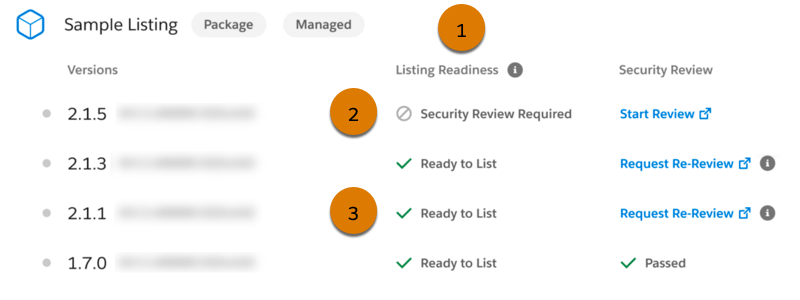
To see if a solution requires a re-review, on the Solutions page in the Salesforce Partner Console, check the Listing Readiness area(1). If Security Review Required is shown (1), the solution is due for re-review. If Ready to List is shown (3), you can voluntarily request a re-review, but it isn’t required.
If we find that your solution no longer meets our security standards, we also notify you by email and provide a timeline for you to remedy the issues, typically 60 days. In extreme cases, we pull the AppExchange listing from public viewing. Before you can relist it for distribution, you must fix the security issues and submit it for a follow-up review.