Use SAQL date functions for advanced time-based analysis.
You can use date filters in the dashboard for basic time-based analysis, for example to calculate month-to-date amounts. You can also use window functions in the dashboard for basic date range calculations, such as calculating the change in year-over-year earnings
Note
Example - on Which Weekday Do Customers Send the Most Emails?
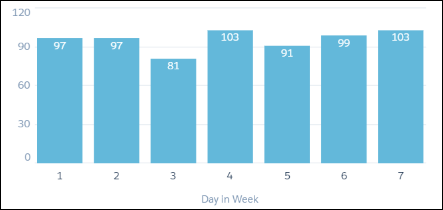
Suppose that you want to see which day of the week your customers are most active on email. This information allows you to better target your email campaigns. Use day_in_week() on the Mail_sent_sec_epoch field to calculate the day of the week, then count the number of records for each day.
1q = load "DTC_Opportunity_SAMPLE";2q = foreach q generate day_in_week(toDate(’Mail_sent_sec_epoch’)) as 'Day in Week';3q = group q by 'Day in Week';4q = foreach q generate 'Day in Week', count() as 'count';
In this case, email traffic is slightly higher on day 4 (Wednesday) and day 7 (Sunday).


 j
j