


Analytics SAQL Developer Guide
 j
jNewer Version Available
union
Combines multiple result sets into one result set. The result sets must have the same
field names and structure. You can use a different dataset to create each result set, or you can
use the same dataset.
Syntax
1result = union resultSetA, resultSetB [, resultSetC ...];Example
1q = union q1, q2, q3;Example
You want to see how each rep compares to the average for deals won. You can make this comparison by appending these two result sets together:Then use union to append the two result sets.
- Total amount of opportunities won for each rep
- Average amount of opportunities won for all reps
First, show the total amount of won opportunities for each rep.
1opt = load "DTC_Opportunity_SAMPLE";
2opt = filter opt by 'Won' == "true";
3
4-- group by owner
5rep = group opt by 'Account_Owner';
6
7-- project the sum of amount for each rep
8rep = foreach rep generate 'Account_Owner' as 'Account_Owner', sum('Amount') as 'sum_Amount';
9
10rep = order rep by 'sum_Amount' desc;
The resulting graph shows the sum of amount for each rep.
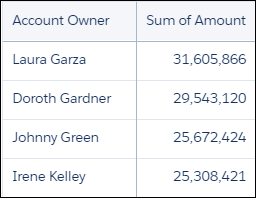
Next, calculate the average of the sum of the amounts for each rep using the average
function.
1-- grouping rep by all returns all the data in a single row.
2avg_rep = group rep by all;
3
4-- Calculate the average of the Sum of Amount column.
5-- Use the text ‘Average Deal Size’ in the ‘Account Owner’ column
6avg_rep = foreach avg_rep generate "Average deal size" as 'Account_Owner', avg('sum_Amount') as 'sum_Amount';
Because the two data streams have the same field names and structure, you can use union to combine them.
1q = union rep, avg_rep;The resulting graph contains the sum of amounts by each rep together with the average amount per rep.

Combine the SAQL fragments to get the complete SAQL statement.
1opt = load "DTC_Opportunity_SAMPLE";
2opt = filter opt by 'Won' == "true";
3
4-- group by owner
5rep = group opt by 'Account_Owner';
6
7-- project the sum of amount for each rep
8rep = foreach rep generate 'Account_Owner' as 'Account_Owner', sum('Amount') as 'sum_Amount';
9
10rep = order rep by 'sum_Amount' desc;
11
12-- grouping rep by all returns all the data in a single row.
13avg_rep = group rep by all;
14
15
16-- Calculate the average of the Sum of Amount column.
17-- Use the text ‘Average Deal Size’ in the ‘Account Owner’ column
18avg_rep = foreach avg_rep generate "Average deal size" as 'Account_Owner', avg('sum_Amount') as 'sum_Amount';
19
20q = union rep, avg_rep;