Salesforce CLI Setup Guide
 j
jNewer Version Available
Debug Errors When Deploying or Retrieving Source
Sometimes you want to inspect the retained files even if you don’t run into an explicit error. Let’s say, for example, that your deployment completes successfully, but when you check your org, the deployed components look different from what you expect. You can inspect the metadata files before Salesforce sent them to the org and possibly find the problem. Similarly, if a retrieve completes successfully, but the source files in your package directory aren’t what you expect, or something is missing, you can inspect the metadata format files that were initially retrieved from the org, but before they were converted to source format.
How To Retain Temporary Metadata Files
To retain all the metadata files in a directory when you run the project deploy start and project retrieve start commands, set the SF_MDAPI_TEMP_DIR environment variable to the directory path.
This example, run from a DX project directory, shows how to set the environment variable for a single retrieve.
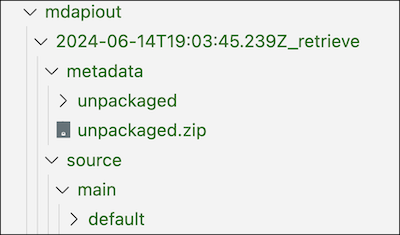
1SF_MDAPI_TEMP_DIR=mdapiout sf project retrieve startWhen the command completes, the retained files are in a subdirectory of the mdapiout directory. The subdirectory’s name consists of the timestamp when you ran the command, and either the suffix _retrieve or _deploy, depending on whether the command was a retrieve or a deploy.
The format and location of the retained files depends on whether you ran a retrieve or a deploy:
- For retrieves, the retained files are in both formats and in their own directories (metadata and source). The metadata directory includes the downloaded metadata .ZIP file, the unzipped metadata format files, and the package.xml file. The source directory contains the converted files in source format.
- For deploys, the retained files are only in metadata format in the metadata directory, along with the package.xml file. There are no source-format files because they’re already in your package directory.
Here’s what the mdapiout directory looks like after running project retrieve start with SF_MDAPI_TEMP_DIR set.