


LWR Sites for Experience Cloud
 j
jNewer Version Available
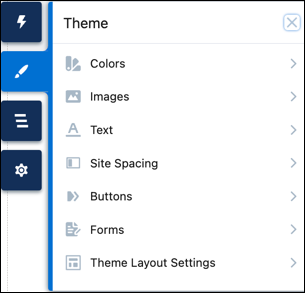
How --dxp Styling Hooks Map to Theme Panel Properties
Colors
For button colors, see the Button Color section.
| These Theme panel properties... | ...map to these --dxp styling hooks |
|---|---|
| Basic | |
| Background Color |
--dxp-g-root --dxp-g-root-1 --dxp-g-root-2 --dxp-g-root-3 |
| Text Color |
--dxp-g-root-contrast --dxp-g-root-contrast-1 --dxp-g-root-contrast-2 --dxp-g-root-contrast-3 |
| Brand Color |
--dxp-g-brand --dxp-g-brand-1 --dxp-g-brand-2 --dxp-g-brand-3 |
| Brand Foreground Color |
--dxp-g-brand-contrast --dxp-g-brand-contrast-1 --dxp-g-brand-contrast-2 --dxp-g-brand-contrast-3 |
| Text | |
| Heading 1 | --dxp-s-text-heading-extra-large-color |
| Heading 2 | --dxp-s-text-heading-large-color |
| Heading 3 | --dxp-s-text-heading-medium-color |
| Heading 4 | --dxp-s-text-heading-small-color |
| Heading 5 | --dxp-s-text-heading-extra-small-color |
| Heading 6 | --dxp-s-text-heading-extra-extra-small-color |
| Paragraph 1 | --dxp-s-body-text-color |
| Paragraph 2 | --dxp-s-body-small-text-color |
| Links | |
| Link Color | --dxp-s-link-text-color |
| Link Hover Color | --dxp-s-link-text-color-hover |
| Forms | |
| Field Label | --dxp-s-form-element-label-color |
| Placeholder Text | --dxp-s-form-element-placeholder-text-color |
| Input Text | --dxp-s-form-element-text-color |
| Input Text Focus | --dxp-s-form-element-text-color-focus |
| Field Background Fill | --dxp-s-form-element-color-background |
| Field Background Focus | --dxp-s-form-element-color-background-active |
| Field Border | --dxp-s-form-element-color-border |
| Field Border Focus | --dxp-s-form-element-color-border-focus |
| Checkbox Background | --dxp-s-form-checkbox-color-background |
| Selected Checkbox Background | --dxp-s-form-checkbox-color-background-checked |
| Checkbox Border | --dxp-s-form-checkbox-color-border |
| Selected Checkbox Border | --dxp-s-form-checkbox-color-border-checked |
| Dropdowns | |
| Dropdown Text Color | --dxp-s-dropdown-text-color |
| Dropdown Background Color | --dxp-s-dropdown-color-background |
| Dropdown Text Hover Color | --dxp-s-dropdown-text-color-hover |
| Dropdown Background Hover Color | --dxp-s-dropdown-color-background-hover |
| Dropdown Border Color | --dxp-s-dropdown-color-border |
Images
| These Theme panel properties... | ...map to these --dxp styling hooks |
|---|---|
| Site Logo |
--dxp-s-site-logo-path --dxp-s-site-logo-url |
| Browser Icon (Favicon) | No styling hook. To add a favicon in Experience Builder, click and upload the file. After upload, the favicon is added automatically to your site’s browser tab. |
Text
The Base Font Family and Base Font Size properties set the font family and font size on the <html> element of your site.
The Base Font Family defaults to Visitor’s Native System Font, and the Font Family for each text element defaults to Use Base Font Family. You can change these settings for any text element, but for the best site performance, minimize the number of font families used in the site.
The Base Font Size properties determine the default desktop and mobile font sizes for your site. When you change the base font size, you proportionally adjust any site elements, such as font sizes or spacing values, whose size is specified with relative units (rem or em).
1--dxp-s-level-styleIn the Headings and Body portion of this table, replace level with these values, as appropriate. For text in buttons, see the Buttons section. For text in forms, see the Forms section.
- text-heading-extra-large for Heading 1
- text-heading-large for Heading 2
- text-heading-medium for Heading 3
- text-heading-small for Heading 4
- text-heading-extra-small for Heading 5
- text-heading-extra-extra-small for Heading 6
- body for Paragraph 1
- body-small for Paragraph 2
1--dxp-s-text-heading-extra-large-font-family| These Theme panel properties... | ...map to these --dxp styling hooks |
|---|---|
| Base Font Family and Size | |
| Base Font Family | --dxp-s-html-font-family |
| Desktop Base Font Size | --dxp-s-html-font-size |
| Mobile Base Font Size | --dxp-s-html-font-size-mobile |
| Headings and Body | |
| Font Family | --dxp-s-level-font-family |
| Font Size | --dxp-s-level-font-size |
| Font Style | --dxp-s-level-font-style |
| Font Weight | --dxp-s-level-font-weight |
| Text Decoration | --dxp-s-level-text-decoration |
| Text Case | --dxp-s-level-text-transform |
| Line Height | --dxp-s-level-line-height |
| Character Spacing | --dxp-s-level-letter-spacing |
| Link Text | |
| Text Decoration | --dxp-s-link-text-decoration |
| Focus Text Decoration | --dxp-s-link-text-decoration-focus |
| Hover Text Decoration | --dxp-s-link-text-decoration-hover |
Site Spacing
| These Theme panel properties... | ...map to these --dxp styling hooks |
|---|---|
| Desktop Site Spacing | |
| Max Content Width |
--dxp-s-section-columns-max-width --dxp-s-header-content-max-width --dxp-s-footer-content-max-width |
| Section Padding: Top & Bottom |
--dxp-s-section-content-spacing-block-start --dxp-s-section-content-spacing-block-end |
| Section Padding: Left & Right |
--dxp-s-section-content-spacing-inline-start --dxp-s-section-content-spacing-inline-end |
| Column Gutters | --dxp-s-column-spacer-size |
| Vertical Space Between Components | --dxp-s-component-wrapper-spacer-size |
| Mobile Site Spacing | |
| Max Content Width |
--dxp-s-section-columns-max-width-mobile --dxp-s-header-content-max-width-mobile --dxp-s-footer-content-max-width-mobile |
| Section Padding: Top & Bottom |
--dxp-s-section-content-spacing-block-start-mobile --dxp-s-section-content-spacing-block-end-mobile |
| Section Padding: Left & Right |
--dxp-s-section-content-spacing-inline-start-mobile --dxp-s-section-content-spacing-inline-end-mobile |
| Column Gutters | --dxp-s-column-spacer-size-mobile |
| Vertical Space Between Components | --dxp-s-component-wrapper-spacer-size-mobile |
Buttons
When you set the base font size for the text on your site (see the Text section), that setting affects the default font size of the text in the buttons on your site. For button colors, see the Button Colors section.
| These Theme panel properties... | ...map to these --dxp styling hooks |
|---|---|
| Text Values for All Buttons | |
| Font Family | --dxp-s-button-font-family |
| Font Style | --dxp-s-button-font-style |
| Font Weight | --dxp-s-button-font-weight |
| Text Case | --dxp-s-button-text-transform |
| Text Decoration | --dxp-s-button-text-decoration |
| Line Height | --dxp-s-button-line-height |
| Character Spacing | --dxp-s-button-letter-spacing |
| Standard Button Values | |
| Vertical Padding |
--dxp-s-button-padding-block-start --dxp-s-button-padding-block-end |
| Horizontal Padding |
--dxp-s-button-padding-inline-start --dxp-s-button-padding-inline-end |
| Font Size | --dxp-s-button-font-size |
| Border Radius | --dxp-s-button-radius-border |
| Small Button Values | |
| Vertical Padding |
--dxp-s-button-small-padding-block-start --dxp-s-button-small-padding-block-end |
| Horizontal Padding |
--dxp-s-button-small-padding-inline-start --dxp-s-button-small-padding-inline-end |
| Font Size | --dxp-s-button-small-font-size |
| Border Radius | --dxp-s-button-small-radius-border |
| Large Button Values | |
| Vertical Padding |
--dxp-s-button-large-padding-block-start --dxp-s-button-large-padding-block-end |
| Horizontal Padding |
--dxp-s-button-large-padding-inline-start --dxp-s-button-large-padding-inline-end |
| Font Size | --dxp-s-button-large-font-size |
| Border Radius | --dxp-s-button-large-radius-border |
As of Winter ’25, color properties for buttons are on the panel.
| Button State | These Theme panel properties... | ...map to these --dxp styling hooks |
|---|---|---|
| Primary Buttons | ||
| Default State | Background | --dxp-s-button-color |
| Border | --dxp-s-button-border-color | |
| Text | --dxp-s-button-color-contrast | |
| Hover State | Hover Background | --dxp-s-button-color-hover |
| Hover Border | --dxp-s-button-border-color-hover | |
| Hover Text | --dxp-s-button-color-hover-contrast | |
| Focus State | Focus Background | --dxp-s-button-color-focus |
| Focus Border | --dxp-s-button-border-color-focus | |
| Focus Text | --dxp-s-button-color-focus-contrast | |
| Secondary Buttons | ||
| Default State | Background | --dxp-s-secondary-button-color |
| Border | --dxp-s-secondary-button-border-color | |
| Text | --dxp-s-secondary-button-text-color | |
| Hover State | Hover Background | --dxp-s-secondary-button-color-hover |
| Hover Border | --dxp-s-secondary-button-border-color-hover | |
| Hover Text | --dxp-s-secondary-button-text-color-hover | |
| Focus State | Focus Background | --dxp-s-secondary-button-color-focus |
| Focus Border | --dxp-s-secondary-button-border-color-focus | |
| Focus Text | --dxp-s-secondary-button-text-color-focus | |
| Tertiary Buttons | ||
| Default State | Background | --dxp-s-tertiary-button-color |
| Border | --dxp-s-tertiary-button-border-color | |
| Text | --dxp-s-tertiary-button-text-color | |
| Hover State | Hover Background | --dxp-s-tertiary-button-color-hover |
| Hover Border | --dxp-s-tertiary-button-border-color-hover | |
| Hover Text | --dxp-s-tertiary-button-text-color-hover | |
| Focus State | Focus Background | --dxp-s-tertiary-button-color-focus |
| Focus Border | --dxp-s-tertiary-button-border-color-focus | |
| Focus Text | --dxp-s-tertiary-button-text-color-focus | |
Forms
Similar to the different levels of text styling available for headings and body text on your site, the design system provides text styles for different parts of a form. In the Field Labels, Input Text, and Caption Text section of this table, replace level with these values, as appropriate.
- label for Field Label
- text for Input Text
- caption-text for Caption
1--dxp-s-form-element-label-font-family| These Theme panel properties... | ...map to these --dxp styling hooks |
|---|---|
| Spacing | |
| Field Padding: Top | --dxp-s-form-element-spacing-block-start |
| Field Padding: Right | --dxp-s-form-element-spacing-horizontal-end |
| Field Padding: Bottom | --dxp-s-form-element-spacing-block-end |
| Field Padding: Left | --dxp-s-form-element-spacing-horizontal-start |
| Borders | |
| Field Border Radius | --dxp-s-form-element-radius-border |
| Field Border Weight | --dxp-s-form-element-width-border |
| Checkbox Border Radius | --dxp-s-form-checkbox-radius-border |
| Checkbox Border Weight | --dxp-s-form-checkbox-width-border |
| Field Labels, Input Text, and Caption Text | |
| Font Family | --dxp-s-form-element-level-font-family |
| Font Size | --dxp-s-form-element-level-font-size |
| Font Style | --dxp-s-form-element-level-font-style |
| Font Weight | --dxp-s-form-element-level-font-weight |
| Text Case | --dxp-s-form-element-level-text-transform |
| Line Height | --dxp-s-form-element-level-line-height |
| Character Spacing | --dxp-s-form-element-level-letter-spacing |