


Insurance Developer Guide
 j
jNewer Version Available
Issue Policy
The policy issuance process begins after the policyholder accepts the quote provided by
the insurance company.
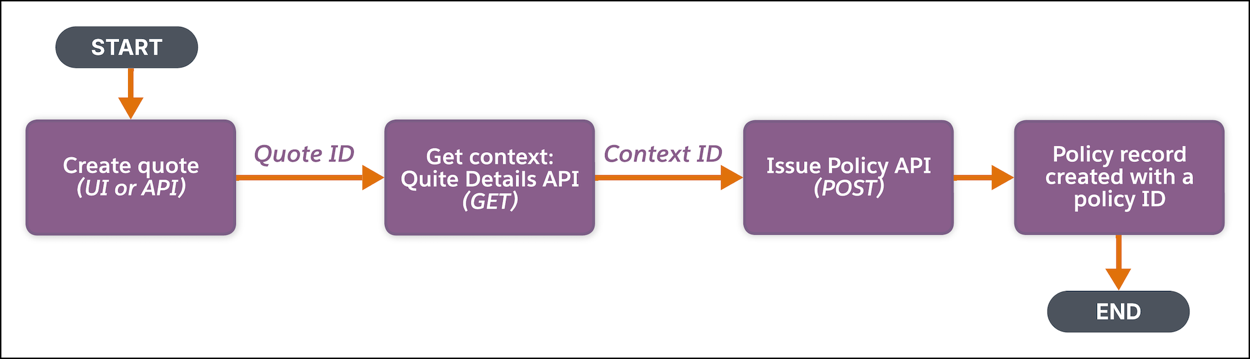
-
Create Quote—Create a quote either by:
- Making a POST request on the Insurance Quote Connect API, or
- Using the Create Insurance Quote invocable action, or
- Using the Salesforce Quote User Interface.
This process creates the quote and generates the quote ID. -
Get Quote Context—Use the quote ID to retrieve the quote
details either by:
- Making a GET request on the Insurance Quote Details Connect API, or
- Using the Get Insurance Quote Details invocable action.
This request returns the context ID in the response that contains the context of the quote. -
Issue Policy—Use the context details, specifically the
context ID, to issue policy either by:
- Making a POST request on the Issue Insurance Policy Connect API, or
- Using the Issue Insurance Policy invocable action.
You can override the context data, such as policy name, policy number, effective-from date, effective-to date, and any other additional fields to provide the values for the custom fields during the API call. You can also specify a name for the transaction record that’s created as part of the policy issuance process. This transaction record is used to track an audit or as a financial marker.This request creates a new policy record.
Expected Results:
- A new policy record is created and saved in Salesforce. The policy record includes the details, such as the policy name, number (if provided or created during the API call), policy start date, chosen coverage, and the price.
- Any custom field values that are provided during the API call are saved to the new policy record.
- A transaction record is created and linked to the policy.