ISVforce Guide
 j
jNewer Version Available
Add AI Details to Your Agentforce Solution Listing
Showcase the value of your Agentforce solution on your AppExchange listing. Explain the
solution’s capabilities and how it extends Agentforce. State the number of agents, topics, and
actions in your managed package. This information aids customer understanding and enables
filtering in AgentExchange search results.
| User Permissions Needed | |
|---|---|
| To create or update AppExchange listings: | Manage Listings |
- Go to the Partner Console.
- Click Listings.
- Select an existing Agentforce solution listing, or create one.
- Click Fill in the Basics.
- For Agentforce Capabilities Description, summarize what your solution enables Agentforce to do in 100 characters or fewer. It’s ok to get technical. Assume the customer understands Agentforce concepts.
- Enter the number of agents, topics, and actions.
- Save your changes.
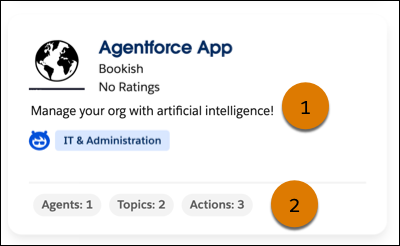
After you publish your listing, the capabilities description (1) and the number of agents, topics, and actions (2) appear on the listing card. The numeric values also appear on the listing page in the Agentforce Contents section. On AgentExchange, customers can filter solutions based on the agents, topics, and actions they contain.