


Metadata API Developer Guide
 j
jNewer Version Available
DataCategoryGroup
- Classify and filter data.
- Share data among users.
1Geography
2    Worldwide
3        North America
4            United States of America
5            Canada
6            Mexico
7        Europe
8 AsiaFile Suffix and Directory Location
The file suffix is .datacategorygroup. There is one file for each data category group stored in the datacategorygroups folder in the corresponding package directory.
Version
Data category groups are available in API version 18.0 and later.
Fields
This metadata type contains the following fields:
| Field Name | Field Type | Description |
|---|---|---|
| active | boolean | Required. The status of the category group. Indicates whether this category group is active, (true), or not active (false). |
| dataCategory | DataCategory | Required. The top-level category within the data category group. |
| description | string | The description of the data category group. |
| fullName | string | Required. The unique name of the data category group. When creating a data category group, the fullName field and the file name (without its suffix) must match.The fullName can contain only underscores and alphanumeric characters. It must be unique, begin with a letter, not include spaces, not end with an underscore, and not contain two consecutive underscores. This field is inherited from the Metadata component. |
| label | string | Required. Label that represents the object in Salesforce. |
| objectUsage | ObjectUsage | The objects that are associated with the data category group. |
DataCategory
Represents an item (or data category) in the data category group. A data category can recursively contain a list of other data categories.
| Field Name | Field Type | Description |
|---|---|---|
| dataCategory | DataCategory[] | A recursive list of sub data categories. For example, a list of countries within a continent. You can create up to 100 categories in a data category group and have up to 5 levels in a data category group hierarchy. |
| label | string | Required. Label for the data category throughout the Salesforce user interface. |
| name | string | Required. The developer name of the data category used as a unique identifier for API access. The name can only contain characters, letters, and the underscore (_) character, must start with a letter, and cannot end with an underscore or contain two consecutive underscore characters. |
ObjectUsage
Represents the objects that can be associated with the data category group. This association allows the object to be classified and filtered using the data categories.
Declarative Metadata Sample Definition
This sample is the definition of the Geography data category group and its data categories:
1<?xml version="1.0" encoding="UTF-8"?>
2<DataCategoryGroup xmlns="http://soap.sforce.com/2006/04/metadata">
3   <label>Geography</label>
4   <description>Geography structure of service center locations</description>
5   <fullName>geo</fullName>
6
7   <dataCategory> <name>WW</name> <label>Worldwide</label>
8      <dataCategory> <name>AMER</name> <label>North America</label>
9         <dataCategory>
10             <name>USA</name>
11             <label>United States of America</label>
12         </dataCategory>
13         <dataCategory>
14             <name>CAN</name>
15             <label>Canada</label>
16         </dataCategory>
17         <dataCategory>
18             <name>MEX</name>
19             <label>Mexico</label>
20         </dataCategory>
21      </dataCategory>
22      <dataCategory> <name>EMEA</name> <label>Europe, Middle East, Africa</label>
23         <dataCategory>
24             <name>FR</name>
25             <label>France</label>
26         </dataCategory>
27         <dataCategory>
28             <name>SP</name>
29             <label>Spain</label>
30        </dataCategory>
31         <dataCategory>
32            <name>UK</name>
33            <label>United-Kingdom</label>
34         </dataCategory>
35      </dataCategory>
36      <dataCategory>
37          <name>APAC</name>
38          <label>Asia</label>
39      </dataCategory>
40   </dataCategory>
41
42   <objectUsage>
43      <object>KnowledgeArticleVersion </object>
44   <objectUsage>
45</DataCategoryGroup>
Usage
- Adds any new category or object defined in the XML file.
- Deletes any category that is not defined in the XML file. Records associated with the deleted categories are re-associated with the parent category.
- Deletes any object association that is not defined in the XML file.
- Moves any category if its hierarchical position differs from the position specified in the XML file.
Using Metadata API to deploy category changes from one organization to another permanently removes categories and record categorizations that are not specified in your XML file. Salesforce recommends that you manually create data categories and record associations in an organization from Setup by entering Data Categories in the Quick Find box, then selecting Data Categories rather than deploying changes from a sandbox to a production organization.
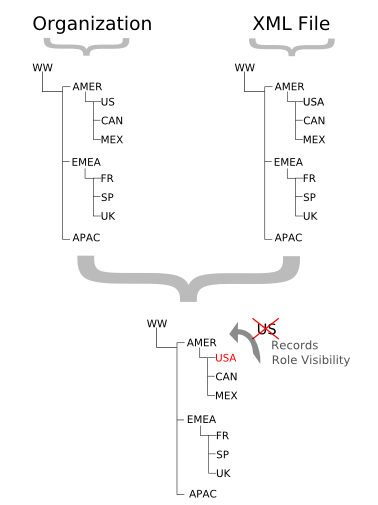
The following example illustrates what happens if you deploy an XML representation of a Geography data category group hierarchy to an organization that already has this data category group defined. Note that the organization contains a US category, while the XML file includes a USA category in the same hierarchical position. The Metadata API deployment process deletes the US category from the organization and moves associations for any records from US to the parent AMER category. It also adds the USA category under AMER. Note that all records that were previously categorized with US are now associated with the AMER category.
The next example illustrates what can happen when you delete or move a category in a data category group and deploy its XML representation from a sandbox to a production organization that already has this data category group defined. Hierarchy 1 shows the initial data category group in the sandbox organization. In hierarchy 2, we add an EU category under EMEA and move FR, SP and UK below EU. In hierarchy 3, we delete FR and associate its records with its new parent, EU. Finally, we deploy the changes from the sandbox to the production organization.
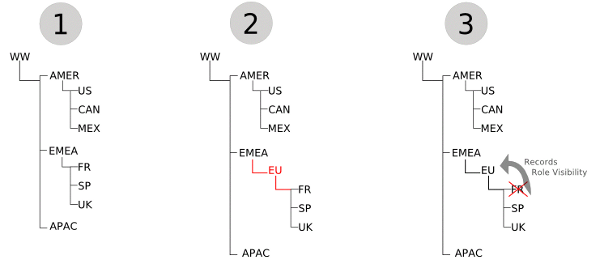
Metadata API has no concept of the order of the changes made to the sandbox organization. It just deploys the changes from one organization to another. During the deployment, it first notices the deletion of the FR category and removes it from the production organization. Consequently, it moves associations for any records from FR to its parent on the production organization, EMEA. Metadata API then adds the EU category and moves SP and UK below it. Although the category group hierarchy looks the same in both organizations, record categorization in production is different from the sandbox organization. The records that were originally associated with FR in hierarchy 1 are associated with EU in the sandbox organization, but are associated with EMEA in the production organization.
Wildcard Support in the Manifest File
This metadata type supports the wildcard character * (asterisk) in the package.xml manifest file. For information about using the manifest file, see Deploying and Retrieving Metadata with the Zip File.