


Metadata API Developer Guide
 j
jNewer Version Available
DigitalExperienceBundle
Parent Type
File Suffix and Directory Location
DigitalExperienceBundle components have the suffix .digitalExperience and are stored in the digitalExperiences folder.
DigitalExperienceBundle uses workspaces and content types to organize your data in a content-focused structure.
- Workspace: For enhanced Lightning Web Runtime (LWR) sites, a collection of
related content items that form the site when combined with data from the DigitalExperienceConfig metadata type.
For Salesforce CMS, a collection of related content items contained in a general workspace.
For Marketing Cloud, a collection of related content items contained in a marketing or general workspace.
- Workspace type: A way to categorize different kinds of workspaces. For example, the workspace type for enhanced LWR sites is site, and the workspace type for marketing workspaces in Marketing Cloud is marketing. The workspace type determines which content types are available in the workspace. In the DigitalExperienceBundle folder structure, all workspaces of a given type are under that workspace type. site, marketing, and general are the supported workspace types.
- Content types: A way to categorize different kinds of content in a workspace. For example, all routes in an enhanced LWR site are stored under a content type folder called sfdc_cms__route. Similarly, forms for a marketing workspace are stored under a content type folder called sfdc_cms__form.
- Content items: For enhanced LWR sites, the individual settings and site
components that make up an enhanced LWR site. For example, each of the routes in
an enhanced LWR site is a single content item.
For marketing workspaces, the content items used in marketing campaigns. For example, each form in a workspace is a single content item.
Here’s an example of the DigitalExperienceBundle structure.
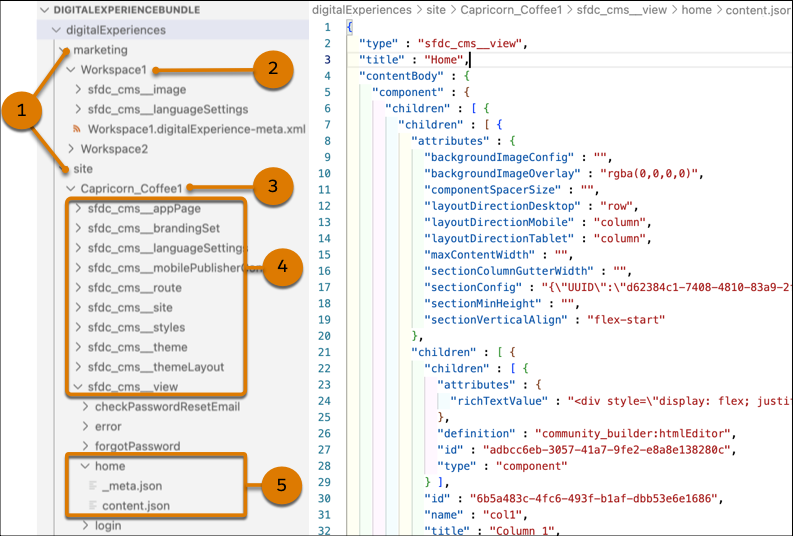
When retrieved, DigitalExperienceBundle contains workspace type folders (1) under the digitalExperiences folder.
The marketing folder contains one or more workspace folders (2), each representing a marketing workspace in Marketing Cloud. The site folder contains one or more workspace folders (3), each representing the workspace for an individual enhanced LWR site. Each workspace folder contains an XML file with information about the workspace, such as the label. For enhanced LWR sites, be sure to keep the label value in sync with the site’s network name.
Each workspace folder also contains several content type folders that represent each of the different content types (4) used in that workspace. For example, marketing workspaces support landing pages, forms, emails, and referenced images and branding.
Finally, each content type folder can contain one or more content subfolders. Each content subfolder can contain additional subfolders and several files that, when combined, represent an individual content item, such as a specific view (5).
- A _meta.json file that contains the metadata for the content item. Use the _meta.json file to learn the location of a content item within the workspace, or to move the content item to another location, including creating a new location for the content item. You can also use the _meta.json file to view a content item’s parent-child relationships, to move the content item from one parent to another, or to remove a parent-child relationship entirely.
- A content.json file that contains the primary version of the content item. Each content.json file includes values for the content item’s type, title, and content body. Use this file to edit the content’s properties on your local machine or scratch org and then deploy.
- If applicable, additional JSON files that represent variants of the content item, such as language translations.
The _meta.json file contains several properties:
| Property | Description |
|---|---|
| apiName |
|
| parent |
|
| path |
|
| type |
|
Version
DigitalExperienceBundle components are available in API version 56.0 and later.
Special Access Rules
In Experience Cloud, you can use DigitalExperienceBundle for enhanced LWR sites created in Winter ’23 or later. For Aura sites and other LWR sites, use the ExperienceBundle (recommended) or the SiteDotCom metadata types. Packaging is unsupported for enhanced LWR sites.
In Salesforce CMS and in Marketing Cloud, you must have a contributor role in a workspace to retrieve it. For Marketing Cloud, you can package the content of general and marketing workspaces, including landing pages, forms, and emails (and their associated images and branding).
Fields
| Field Name | Description |
|---|---|
| description |
|
| digitalExperienceFolderShares |
|
| label |
|
| spaceResources |
|
DigitalExperience
Represents content in the bundle. When retrieved as part of DigitalExperienceBundle, DigitalExperience represents all content for the requested workspace or workspaces. When retrieved on its own, DigitalExperience represents only the content types you specify.
This subtype extends the MetadataWithContent metadata type and inherits its content and fullName fields.
When you retrieve DigitalExperience, the folder structure matches that of DigitalExperienceBundle, with only the specified content returned.
| Field Name | Description |
|---|---|
| fileName |
|
| filePath |
|
| format |
|
Declarative Metadata Sample Definition
The following is an example of a DigitalExperienceBundle component.
1<?xml version="1.0" encoding="UTF-8"?>
2<DigitalExperienceBundle xmlns="http://soap.sforce.com/2006/04/metadata">
3    <description>content</description>
4    <label>isv1</label>
5</DigitalExperienceBundle>
The following is an example package.xml that references the previous definition.
1<?xml version="1.0" encoding="UTF-8"?>
2<Package xmlns="http://soap.sforce.com/2006/04/metadata">
3    <types>
4        <members>site/isv1</members>
5        <name>DigitalExperienceBundle</name>
6    </types>
7    <version>56.0</version>
8</Package>
Usage
To retrieve and deploy DigitalExperienceBundle, use legacy sfdx commands.
Wildcard Support in the Manifest File
This metadata type supports the wildcard character * (asterisk) in the package.xml manifest file. For information about using the manifest file, see Deploying and Retrieving Metadata with the Zip File.