


Insurance Developer Guide
 j
jNewer Version Available
Claims Processing Journey
A valid claim requires an active insurance policy, a reported loss date, and an incident that falls within the policy's covered benefits. Once initiated, the claim process includes creating policy limits for the policyholder, verifying policy coverage, creating a claim record, collecting supporting claim items and participant details, routing the claim for adjuster review, assessing eligibility and damages, performing financial calculations, and determining the payout amount. The process concludes with issuing payment for the claim. As an exception, the process also concludes when the customer withdraws the claim or when the payment is voided because it was initiated based on inaccurate data.
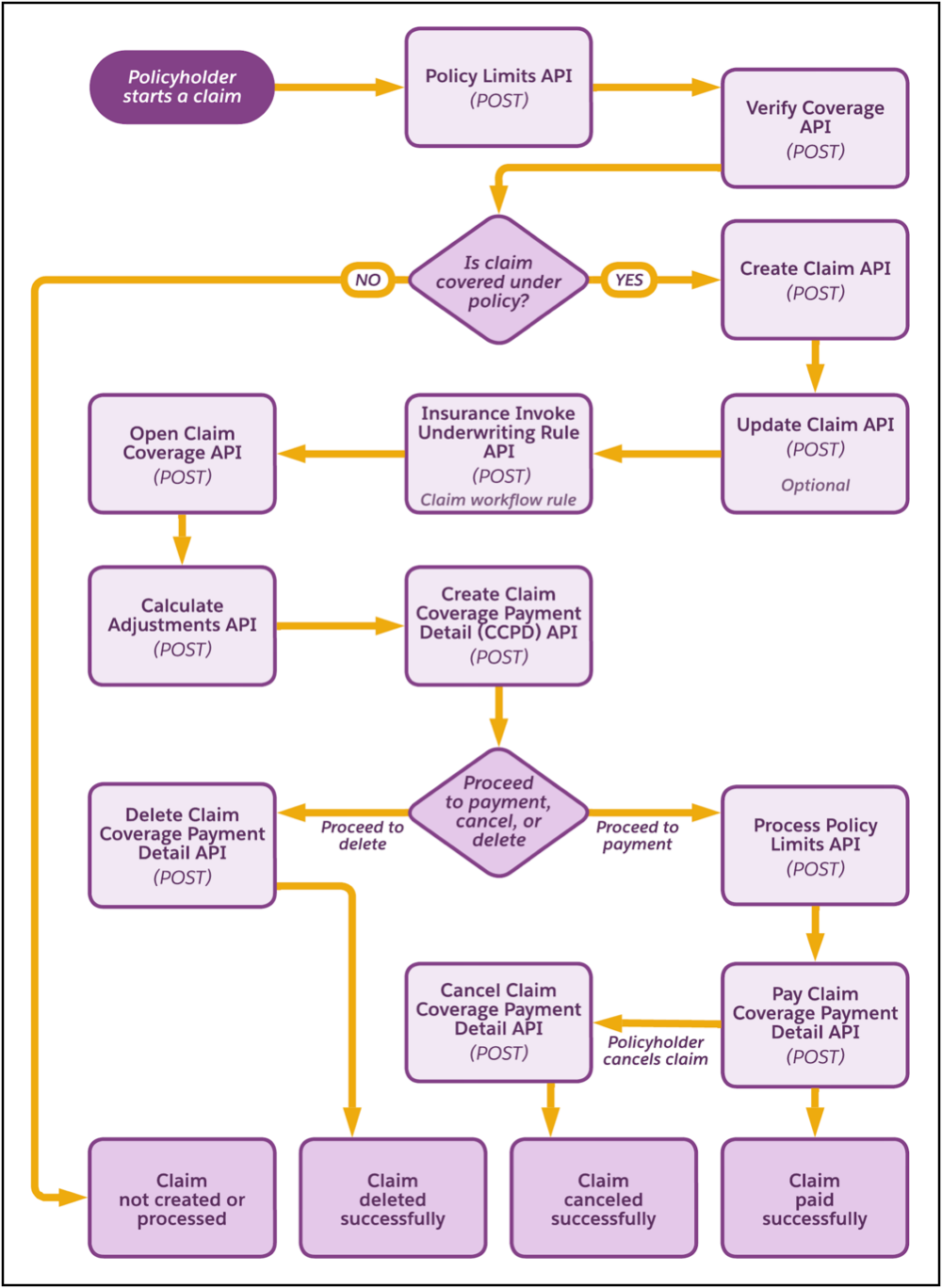
This diagram outlines the sequence of operations that are involved in the claim process.
-
Create Policy Limits—Generate a record of the trackable policy
or coverage attributes, such as deductibles and limits, and store the record details in a
separate entity. You can create policy limits by either:
- Making a POST request on the Policy Limits Connect API, or
- Using the Create Policy Limits invocable action.
-
Verify Policy Coverage—Validate whether the policy covers
the type of claim being submitted by either:
- Making a POST request on the Verify Policy Coverage Connect API, or
- Using the Verify Coverage invocable action.
-
Create Claim—Create a new claim for the covered incident,
including related details, such as involved items and participants. Create a claim by
either:
- Making a POST request on the Claim Connect API, or
- Using the Create Claim invocable action.
-
(Optional)Update Claim—Update an existing claim, including
its items and participant details by either:
- Making a PATCH request on the Claim Connect API, or
- Using the Update Claim invocable action.
-
Invoke Claim Workflow Rules—Route the claim for automated or
manual review by triggering the underwriting API by either:
- Making a POST request on the Insurance Invoke Underwriting Rule Connect API, or
- Using the Invoke Underwriting Rules invocable action.
-
Open Claim Coverage—Open a claim coverage record that tracks
the coverage-level reserves, payments, and other financial transactions, and maps them to
the corresponding insurance policy coverage, asset, or participant. Open a claim coverage
by either:
- Making a POST request on the Claim Coverage Connect API, or
- Using the Open Claim Coverage invocable action.
-
Calculate Adjustments—Calculate how much the insurer must
pay after applying adjustments to the policy’s deductible, copay, coinsurance, and
out-of-pocket maximums (OOPM). Calculate the adjusted amount by either:
- Making a POST request on the Calculate Adjustments Connect API, or
- Using the Calculate Adjustments invocable action.
-
Create Claim Coverage Payment Detail (CCPD)—Create a claim
coverage payment detail record capturing the amount requested by the claimant. The record
is used to track payment requests and associated claim coverage details. Create a CCPD by
either:
- Making a POST request on the Create Claim Coverage Payment Detail Connect API, or
- Using the Create Claim Coverage Payment Detail invocable action.
Standard Claim Resolution Flow (Successful Payment)
When the reviewer approves the claim, use this sequence to process and complete payment.
-
(Optional) Validate Payment Limits—Before the payment is
executed, the system must validate that the payout amount is within the policy’s
applicable coverage limits, such as the collision limit or other coverage-specific
maximums. This prevents overpayments and protects the insurer from financial
leakage.
Make a POST request to the Process Policy Limits Connect API to ensure the payout is within policy limits.
-
Execute Payment TransactionInitiate the payment process by either:
- Making a POST request on the Pay Claim Coverage Payment Detail Connect API, or
- Using the Pay Claim Coverage Payment Detail invocable action.
Exception Flows
Void Payment Record—The reviewer approves the claim based on inaccurate data. Before payment processing, the admin must void the incorrect CCPD record that's already created. Invalidate the payment record by either:
- Making a POST request on the Delete Claim Coverage Payment Detail Connect API, or
- Using the Delete Claim Coverage Payment Detail invocable action.
The payment instruction is permanently deleted from the financial system, and the claim must be re-evaluated.
Cancel Payment—After the Pay CCPD record is created and payment is initiated, policyholder withdraws the claim before payout. Cancel the payment by either:
- Making a POST request on the Cancel Claim Coverage Payment Detail Connect API, or
- Using the Cancel Claim Coverage Payment Detail invocable action.
The payment instruction is formally canceled. The claim is logged as Canceled at Customer’s Request and closed with status Withdrawn. Any policy-related financial updates are rolled back, and the original policyholder information remains unchanged.