


First-Generation Managed Packaging Developer Guide
 j
jNewer Version Available
Complete the Move to 2GP Package Development
To fully transition to 2GP package development, you retrieve the source files for your package’s latest converted version. Then, you confirm in Setup for your packaging org that you’re ready to develop and distribute your package solely using 2GP packaging.
-
To retrieve the source files for your package’s latest converted version, run the sf package version retrieve CLI command. This example retrieves the package metadata for a converted subscriber package version ID into my-folder/ within a Salesforce DX project directory:
1sf package version retrieve --package 04tXXX --output-dir my-folder –-target-dev-hub devhub@example.com - Open the new sfdx-project.json file and update the versionName, versionNumber, and ancestorVersion.
- From Setup in the packaging org, enter Package Manager in the Quick Find box, and then select Package Manager.
- Click the package that you want to move to 2GP development.
-
On the package’s detail page, click Move to 2GP.

-
Carefully review and acknowledge the statements in the Move to Second-Generation Managed Packaging window, then click Proceed.
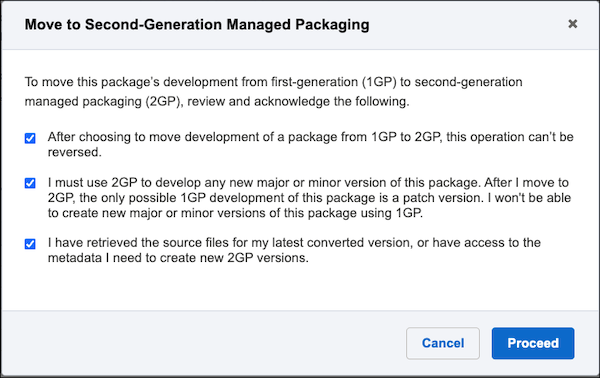
After you click Proceed, you can no longer create new major or
minor versions in the packaging org. To innovate on the package using 2GP, you create new
package versions using the sf package version create CLI
command.