


Analytics SAQL Developer Guide
 j
jReplace Null Values with coalesce()
For information about how to use the coalesce() Function, see coalesce.
Example: Left Outer Cogroup with coalesce()
A left outer cogroup blends the right data stream with the left data stream. If a record on the left stream does not have a match on the right stream, The missing right value comes through as null. To replace null values with A different value, use coalesce().
For example, suppose that you have a dataset of meeting information from the Salesforce Event object, and you join it with data from the Salesforce Opportunity object. This shows amount won with the total time spent in meetings.
1ops = load "Ops";
2meetings = load "Meetings";
3q = cogroup ops by 'Account' left, meetings by 'Company';
4q = foreach q generate ops.'Account' as 'Account', sum(ops.'Amount') as 'sum_Amount', sum(meetings.'MeetingDuration') as 'TimeSpent';
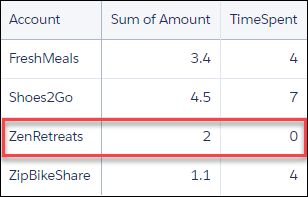
It looks like we had no meetings with Zen Retreats.

Let's use coalesce() to change that null value to a zero.
1ops = load "Ops";
2meetings = load "Meetings";
3q = cogroup ops by 'Account' left, meetings by 'Company';
4
5--use coalesce() to replace null values with zero
6q = foreach q generate ops.'Account' as 'Account', sum(ops.'Amount') as 'sum_Amount', coalesce(sum(meetings.'MeetingDuration'), 0) as 'TimeSpent';
Example: Right Outer Cogroup with coalesce()
A right outer cogroup blends the left data stream with the right data stream. When a record on the right stream has no matching record on the left stream, The left-side fields return null. To replace null values with a different value, Use coalesce().
In this example, accounts is the primary (right) dataset. Opportunities are Blended into accounts. All accounts are preserved. Accounts with no matching Opportunities return null for Sum of Amount.
1q = load "opportunity";
2q2 = load "account";
3q = cogroup q by 'AccountId' right, q2 by 'AccountId';
4q = foreach q generate
5    q2.'AccountId' as 'AccountId',
6    sum(q.'Amount') as 'Sum of Amount',
7    sum(q2.'AnnualRevenue') as 'Sum of AnnualRevenue';
It looks like 0010900000CdEfGCCX and 0010900000EfGhIEEV have no matching opportunities.

Let's use coalesce() to change those null values to zero.
1q = load "opportunity";
2q2 = load "account";
3q = cogroup q by 'AccountId' right, q2 by 'AccountId';
4
5--use coalesce() to replace null values with zero
6q = foreach q generate
7    q2.'AccountId' as 'AccountId',
8    coalesce(sum(q.'Amount'), 0) as 'Sum of Amount',
9    sum(q2.'AnnualRevenue') as 'Sum of AnnualRevenue';

Troubleshooting Null Values in Blended Datasets
Null Values Display Instead of Zeros After a Blend
Left and right blends use outer join semantics. When a row in one dataset has No matching row in the other, the unmatched fields return null, not zero.
To replace null values with zero, use coalesce() In your SAQL query.
The Null Measure Handling Setting Doesn't Affect SAQL Results
The Null Measure Handling setting controls how null values are displayed in Table and chart widgets. It doesn't modify the underlying SAQL query Results. If your query returns null, that null is passed to the widget Before the display setting is applied—so calculations that depend on those Values still treat them as null.
To fix null values at the query level, use coalesce().
Null Values in Calculations Return Null, Not Zero
Null values propagate through arithmetic. For example:
- null + 5 = null
- null / 2 = null
Wrap the affected field in coalesce() to Substitute zero before the calculation runs.
1coalesce(sum(q.'Amount'), 0) / sum(q2.'AnnualRevenue')