Analytics SAQL Developer Guide
 j
jNote: This release is in preview. Features described here don’t become generally available until the latest general availability date that Salesforce announces for this release. Before then, and where features are noted as beta, pilot, or developer preview, we can’t guarantee general availability within any particular time frame or at all. Make your purchase decisions only on the basis of generally available products and features.
grouping()
Returns 1 if null dimension values are due to higher-level aggregates (which
usually means the row is a subtotal or grand total), otherwise returns 0.
The grouping() function is most useful when paired with the rollup modifier on the group statement. Invoking grouping() lets work with subtotaled data.
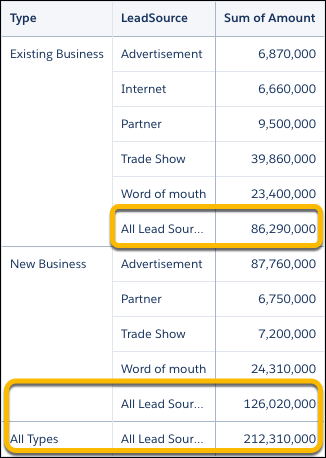
Example - Label Subtotaled Data
Suppose that you have a dataset of opportunity information with amounts totaled
by lead source and type. Calculate totals with rollup. Then use grouping() with a case
statement to check whether a row is a total and if it is then label it as
"all"
values.
1q = load "opportunityData";
2
3--Modify the group statement with rollup to calculate subtotals of grouped measures
4q = group q by rollup('Type', 'LeadSource');
5
6q = order q by ('Type', 'LeadSource');
7
8--Determine which rows are totals with grouping(), which returns 1 if a row is a total
9q = foreach q generate
10    (case
11        when grouping('Type') == 1 then "All Types"
12        else 'Type'
13    end) as 'Type',
14    (case
15        when grouping('LeadSource') == 1 then "All Lead Sources"
16        else 'LeadSource'
17    end) as 'LeadSource',
18    sum('Amount') as 'sum_Amount';