


Analytics SAQL Developer Guide
 j
jNote: This release is in preview. Features described here don’t become generally available until the latest general availability date that Salesforce announces for this release. Before then, and where features are noted as beta, pilot, or developer preview, we can’t guarantee general availability within any particular time frame or at all. Make your purchase decisions only on the basis of generally available products and features.
toDate()
Syntax
If a format argument isn’t provided, the function uses the format yyyy-MM-dd HH:mm:ss. format is only valid for converting date string values.
For the allowed formats, see Date Formats.
toDate(epoch_seconds)
The format argument is not valid for converting epoch_seconds numerical values.
Example: Display the Exact Date an Opportunity Opened
Suppose that you want to see the exact day that an opportunity opened. Use toDate() with CreatedDate_Year, CreatedDate_Month, CreatedDate_Day, and an accepted date format. This query will resemble the example below:
1q = load "oppty";
2q = foreach q generate toDate(CreatedDate_Year + "/" + CreatedDate_Month + "/" + CreatedDate_Day, "yyyy/MM/dd") as CreatedDate;
3q = order q by 'CreatedDate';
Example: Display the Number of Days Since an Opportunity Opened
Suppose that you have an opportunity dataset with the account name and the epoch seconds fields:
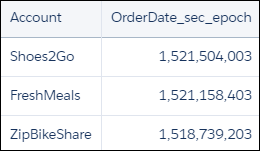
You want to see how many days ago an opportunity was opened. Use daysBetween() and now(). Use toDate() to convert the order date epoch seconds to a date format that can be passed to daysBetween().
1q = load "OpsDates1";
2
3q = foreach q generate Account, daysBetween(toDate(OrderDate_sec_epoch), now()) as 'daysOpened';
The resulting data stream displays the number of days since the opportunity was opened.
