


Platform Events Developer Guide
 j
jNote: This release is in preview. Features described here don’t become generally available until the latest general availability date that Salesforce announces for this release. Before then, and where features are noted as beta, pilot, or developer preview, we can’t guarantee general availability within any particular time frame or at all. Make your purchase decisions only on the basis of generally available products and features.
Publish Event Messages with Flows
Use flows to publish event messages from a Salesforce app
as part of some user interaction, an automated process, Apex, or workflow
action.
To publish event messages, add a Create Records element to the appropriate flow. Where you'd usually pick an object to create, select the custom platform event.
For example, here’s how to configure a Create Records element that publishes a Printer Status
platform event message. This example assumes that the Printer Status platform event is defined
in your org and that the event has these custom fields.
- Printer Model (Text)
- Serial Number (Text)
- Ink Status (Text)
- For How Many Records to Create, choose One.
- For How to Set the Record Fields, choose Use separate variables, resources, and literal values.
- For Object, enter Printer and select Printer Status.
-
Set these field values.
Field Value Printer Model XZO-5 Serial Number 12345 Ink Status Low 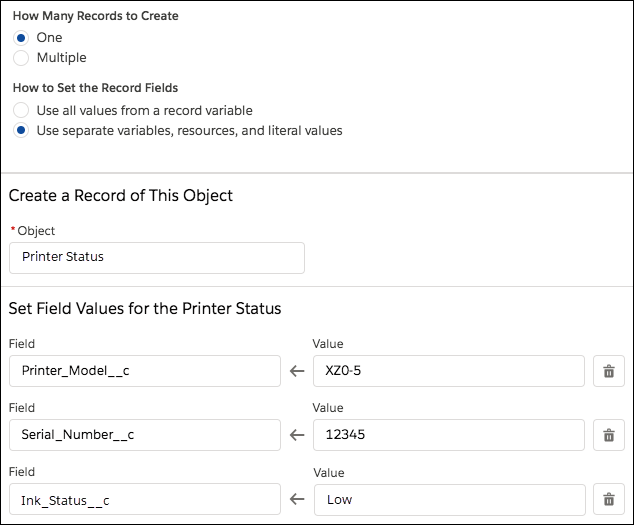
- Save and activate the flow.