The ExperienceBundle metadata type provides text-based representations of the different settings and components, such as pages, branding sets, and themes, that make up an Experience Builder site. Whether it’s for your own org or you’re a consulting partner or ISV, you can quickly update and deploy sites programmatically using your preferred development tools, including Salesforce Extensions for VS Code, Salesforce CLI, or your favorite IDE or text editor.
Before the Summer ’19 release (API version 45.0 and earlier), the Network, CustomSite, and SiteDotCom metadata types combined to define an Experience Builder site. However, retrieving the SiteDotCom type produces a binary .site file that isn’t human readable. By retrieving the ExperienceBundle type instead of SiteDotCom, you can extract and edit granular site metadata in a human-readable format, contained in a three-level folder structure.
Limitations
Managed packages aren’t supported.
ExperienceBundle Structure
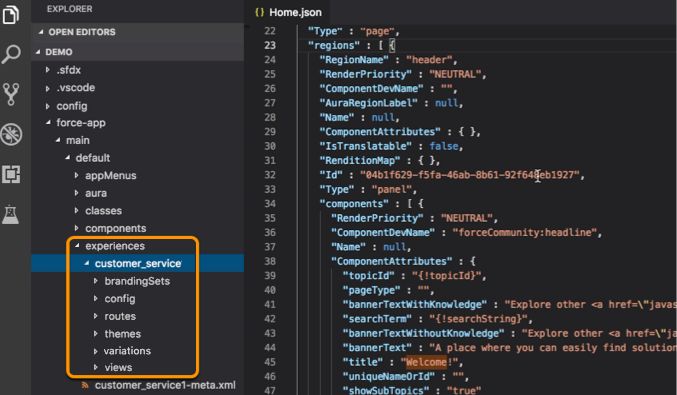
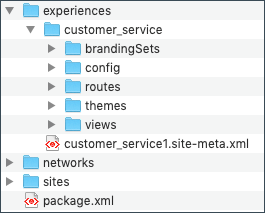
When you retrieve ExperienceBundle, the data is stored in a three-level folder structure.
The experiences folder contains a folder for each Experience Builder site in your org. Each site_name folder—customer_service in this example—contains subfolders that define the site and represent the different elements that you access in Experience Builder. Each subfolder has .json files that contain the properties that you can edit on your local machine or scratch org and then deploy.
Let’s take a closer look at the files that define each Experience Builder site.
Folder
Contents
brandingSets
branding_set_name.json defines the site’s branding set properties.
config
site_name.json defines some site settings, such as public access and progressive rendering.
languages.json defines supported languages.
loginAppPage.json and mainAppPage.json are single-page applications (SPA). loginAppPage.json is used for site pages that require a login, and mainAppPage is used for all other pages.
An SPA is a web app that loads a single HTML page. Unlike a traditional website, which comprises several pages that the user navigates between, an SPA consists of multiple views that update the page dynamically as the user interacts with it.
routes
Contains one file per page, named page_name.json, which defines the URL and other route-related information.
themes
Contains one file per theme, named theme_name.json, which defines the theme.
variations
Contains one file per variation, named experienceVariation_name.json. You can use an experience variation to change the default behavior of an Experience Builder site based on the audience, such as branding, page variations, component visibility, or component attributes.
views
Contains one file per view, named view_name.json. Each file defines an SPA view, which is equivalent to a page to the end user. A view consists of regions that contain other regions or components in the rendered page.
Before you update the .json files of an Experience Builder site, we recommend making a copy of the site’s folder as a backup.
After you enable ExperienceBundle for Aura sites, Metadata API calls (retrieve and deploy) and Salesforce DX operations (pull, push, and status) use the ExperienceBundle type instead of SiteDotCom.
If you use change sets to deploy your site, the list of dependencies includes two items of type Site.com—MySiteName and _MySiteName_1. _MySiteName_1 now represents ExperienceBundle instead of SiteDotCom.
You don’t need to enable the ExperienceBundle metadata type for LWR sites. LWR sites use ExperienceBundle by default.
Note
From Setup, enter Digital Experiences in the Quick Find box, and then select Settings.
Select Enable ExperienceBundle Metadata API.
Save your changes.
Alternatively, you can enable this feature when creating a scratch org using a scratch org definition file. (See the Metadata Coverage report.)
Retrieve and Deploy ExperienceBundle Using Metadata API
In Metadata API, a manifest file defines the components that you’re trying to retrieve. This example shows a package.xml manifest file for retrieving an Experience Builder site using ExperienceBundle instead of SiteDotCom.
Retrieve and Deploy ExperienceBundle with Salesforce DX
Salesforce Developer Experience (DX) is a set of tools that streamlines the entire development lifecycle. It improves team development and collaboration, facilitates automated testing and continuous integration, and makes the release cycle more efficient and agile.
If you’ve set up your Salesforce DX environment, you can quickly:
Retrieve all the Experience Builder sites in your org using sf project retrieve start
Deploy updates using sf project deploy start
Check for conflicts or changes on the server using sf project deploy preview or sf project retrieve preview
Retrieve a list of available templates using sf community list template
Create a site using sf community create
Publish an Experience Builder site using sf community publish
If you’re not familiar with Salesforce DX, check out these great resources.


 j
j