


LWR Sites for Experience Cloud
 j
jText --dxp Styling Hooks
The Base Font Family and Base Font Size properties set the font family and font size on the <html> element of your site.
The Base Font Family property defaults to Visitor’s Native System Font. In turn, the Font Family for each text element defaults to Use Base Font Family. (In LWR sites created before Spring ’25, your existing font settings remain as is, but you can update them.) These settings give visitors better readability and site performance by using their operating system’s native or default font as the site’s font. The native system font varies for Windows, macOS, and mobile operating systems, but usually it’s a sans serif font. You can customize the font setting for any text element, but for the best site performance, minimize the number of font families used in the site.
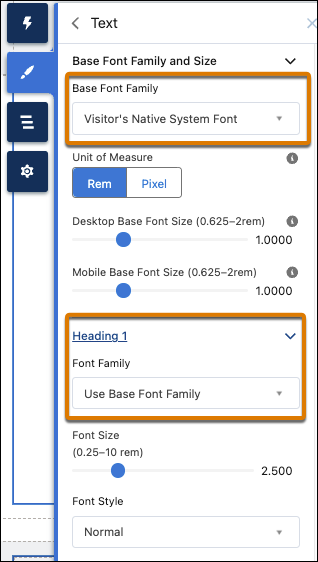
The Base Font Size properties determine the default desktop and mobile font sizes for your site. When you change the base font size, you proportionally adjust any site elements, such as font sizes or spacing values, whose size is specified with relative units (rem or em).
In addition to text for buttons, links, and forms, you can modify the style for several levels of heading and body text, including:
- Heading 1
- Heading 2
- Heading 3
- Heading 4
- Heading 5
- Heading 6
- Paragraph 1
- Paragraph 2
You can configure each of these text styles declaratively in the Theme panel or programmatically via --dxp styling hooks. When you change the values for these properties, it also affects the SLDS and DXP CSS classes that consume them.
To use these text properties in your components, use either SLDS or DXP CSS classes, or use the --dxp styling hook directly in the component’s CSS.
For example, this code sample styles a component’s h1 using the DXP CSS class to use the branding property values defined in the Extra Large Heading.
1<template>
2  <h1 class="dxp-text-heading-xlarge">Heading 1</h1>
3</template>
Alternatively, you can use the --dxp styling hooks directly in the component’s CSS:
1h1 {
2  font-size: var(--dxp-s-text-heading-extra-large-font-size);
3  font-family: var(--dxp-s-text-heading-extra-large-font-family);
4}
To alter the Base Font Size for small form factors, such as Tablet Portrait or Mobile, you can set the value of --dxp-s-html-font-size-mobile programmatically.