


Loyalty Management Developer Guide
 j
jReceipt Evaluation
| Available in: all editions that have Loyalty Management enabled |
Here are the factors for evaluating.
Confidence Score
Define a confidence score to assess if the scanned receipt meets the criteria to extract the receipt information. A confidence value higher than the defined threshold value typically implies greater certainty in the accuracy of the receipt scanning result, while a lower value suggests more uncertainty in reading the receipt.
To understand how a receipt is evaluated based on the confidence score, consider these scenarios:
| Business Scenario | Result | What Happens in this Scenario? |
|---|---|---|
| A member uploads a clean receipt and the receipt content is readable. | The confidence value for the receipt is higher than or equal to the threshold value. | Submit the receipt and get rewards for eligible items. |
| A member uploads a crumpled receipt or a receipt with poor image quality, and the receipt lines are partially readable. | The confidence value for the crumpled receipt is lower than the threshold value. | Submit the receipt for a manual review or capture the image again to ensure that it's readable. |
| A member uploads a crumpled or a torn receipt, and the mandatory fields on the receipt such as receipt number, date, and store name aren’t readable. | The confidence value for the crumpled receipt is lower than the threshold value. | The receipt is rejected because the information required to process the receipt wasn’t extracted. |
Ineligible Receipt Items
Configure the receipt scanning to show members the items from their receipt that aren’t eligible for loyalty points. Typically, items that don't meet the criteria for earning loyalty points include certain excluded categories, products, or expired promotions.
Required Receipt Fields
If any mandatory information is missing in a receipt uploaded by a member, the receipt is rejected. When you enable receipt scanning, Receipt Date is a mandatory field to be included in every receipt. You can select the other mandatory fields from these options:
- Receipt Number
- Store Name
- Postal Code
You can also configure additional mandatory fields on a receipt.
Eligible Item Identifier Fields
When you enable receipt scanning, you can select fields that uniquely determine eligible items from a receipt. For example, if you select product name and product code as the eligible item identifier fields, the receipt is evaluated to determine the eligible items, and the results show the products that match the filter criteria with product name and product code.
Consider this example to understand how an eligible item is determined. Adam Smith submits a receipt by using the Loyalty Management mobile app.
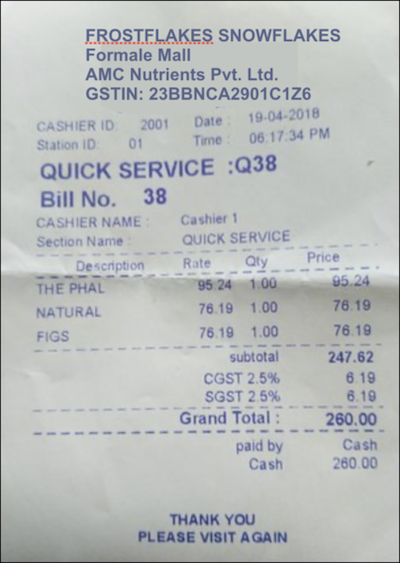
The receipt is uploaded using the Receipt Upload API, and the Expense Analysis API provides the scanned results by using this JSON response:
1"{"ExpenseDocuments":[
2{"SummaryFields":[
3{"ValueDetection":{"Text":"FROSTFLAKES SNOWFLAKES"},"Type":{"Text":"NAME"}},
4{"ValueDetection":{"Text":"260.00"},"Type":{"Text":"AMOUNT_PAID"}},
5{"ValueDetection":{"Text":"19-04-2018"},"Type":{"Text":"INVOICE_RECEIPT_DATE"}},
6{"ValueDetection":{"Text":"38"},"Type":{"Text":"INVOICE_RECEIPT_ID"}},
7{"ValueDetection":{"Text":"23BBNCA2901C1Z6"},"Type":{"Text":"TAX_PAYER_ID"}},
8{"ValueDetection":{"Text":"23BBNCA2901C1Z6"},"Type":{"Text":"VENDOR_GST_NUMBER"}},
9{"ValueDetection":{"Text":"247.62"},"Type":{"Text":"SUBTOTAL"}},
10{"ValueDetection":{"Text":"6.19"},"Type":{"Text":"TAX"}},
11{"ValueDetection":{"Text":"6.19"},"Type":{"Text":"TAX"}},
12{"ValueDetection":{"Text":"260.00"},"Type":{"Text":"TOTAL"}},
13{"ValueDetection":{"Text":"FROSTFLAKES SNOWFLAKES"},"Type":{"Text":"VENDOR_NAME"}},
14{"ValueDetection":{"Text":"2001"},"Type":{"Text":"OTHER"}},
15{"ValueDetection":{"Text":"01"},"Type":{"Text":"OTHER"}},
16{"ValueDetection":{"Text":"06:17:34 PM"},"Type":{"Text":"OTHER"}},
17{"ValueDetection":{"Text":"Q38"},"Type":{"Text":"OTHER"}},
18{"ValueDetection":{"Text":"Cashier 1"},"Type":{"Text":"OTHER"}},
19{"ValueDetection":{"Text":"QUICK SERVICE"},"Type":{"Text":"OTHER"}},
20{"ValueDetection":{"Text":"Cash"},"Type":{"Text":"OTHER"}}],
21"LineItemGroups":[
22"LineItems":[
23{"LineItemExpenseFields":[
24{"ValueDetection":{"Text":"THE PHAL"},"Type":{"Text":"PRODUCT_NAME"}},
25{"ValueDetection":{"Text":"95.24"},"Type":{"Text":"UNIT_PRICE"}},
26{"ValueDetection":{"Text":"1.00"},"Type":{"Text":"QUANTITY"}},
27{"ValueDetection":{"Text":"95.24"},"Type":{"Text":"PRICE"}},
28{"ValueDetection":{"Text":"THE PHAL 95.24 1.00 95.24"},"Type":{"Text":"EXPENSE_ROW"}}
29]},
30{"LineItemExpenseFields":[
31{"ValueDetection":{"Text":"NATURAL"},"Type":{"Text":"PRODUCT_NAME"}},
32{"ValueDetection":{"Text":"76.19"},"Type":{"Text":"UNIT_PRICE"}},
33{"ValueDetection":{"Text":"1.00"},"Type":{"Text":"QUANTITY"}},
34{"ValueDetection":{"Text":"76.19"},"Type":{"Text":"PRICE"}},
35{"ValueDetection":{"Text":"NATURAL 76.19 1.00 76.19"},"Type":{"Text":"EXPENSE_ROW"}}
36]},
37{"LineItemExpenseFields":[
38{"ValueDetection":{"Text":"FIGS"},"Type":{"Text":"PRODUCT_NAME"}},
39{"ValueDetection":{"Text":"76.19"},"Type":{"Text":"UNIT_PRICE"}},
40{"ValueDetection":{"Text":"1.00"},"Type":{"Text":"QUANTITY"}},
41{"ValueDetection":{"Text":"76.19"},"Type":{"Text":"PRICE"}},
42{"ValueDetection":{"Text":"FIGS 76.19 1.00 76.19"},"Type":{"Text":"EXPENSE_ROW"}}]}]}
43]}]}"
44
The loyalty program admin has selected Price as the eligible item identifier field, and so the receipt line item's response shows eligible items by comparing the line item’s price with the product price. The eligible items in the receipt are: The Phal, Natural, and Figs.