


Programmatic Marketing Content
 j
jAMPscript 201
This scenario contains information on these aspects of using AMPscript:
- Using an if/else statement to insert a customer's preferred name
- Inserting dynamic content into an email based on a customer's status
- Inserting an estimated shipping date based on the customer's ZIP code
This AMPscript provides the content for the entire email message:
%%[/* 201 */
Var @memid, @fname, @lname, @prefname, @address, @city, @state, @zip, @mempref, @plat, @ship

Set @memid = MemberID
Set @fname = FirstName
Set @lname = LastName
Set @prefname = PrefName
Set @address = Address
Set @zip = Zip
Set @city = Lookup("ShipTimes","city","zip",@zip)
Set @state = Lookup("ShipTimes","state","zip",@zip)
Set @mempref = MemPref
Set @plat = Plat

/* 201 */ ]%%%%[ if not empty(@prefname) then ]%%%%= v(@prefname) =%%%%[ else ]%%%%= v(@fname) =%%%%[ endif
 ]%%, below are your account detailsName

First Name:%%= v(@fname) =%%Last Name:%%= v(@lname) =%%

%%[ if not Empty(@prefname) then ]%%Preferred Name:%%= v(@prefname) =%%

%%[ endif ]%%Address

Address:%%= v(@address) =%%City:%%= v(@city) =%%
State:%%= v(@state) =%%Zip:%%= v(@zip) =%%

Member Preferences

Shopping Preference:%%= v(@mempref) =%%Platinum Member:%%[ if @plat == "N" then ]%%

%%= RedirectTo(Concat('http://example.com?s=',_subscriberkey)) =%%

Sign-Up %%[ else ]%%%%= v(@plat) =%%%%[ endif ]%%
This code is similar to the example shown in AMPscript 101, but notice a few important differences that add more functionality to the email sends.
The Lookup() Function
This section of AMPscript sets the values of two variables (@city and @state) by retrieving information from the ShipTimes data extension:
Set @city = Lookup("ShipTimes","city","zip",@zip)
Set @state = Lookup("ShipTimes","state","zip",@zip)
The Lookup() function consults the ShipTimes data extension and looks for the city and state that correspond to the ZIP code value contained in the @zip variable. The function then assigns the applicable city or state to the variable.
Preferred Name If/Else Statement
The Preferred Name field involves two different if/else statements. The first statement determines whether or not the field displays in the email at all. If no preferred name exists, the message does not include the field. If the data extension includes a preferred name value, the email message includes both the field and the preferred name.
%%[ if not empty(@prefname) then ]%%%%= v(@prefname) =%%%%[ else ]%%%%= v(@fname) =%%%%[ endif]%%In this section of AMPscript, the Marketing Cloud application will insert a subscriber's preferred name from the sendable data extension when available. If the data extension does not include the value, then the application defaults to the customer's first name. The if statement looks for the preferred name and inserts it when available. If not, the else statement puts in the first name.
<strong>%%[ if not empty(@prefname) then ]%%%%= v(@prefname) =%%%%[ else ]%%%%= v(@fname) =%%%%[ endif ]%%</strong>, below are your account details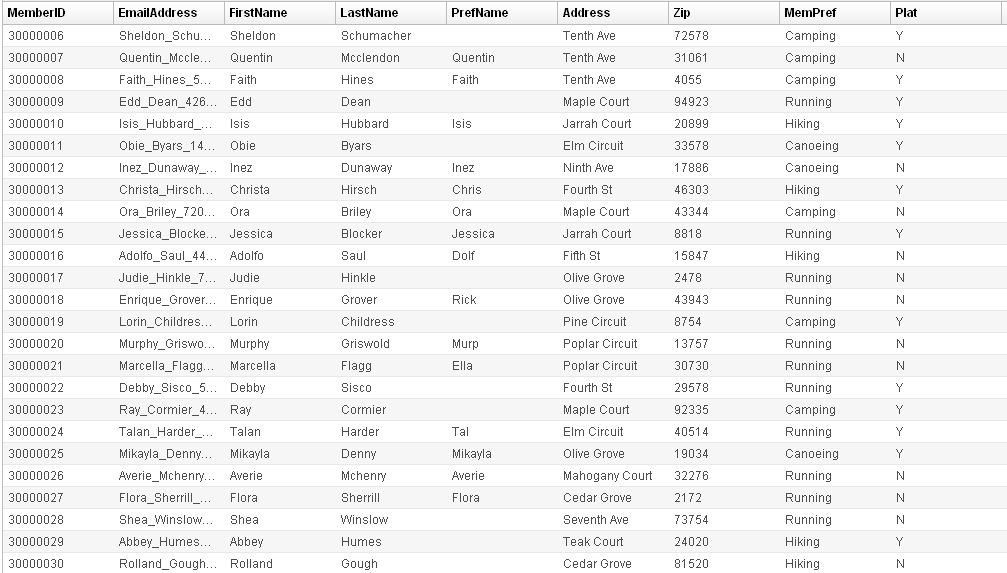
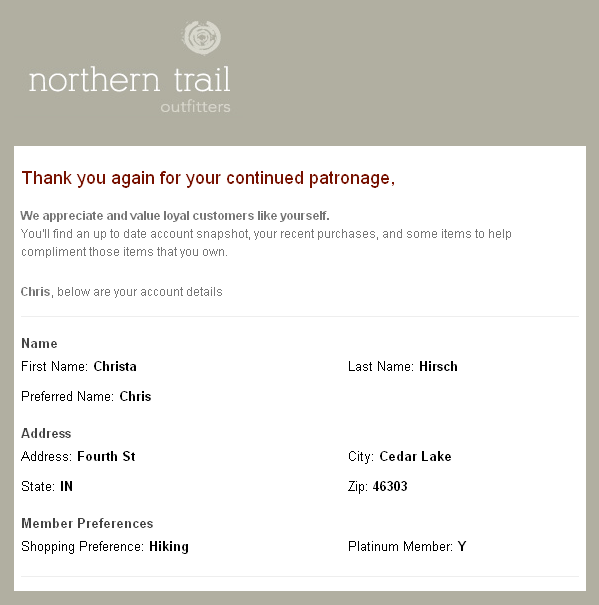
In the case of Christa Hirsch, the email send refers to the data extension shown above and inserts the preferred name of Chris into the email greeting.
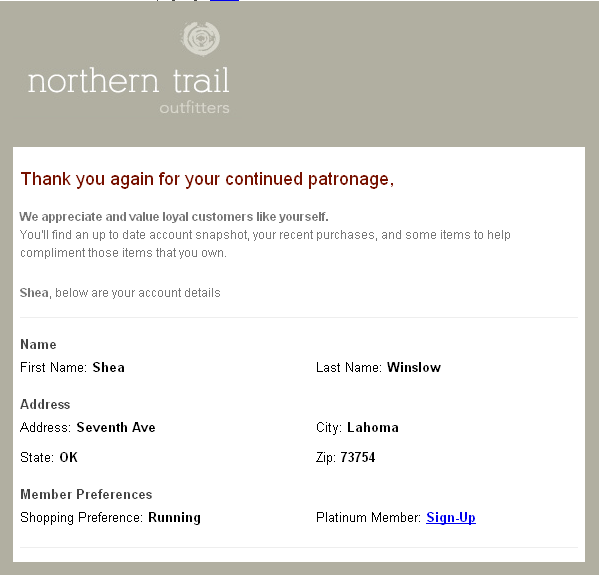
In the case of Shea Winslow, the email greeting defaults to the first name because of an unavailable preferred name value.
Platinum Status If/Else Statement
In the section of AMPscript shown below, the application determines whether the Platinum member status of the subscriber. If the subscriber did not join the Platinum program yet, the email contains a link prompting the subscriber to sign up on a separate web page. The email confirms Platinum status by displaying a capital Y.
Platinum Member: <strong style="color: #000;">%%[ if @plat == "N" then ]%%<a href="%%= RedirectTo(Concat('http://example.com?s=',_subscriberkey)) =%%" alias="Platinum Sign-Up">Sign-Up</a>%%[ else ]%%%%= v(@plat) =%%%%[ endif ]%%</strong>The AMPscript [ if @plat == "N" then ]%% %%= RedirectTo(Concat('http://example.com?s=',_subscriberkey)) then displays the link if and only if the variable value equals N. Any other answer displays the value of the variable v(@plat) in the email.
In the screenshots previously displayed, the email sent to Shea Winslow shows the link because she is not a Platinum member. The email sent to Christa Hirsch displays a Y in that field because she is a Platinum member.