


Visualforce 開発者ガイド
 j
j
No Results
Search Tips:
- Please consider misspellings
- Try different search keywords
コンポーネント facet の使用のためのベストプラクティス
facet は、コンポーネントに示されるデータに関するコンテキスト情報を提供する、Visualforce コンポーネント内の 1 つの領域のコンテンツで構成されます。たとえば、<apex:dataTable> はテーブルのヘッダー、フッター、キャプションの facet をサポートしますが、<apex:column> は列のヘッダーまたはフッターの facet のみをサポートします。<apex:facet> コンポーネントを使用すると、Visualforce コンポーネントのデフォルトの facet を独自のコンテンツで上書きできます。facet の開始タグと終了タグ内で使用できるのは 1 つの子のみです。
<apex:facet> を定義すると、必ず他の Visualforce コンポーネントの子として使用されます。facet の name 属性では親コンポーネントが上書きされる領域を特定します。
例: <apex:dataTable> での facet の使用
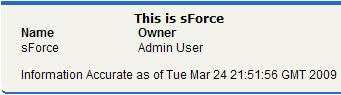
次のマークアップでは、<apex:dataTable> コンポーネントを <apex:facet> を使用して変更できる方法を示します。
1swfobject.registerObject("clippy.codeblock-0", "9");<apex:page standardController="Account">
2    <apex:pageBlock>
3        <apex:dataTable value="{!account}" var="a">
4            <apex:facet name="caption"><h1>This is
5              {!account.name}</h1></apex:facet>
6            <apex:facet name="footer"><p>Information
7              Accurate as of {!NOW()}</p></apex:facet>
8            <apex:column>
9                <apex:facet name="header">Name</apex:facet>
10                <apex:outputText value="{!a.name}"/>
11            </apex:column>
12
13            <apex:column>
14                <apex:facet
15              name="header">Owner</apex:facet>
16                <apex:outputText value="{!a.owner.name}"/>
17            </apex:column>
18        </apex:dataTable>
19    </apex:pageBlock>
20</apex:page>
21ページは次のように表示されます。
facet による <apex:dataTable> の拡張
<apex:actionStatus> での facet の使用
facet を使用できる他のコンポーネントは <apex:actionStatus> です。<apex:actionStatus> コンポーネントを拡張することにより、ページが更新されるたびにインジケータを表示できます。たとえば、次のマークアップを使用して進行状況ホイールを定義できます。
1swfobject.registerObject("clippy.codeblock-2", "9");<apex:page controller="exampleCon">
2    <apex:form >
3        <apex:outputText value="Watch this counter: {!count}" id="counter"/>
4        <apex:actionStatus id="counterStatus">
5            <apex:facet name="start">
6                 <img src="{!$Resource.spin}"/> <!-- A previously defined image -->
7            </apex:facet>
8        </apex:actionStatus>
9        <apex:actionPoller action="{!incrementCounter}" rerender="counter"
10            status="counterStatus" interval="7"/>
11    </apex:form>
12</apex:page>
関連付けられているコントローラは次のようにカウンタを更新します。
1swfobject.registerObject("clippy.codeblock-3", "9");public class exampleCon {
2    Integer count = 0;
3
4    public PageReference incrementCounter() {
5            count++;
6            return null;
7    }
8
9    public Integer getCount() {
10        return count;
11    }
12}
ページは次のように表示されます。
facet による <apex:actionStatus> の拡張
