


Visualforce 開発者ガイド
 j
jコンポーネント facet の使用のためのベストプラクティス
facet は、コンポーネントに示されるデータに関するコンテキスト情報を提供する、Visualforce コンポーネント内の 1 つの領域のコンテンツで構成されます。たとえば、<apex:dataTable> はテーブルのヘッダー、フッター、キャプションの facet をサポートしますが、<apex:column> は列のヘッダーまたはフッターの facet のみをサポートします。<apex:facet> コンポーネントを使用すると、Visualforce コンポーネントのデフォルトの facet を独自のコンテンツで上書きできます。facet の開始タグと終了タグ内で使用できるのは 1 つの子のみです。
<apex:facet> を定義すると、必ず他の Visualforce コンポーネントの子として使用されます。facet の name 属性では親コンポーネントが上書きされる領域を特定します。
例: <apex:dataTable> での facet の使用
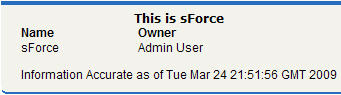
次のマークアップでは、<apex:dataTable> コンポーネントを <apex:facet> を使用して変更できる方法を示します。
1swfobject.registerObject("clippy.codeblock-0", "9");
2
3
4
5
6
7
8
9
10
11
12
13
14
15
16
17<apex:page standardController="Account">
18    <apex:pageBlock>
19        <apex:dataTable value="{!account}" var="a">
20            <apex:facet name="caption"><h1>This is
21              {!account.name}</h1></apex:facet>
22            <apex:facet name="footer"><p>Information
23              Accurate as of {!NOW()}</p></apex:facet>
24            <apex:column>
25                <apex:facet name="header">Name</apex:facet>
26                <apex:outputText value="{!a.name}"/>
27            </apex:column>
28
29            <apex:column>
30                <apex:facet
31              name="header">Owner</apex:facet>
32                <apex:outputText value="{!a.owner.name}"/>
33            </apex:column>
34        </apex:dataTable>
35    </apex:pageBlock>
36</apex:page>
37ページは次のように表示されます。
facet による <apex:dataTable> の拡張
<apex:actionStatus> での facet の使用
facet を使用できる他のコンポーネントは <apex:actionStatus> です。<apex:actionStatus> コンポーネントを拡張することにより、ページが更新されるたびにインジケータを表示できます。たとえば、次のマークアップを使用して進行状況ホイールを定義できます。
1swfobject.registerObject("clippy.codeblock-2", "9");
2
3
4
5
6
7
8
9
10
11
12
13
14
15
16
17<apex:page controller="exampleCon">
18    <apex:form >
19        <apex:outputText value="Watch this counter: {!count}" id="counter"/>
20        <apex:actionStatus id="counterStatus">
21            <apex:facet name="start">
22                 <img src="{!$Resource.spin}"/> <!-- A previously defined image -->
23            </apex:facet>
24        </apex:actionStatus>
25        <apex:actionPoller action="{!incrementCounter}" rerender="counter"
26            status="counterStatus" interval="7"/>
27    </apex:form>
28</apex:page>
関連付けられているコントローラは次のようにカウンタを更新します。
1swfobject.registerObject("clippy.codeblock-3", "9");
2
3
4
5
6
7
8
9
10
11
12
13
14
15
16
17public class exampleCon {
18    Integer count = 0;
19
20    public PageReference incrementCounter() {
21            count++;
22            return null;
23    }
24
25    public Integer getCount() {
26        return count;
27    }
28}
ページは次のように表示されます。
facet による <apex:actionStatus> の拡張
