


Force.com Apex コード開発者ガイド
 j
j
No Results
Search Tips:
- Please consider misspellings
- Try different search keywords
アクションリンクを定義し、フィード要素を使用して投稿する
この例では、アクションリンクグループ内に 1 つのアクションリンクを作成し、アクションリンクグループをフィード項目に関連付けてそのフィード項目を投稿します。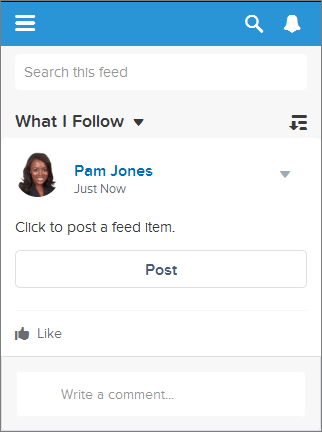
ユーザがこのアクションリンクをクリックすると、ユーザのフィードにフィード項目を投稿する Chatter REST API リソース /chatter/feed-elements が要求されます。ユーザがクリックしたアクションリンクが正常に実行されると、その状況は「成功」に変更され、フィード項目の UI が更新されます。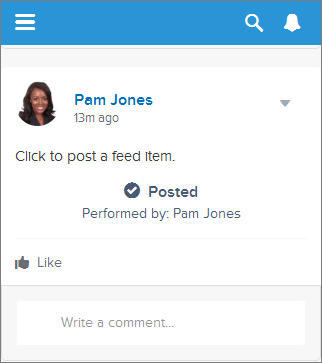 ユーザのフィードを更新して新規投稿を表示させます。
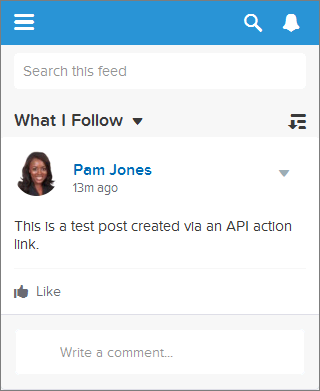 これは単純な例ですが、アクションリンクを使用して Salesforce リソースへのコールを行う方法が示されています。
アクションリンクはフィード項目のボタンと考えます。ボタンのように、アクションリンク定義には表示ラベル (labelKey) があります。アクションリンクグループ定義には、URL (actionUrl) や HTTP メソッド (method) のほか、省略可能なリクエストボディ (requestBody) や HTTP ヘッダー (headers) など、他にもプロパティがあります。
ユーザがこのアクションリンクをクリックすると、Chatter REST API に対して HTTP POST 要求が実行され、フィード項目が Chatter に投稿されます。requestBody プロパティは、新しいフィード項目のテキストなど、actionUrl リソースのリクエストボディを保持します。この例では、新しいフィード項目にテキストしか含まれていませんが、添付ファイルやアンケートなどの他の機能やアクションリンクも含めることができます。
ラジオボタンと同様に、アクションリンクはグループ内にネストする必要があります。グループ内のアクションリンクは、グループのプロパティを共有し、相互に排他的です (クリックできるのは、グループ内の 1 つのアクションリンクのみです)。1 つのアクションリンクを定義する場合でも、アクションリンクグループに含める必要があります。
この例では、ConnectApi.ActionLinks.createActionLinkGroupDefinition(String, ConnectApi.ActionLinkGroupDefinitionInput) をコールしてアクションリンクグループ定義を作成します。
そのコールからアクションリンクグループ ID を保存し、ConnectApi.ChatterFeeds.postFeedElement(String, ConnectApi.FeedElementInput, ConnectApi.BinaryInput) へのコールでフィード要素と関連付けます。
このコードを使用するには、独自の Salesforce 組織の OAuth 値に置き換えます。コード内で To Do コメントを探します。
1swfobject.registerObject("clippy.codeblock-0", "9");ConnectApi.ActionLinkGroupDefinitionInput actionLinkGroupDefinitionInput = new ConnectApi.ActionLinkGroupDefinitionInput();
2ConnectApi.ActionLinkDefinitionInput actionLinkDefinitionInput = new ConnectApi.ActionLinkDefinitionInput();
3ConnectApi.RequestHeaderInput requestHeaderInput1 = new ConnectApi.RequestHeaderInput();
4ConnectApi.RequestHeaderInput requestHeaderInput2 = new ConnectApi.RequestHeaderInput();
5
6// Create the action link group definition.
7actionLinkGroupDefinitionInput.actionLinks = New List<ConnectApi.ActionLinkDefinitionInput>();
8actionLinkGroupDefinitionInput.executionsAllowed = ConnectApi.ActionLinkExecutionsAllowed.OncePerUser;
9actionLinkGroupDefinitionInput.category = ConnectApi.PlatformActionGroupCategory.Primary;
10datetime myDate = datetime.newInstance(2015, 4, 1);
11actionLinkGroupDefinitionInput.expirationDate = myDate;
12
13// Create the action link definition.
14actionLinkDefinitionInput.actionType = ConnectApi.ActionLinkType.Api;
15actionLinkDefinitionInput.actionUrl = '/services/data/v33.0/chatter/feed-elements';
16actionLinkDefinitionInput.headers = new List<ConnectApi.RequestHeaderInput>();
17actionLinkDefinitionInput.labelKey = 'Post';
18actionLinkDefinitionInput.method = ConnectApi.HttpRequestMethod.HttpPost;
19actionLinkDefinitionInput.requestBody = '{\"subjectId\": \"me\",\"feedElementType\": \"FeedItem\",\"body\": {\"messageSegments\": [{\"type\": \"Text\",\"text\": \"This is a test post created via an API action link.\"}]}}';
20actionLinkDefinitionInput.requiresConfirmation = true;
21
22// To Do: Substitute an OAuth value for your Salesforce org.
23requestHeaderInput1.name = 'Authorization';
24requestHeaderInput1.value = 'OAuth 00DD00000007WNP!ARsAQCwoeV0zzAV847FTl4zF.85w.EwsPbUgXR4SAjsp';
25actionLinkDefinitionInput.headers.add(requestHeaderInput1);
26
27requestHeaderInput2.name = 'Content-Type';
28requestHeaderInput2.value = 'application/json';
29actionLinkDefinitionInput.headers.add(requestHeaderInput2);
30
31// Add the action link definition to the action link group definition.
32actionLinkGroupDefinitionInput.actionLinks.add(actionLinkDefinitionInput);
33
34// Instantiate the action link group definition.
35ConnectApi.ActionLinkGroupDefinition actionLinkGroupDefinition = ConnectApi.ActionLinks.createActionLinkGroupDefinition(Network.getNetworkId(), actionLinkGroupDefinitionInput);
36
37ConnectApi.FeedItemInput feedItemInput = new ConnectApi.FeedItemInput();
38ConnectApi.FeedElementCapabilitiesInput feedElementCapabilitiesInput = new ConnectApi.FeedElementCapabilitiesInput();
39ConnectApi.AssociatedActionsCapabilityInput associatedActionsCapabilityInput = new ConnectApi.AssociatedActionsCapabilityInput();
40ConnectApi.MessageBodyInput messageBodyInput = new ConnectApi.MessageBodyInput();
41ConnectApi.TextSegmentInput textSegmentInput = new ConnectApi.TextSegmentInput();
42
43// Set the properties of the feedItemInput object.
44feedItemInput.body = messageBodyInput;
45feedItemInput.capabilities = feedElementCapabilitiesInput;
46feedItemInput.subjectId = 'me';
47
48// Create the text for the post.
49messageBodyInput.messageSegments = new List<ConnectApi.MessageSegmentInput>();
50textSegmentInput.text = 'Click to post a feed item.';
51messageBodyInput.messageSegments.add(textSegmentInput);
52
53
54// The feedElementCapabilitiesInput object holds the capabilities of the feed item.
55// Define an associated actions capability to hold the action link group.
56// The action link group ID is returned from the call to create the action link group definition.
57feedElementCapabilitiesInput.associatedActions = associatedActionsCapabilityInput;
58associatedActionsCapabilityInput.actionLinkGroupIds = new List<String>();
59associatedActionsCapabilityInput.actionLinkGroupIds.add(actionLinkGroupDefinition.id);
60
61// Post the feed item.
62ConnectApi.FeedElement feedElement = ConnectApi.ChatterFeeds.postFeedElement(Network.getNetworkId(), feedItemInput, null);