


コードを使用したケースフィードのカスタマイズ
 j
j
No Results
Search Tips:
- Please consider misspellings
- Try different search keywords
標準ケースフィードページの複製
support:CaseFeed 属性
| 属性名 | 属性型 | 説明 | 必須項目 | API バージョン | アクセス |
|---|---|---|---|---|---|
| caseId | id | ケースフィードに表示するケースレコードの ID。 | はい | 26.0 | |
| id | String | ページの他のコンポーネントがコンポーネントを参照できるようにする識別子。 | 26.0 | グローバル | |
| rendered | Boolean | コンポーネントをページに表示するかどうかを指定する boolean 値。指定されていない場合、この値はデフォルトの true に設定されます。 | 26.0 | グローバル |
使用事例
National Foods は、全米のレストランおよび企業のカフェテリアを対象とする食品サービス会社です。National のサポート業務には、デスクトップコンピュータで主に作業を行うコールセンターエージェントと、モバイルデバイスで主に作業を行う出先エージェントの両方が携わります。この会社では、出先エージェントには使いやすい簡略化したケースフィードを提供し、コールセンターエージェントはケースフィードのフル機能にアクセスできるようにしたいと考えています。
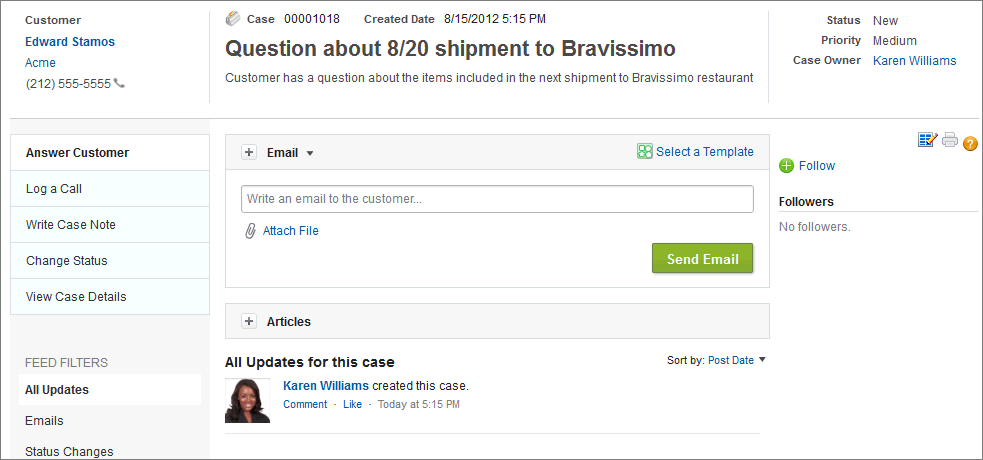
National では、support:CaseFeed コンポーネントを使用して、デスクトップで作業するコールセンターエージェント向けに標準ケースフィードページを再作成し、モバイルデバイスで作業する出先エージェント向けにカスタムページを作成しました。
support:CaseFeed で作成した標準ケースフィードページ
コードサンプル
1swfobject.registerObject("clippy.codeblock-0", "9");<apex:page standardController="Case"
2    extensions="CasePageSelectorExtension" showHeader="true" sidebar="false">
3    <apex:dynamicComponent componentValue="{!casePage}"/>
4</apex:page>
次のサンプルに、上記の Visualforce ページで使用されるコントローラ拡張を含む Apex クラスを示します。
1swfobject.registerObject("clippy.codeblock-1", "9");public class CasePageSelectorExtension {
2    boolean isFieldAgent;
3    String caseId;
4
5    public CasePageSelectorExtension(ApexPages.StandardController controller) {
6        List<UserRole> roles = [SELECT Id FROM UserRole WHERE Name = 'FieldAgent'];
7        isFieldAgent = !roles.isEmpty() && UserInfo.getUserRoleId() == roles[0].Id;
8        caseId = controller.getRecord().id;
9    }
10
11    public Component.Apex.OutputPanel getCasePage() {
12        Component.Apex.OutputPanel panel = new Component.Apex.OutputPanel();
13        if (isFieldAgent) {
14            Component.Apex.Detail detail = new Component.Apex.Detail();
15            detail.subject = caseId;
16            panel.childComponents.add(detail);
17        } else {
18            Component.Support.CaseFeed caseFeed = new Component.Support.CaseFeed();
19            caseFeed.caseId = caseId;
20            panel.childComponents.add(caseFeed);
21        }
22        return panel;
23    }
24}