


Force.com Apex コード開発者ガイド
 j
jVisualforce ページでの長時間コールアウトの実行
次の図は、Visualforce ページから開始する非同期コールアウトの実行パスを示します。ユーザが Visualforce ページで Web サービスから情報を要求するアクションを呼び出します (ステップ 1)。アプリケーションサーバは、コールアウト要求を継続サーバに渡してから Visualforce ページに応答します (ステップ 2 ~ 3)。継続サーバは、要求を Web サービスに送信し、応答を受信します (ステップ 4 ~ 7)。その後で応答をアプリケーションサーバに戻します (ステップ 8)。最後に、応答が Visualforce ページに返されます (ステップ 9)。
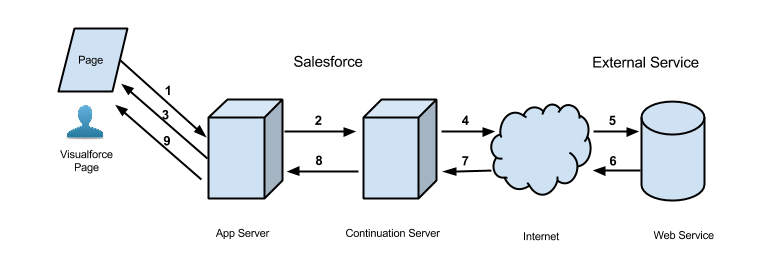
非同期コールアウトを使用するメリットがある典型的な Salesforce アプリケーションとして、Visualforce ページのボタンをユーザがクリックして外部 Web サービスからデータを取得するアプリケーションがあります。たとえば、Visualforce ページで特定の製品の保証情報を Web サービスから取得するとします。このページは、組織の数千ものエージェントによって使用される可能性があります。そのため、そのうちの 100 人のエージェントが同時に同じボタンをクリックして製品の保証情報を処理する場合があります。これらの 100 件の同時アクションは、長時間要求の同時実行数に対する 10 という制限を超えていますが、非同期コールアウトを使用することで要求はこの制限の対象とならず、実行できます。
次のアプリケーション例では、ボタンアクションは Apex コントローラメソッドで実装されます。このアクションメソッドは、Continuation を作成して返します。要求がサービスに送信された後、Visualforce 要求は一時停止されます。ユーザは応答が返されるまで待ってから、ページを使用して処理を進め、新しいアクションを呼び出す必要があります。外部サービスが応答を返すと、Visualforce 要求が再開され、ページはこの応答を受け取ります。
これは同じアプリケーションの Visualforce ページです。このページには、このページに関連付けられたコントローラの startRequest メソッドを呼び出すボタンが含まれています。継続の結果が返されてコールバックメソッドが呼び出された後、ボタンは outputText コンポーネントを再度表示してレスポンスボディを表示します。
1<apex:page controller="ContinuationController" showChat="false" showHeader="false">
2   <apex:form >
3      <!-- Invokes the action method when the user clicks this button. -->
4      <apex:commandButton action="{!startRequest}"
5              value="Start Request" reRender="result"/>
6   </apex:form>
7
8   <!-- This output text component displays the callout response body. -->
9   <apex:outputText id="result" value="{!result}" />
10</apex:page>次は、Visualforce ページに関連付けられている Apex コントローラです。このコントローラには、アクションおよびコールバックメソッドが含まれます。
1public with sharing class ContinuationController {
2    // Unique label corresponding to the continuation
3    public String requestLabel;
4    // Result of callout
5    public String result {get;set;}
6    // Endpoint of long-running service
7    private static final String LONG_RUNNING_SERVICE_URL =
8        '<Insert your service URL>';
9
10   // Action method
11    public Object startRequest() {
12      // Create continuation with a timeout
13      Continuation con = new Continuation(40);
14      // Set callback method
15      con.continuationMethod='processResponse';
16
17      // Create callout request
18      HttpRequest req = new HttpRequest();
19      req.setMethod('GET');
20      req.setEndpoint(LONG_RUNNING_SERVICE_URL);
21
22      // Add callout request to continuation
23      this.requestLabel = con.addHttpRequest(req);
24
25      // Return the continuation
26      return con;
27    }
28
29    // Callback method
30    public Object processResponse() {
31      // Get the response by using the unique label
32      HttpResponse response = Continuation.getResponse(this.requestLabel);
33      // Set the result variable that is displayed on the Visualforce page
34      this.result = response.getBody();
35
36      // Return null to re-render the original Visualforce page
37      return null;
38    }
39}