Web 用組み込みサービス開発者ガイド
 j
jJavaScript を使用したカスタム事前チャットコンポーネントのサンプル
次のコードサンプルには、プレーンな JavaScript を使用したカスタム事前チャットコンポーネントのコンポーネント、コントローラ、ヘルパーのコード例が含まれています。
このコンポーネントには次の特徴があります。
- Javascript を使用してメール入力項目を作成します。
- 最小限の Aura を使用して、表示ハンドラ内で組み込みサービス設定から事前チャット項目を取得します。
- lightningsnapin:prechatAPI の startChat Aura メソッドに渡す事前チャット項目値を取得する例を示しています。
コンポーネントコード
1<aura:component
2	description="Sample pre-chat component that uses Aura only when absolutely necessary"
3	implements="lightningsnapin:prechatUI">
4
5	<!-- Contains methods for getting pre-chat fields, starting a chat, and validating fields -->
6	<lightningsnapin:prechatAPI aura:id="prechatAPI"/>
7
8	<!-- After this component has rendered, call the controller's onRender function -->
9	<aura:handler name="render" value="{!this}" action="{!c.onRender}"/>
10
11	<div class="prechatUI">
12        Prechat Form
13		<div class="prechatFields">
14			<!-- Add pre-chat field HTML elements in the controller's onInit function -->
15		</div>
16		<button class="startChatButton" onclick="{!c.onStartButtonClick}">
17			Start Chat
18		</button>
19	</div>
20
21</aura:component>
コントローラコード
1({
2	/**
3	 * After this component has rendered, create an email input field
4	 *
5	 * @param component - This prechat UI component.
6	 * @param event - The Aura event.
7	 * @param helper - This component's helper.
8	 */
9	onRender: function(component, event, helper) {
10		// Get array of pre-chat fields defined in Setup using the prechatAPI component
11		var prechatFields = component.find("prechatAPI").getPrechatFields();
12		// This example renders only the email field using the field info that comes back from prechatAPI getPrechatFields()
13		var emailField = prechatFields.find(function(field) {
14			return field.type === "inputEmail";
15		});
16
17		// Append an input element to the prechatForm div.
18		helper.renderEmailField(emailField);
19	},
20
21	/**
22	 * Handler for when the start chat button is clicked
23	 *
24	 * @param component - This prechat UI component.
25	 * @param event - The Aura event.
26	 * @param helper - This component's helper.
27	 */
28	onStartButtonClick: function(component, event, helper) {
29		var prechatInfo = helper.createStartChatDataArray();
30
31		if(component.find("prechatAPI").validateFields(prechatInfo).valid) {
32			component.find("prechatAPI").startChat(prechatInfo);
33		} else {
34			// Show some error
35		}
36	}
37});
ヘルパーコード
1({
2	/**
3	 * Create an HTML input element, set necessary attributes, add the element to the DOM
4	 *
5	 * @param emailField - Email pre-chat field object with attributes needed to render
6	 */
7	renderEmailField: function(emailField) {
8		// Dynamically create input HTML element
9		var input = document.createElement("input");
10
11		// Set general attributes
12		input.type = "email";
13		input.class = emailField.label;
14		input.placeholder = "Your email here.";
15
16		// Set attributes required for starting a chat
17		input.name = emailField.name;
18		input.label = emailField.label;
19
20		// Add email input to the DOM
21		document.querySelector(".prechatFields").appendChild(input);
22	},
23
24	/**
25	 * Create an array of data to pass to the prechatAPI component's startChat function
26     */
27	createStartChatDataArray: function() {
28		var input = document.querySelector(".prechatFields").childNodes[0];
29		var info = {
30			name: input.name,
31			label: input.label,
32			value: input.value
33		};
34
35		return [info];
36	}
37});
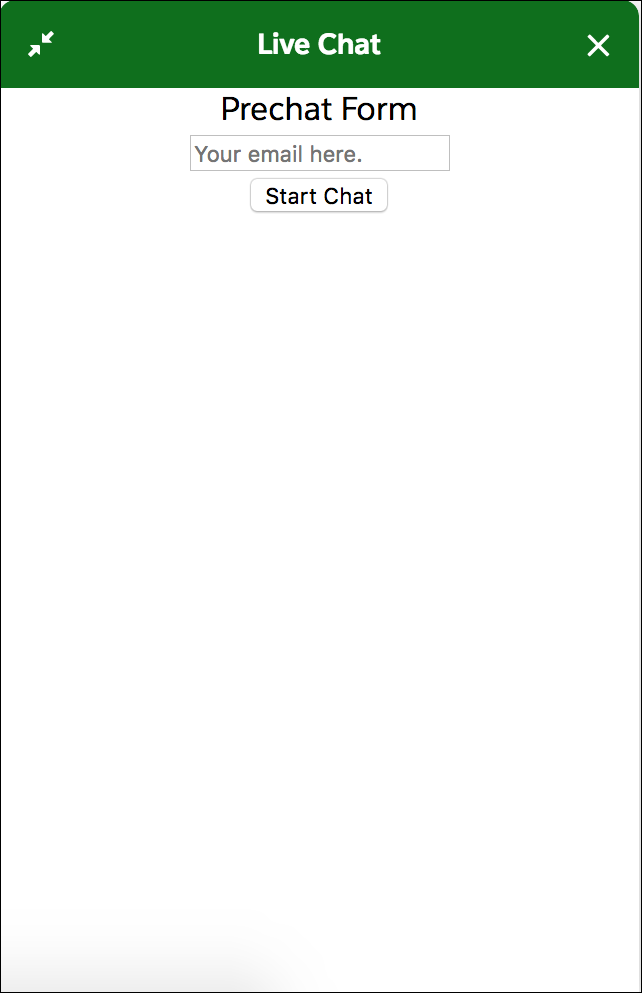
このサンプルでは、次のスタイル設定されていない事前チャットフォームが作成されます。