Define all visible elements in the layout section. The elements are structured in rows spread across a 12-column grid.
There can be:
Form elements inside an attribute form widget
Attributes inside a layout widget
Specialized widgets for certain customizable areas
By using width on an element, modify the number of columns this element occupies. Embed widgets inside a layout or form widget, for example, a product_unit_price inside a form widget. For advanced configuration, both rows and cells can also have conditions to show elements based on the value of attributes.
Layout Row Configuration
The following table describes layout row configuration:
Name
Type
Description
layout
array
As array of layout columns
condition
string
An expression to switch the row visibility
Layout Column Configuration
The following table describes layout column configuration:
Name
Type
Description
id
string
The widget ID
attribute
string
The attribute reference inside a form or layout widget
1"layout": [2{3"attribute": "content1"4}5]
width
integer (1 <= width <= 12)
Number of grid cells the column occupies
offset
integer (1 <= width <= 12)
Number of grid sets to leave empty before this element. Either Offset + Width total 12 or "end".
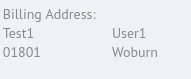
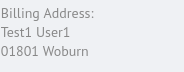
By using the property suppress_new_column, combine multiple elements in one cell. Each element with the property suppress_new_column:true is added to the cell of the previous element.


 j
j