Storefront Next is a full-stack React framework for building B2C Commerce storefronts. It combines server-side rendering with client-side navigation to deliver performant and personalized shopping experiences. Storefront Next runs on Managed Runtime, the infrastructure for deploying, hosting, and monitoring storefronts.
Architectural Components of Storefront Next
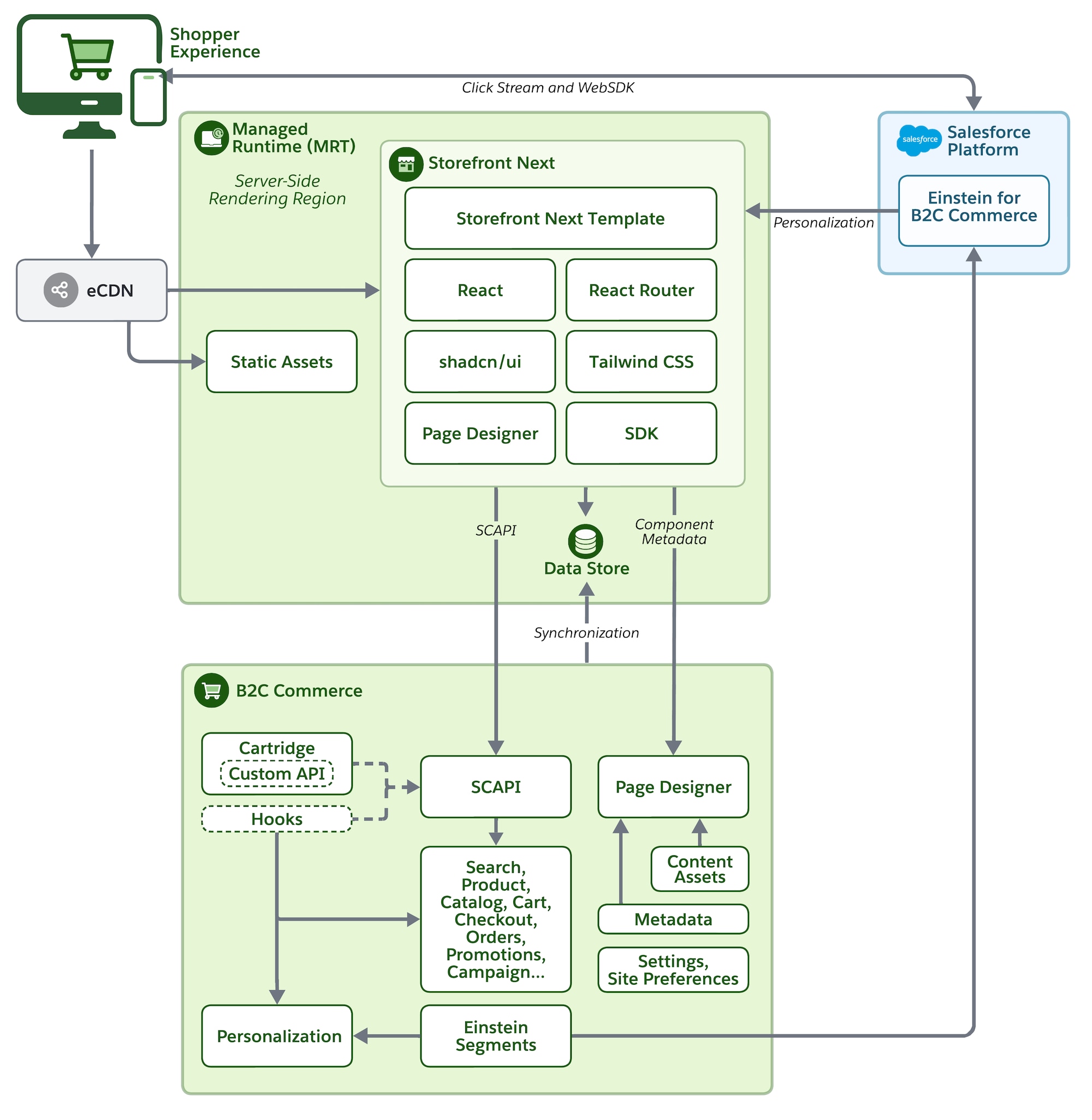
This diagram shows the architecture of Storefront Next, including the request flow from the Shopper Experience to Managed Runtime, data retrieval from the B2C Commerce instance, and interaction with the Salesforce Platform.
Here’s a description of the request flow.
Frontend request: The shopper sends a request to Managed Runtime, which handles server-side rendering (SSR) via the Storefront Next app.
Data Store fetching: The Storefront Next app calls into the Managed Runtime Data Store to fetch any required Site Preferences for rendering.
Commerce data fetching: The Storefront Next app calls the Salesforce B2C Commerce API (SCAPI) on the B2C Commerce backend.
Business logic: The B2C Commerce system executes cartridge logic. It accesses data, such as products, pricing, and content, and uses configurations from Business Manager.
Personalization and recommendations: The storefront communicates with the Salesforce Platform via Recommendations APIs to get product recommendations. It fetches personalized content powered by the personalization engine.
Managed Runtime and Storefront Next
Managed Runtime provides the infrastructure to deploy, host, and monitor the Storefront Next app. Managed Runtime includes these services.
Static asset storage: Enables uploading and deploying your static assets, such as code artifacts and images.
Data storage: Enables synchronizing and storage of site preferences from Business Manager for rendering.
App server: A scalable serverless Node.js runtime environment for your storefront. The Storefront Next app runs on the Managed Runtime app server and uses these technologies: React 19, React Router 7, shadcn/ui, and Tailwind CSS.
B2C Commerce Backend
The B2C Commerce platform provides the ecommerce services and features that your storefront consumes.
Custom APIs and hooks: Optional server-side extensions that developers provide with custom APIs packaged in cartridges, or hooks that modify the behavior of SCAPI endpoints.
Business Manager: Where merchants manage content assets, promotions, campaigns, and personalization.
Einstein Segments: Customer segmentation for personalized experiences.
Page Designer: Page Designer connects to the storefront via component metadata. Merchants use Page Designer, a visual editor in Business Manager, to design, schedule, and publish custom pages in the storefront without writing code. See Salesforce Help: What Is Page Designer?
Salesforce Platform Integration
The storefront connects to the Salesforce Platform through these services.
Personalization Engine: Delivers personalized content and recommendations.
Einstein for B2C Commerce: AI-powered product recommendations. Data flows between B2C Commerce and the Salesforce Platform through segment synchronization.
Core Foundation: React Router 7
Storefront Next is built on React Router 7 in framework mode. Before diving into Storefront Next specifics, understand this foundation.
React Router 7 is more than a client-side router—it’s a full-stack framework that handles:
Server-side rendering: Pages render on the server and stream HTML to the browser.
Data loading: Loaders fetch data before components render.
Mutations: Actions handle form submissions and data changes.
Client navigation: After initial load, navigation happens without full page reloads.
If you’re familiar with Remix, React Router 7 framework mode uses the same patterns. If you’re new to these concepts, we recommend reviewing the React Router Documentation.
React Router’s Framework Mode provides a comprehensive development experience by integrating server-side rendering (SSR) and data handling capabilities directly within React Router.
Ensures high accessibility standards (WCAG/ARIA) and full customization through the underlying Tailwind CSS.
Page Rendering
Storefront Next uses React Router’s rendering model to deliver fast, personalized pages. Understanding this model helps you build performant storefronts. Storefront Next does server-side rendering (SSR) for all requests and handles only page navigation on the client for subsequent requests, as follows.
Initial page load: The first page load uses streaming SSR for data fetching, which ensures that personalization data, such as pricing and promotions, is included in the HTML payload. With React’s streaming model, static content appears immediately while dynamic fragments fill in as data becomes available.
Subsequent navigations: After the initial load, Storefront Next fetches data via the server-side data loaders. Navigations are handled client-side using React Router 7, which minimizes network requests and enables smooth transitions.
Initial Page Load
When a shopper first visits your storefront:
The request reaches Managed Runtime after passing through eCDN.
Middleware runs to set up authentication, configuration, and internationalization.
The route’s loader fetches data from the Salesforce Commerce API.
React renders components on the server and streams HTML to the browser.
After the browser receives the streamed HTML, React hydrates the page. Hydration attaches event handlers to the server-rendered HTML, making buttons clickable, forms submittable, and components interactive. The page is visible immediately and becomes fully interactive after hydration completes.
After hydration, subsequent navigation happens entirely on the client.
React Router intercepts link clicks.
The new route’s loader fetches needed data.
React updates the DOM without a full page reload.
This hybrid approach gives you the SEO and performance benefits of server rendering with the smooth experience of a single-page app.
Next Steps
To dive deeper into the technical aspects of Storefront Next, check out these links.


 j
j