


 j
Get Started with Insurance Developer Resources
Endorse Policy
Issue Policy
Renew Policy
Create Out of Sequence Policy Endorsement
Issue Multi-Root Policy
Endorse Multi-Root Policy
Renew Multi-Root Policy
Cancel Policy
Previous PDF Versions
Perform a backdated change on a policy in the past, current, or future policy term, even when another policy version with an effective date later than the endorsement date already exists. The impacted policy versions are canceled and replaced with new, repriced versions that include the change. The premium impact for each affected policy term is captured in an individual out-of-sequence endorsement transaction.
Make sure you have the following details.
Example
If a policy has three active versions (V1, V2, and V3) within a single term, and you need to make a change from an effective date which lies in the tenure of V2. You can prepare the context for OOSE using the Quote API. Get the context from policy V2. Use this context to make changes and create an updated quote with the createUpdateQuote APIs. Retrieve the quote context, and then pass this context to OOSE.
Important
When you retrieve the policy context and run a product-rating call, it uses the effective date from the policy context to calculate premiums and taxes. If you later endorse the policy with a different effective date or start date, the endorsed policy still consumes the tax calculations from the earlier product-rating call. To avoid incorrect results, the effective date in the product-rating call must align with the effective date range of the endorsed policy. This ensures that the premiums and taxes are calculated correctly for the endorsement’s term.
This diagram outlines the sequence for creating an out-of-sequence policy endorsement using a quote.
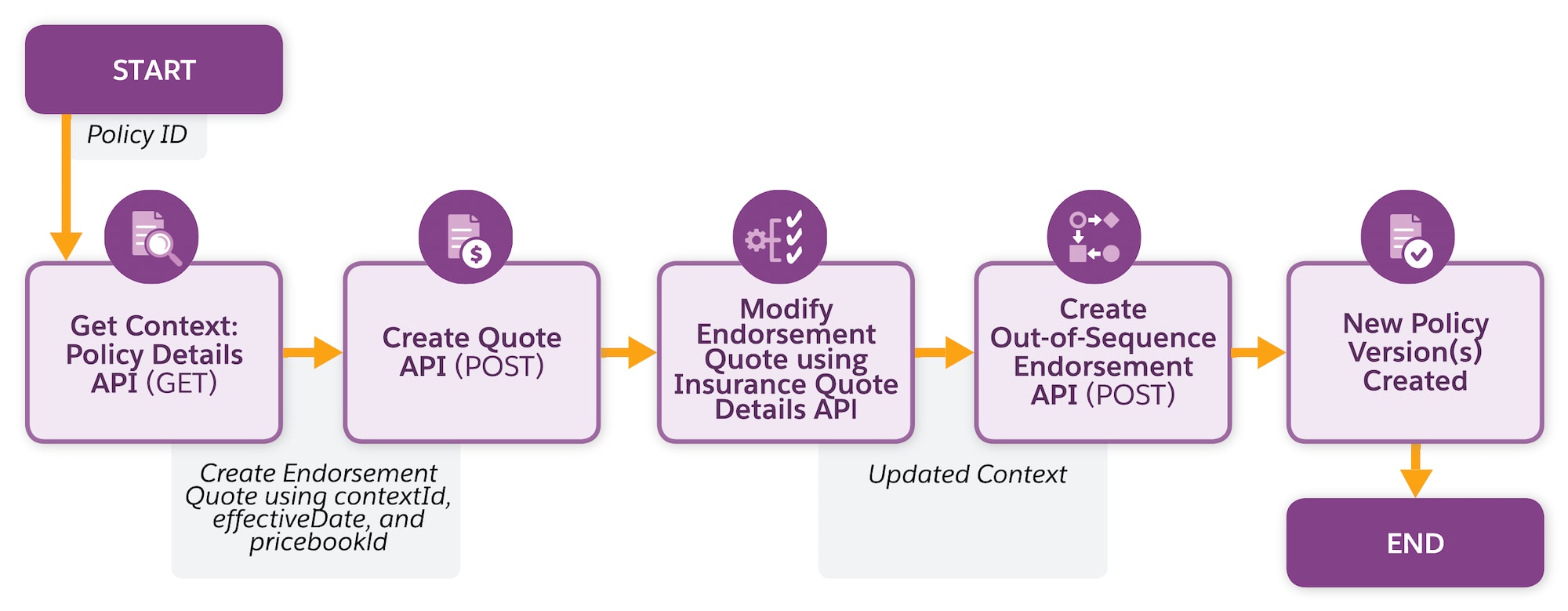
Get Policy Context—Use the policy ID to get the context either by:
Create Endorsement Quote—Use the policy context to create a renewal quote either by:
Specify the contextId, effectiveDate,and pricebookId during the API call.
A new quote record is generated for the policy renewal.
(Optional)Modify Endorsement Quote—If policyholders want to modify the endorsement quote, make a PATCH request on the Insurance Quote Details Connect API with the required changes.
An updated, price-adjusted context is returned in the response.
Submit out of sequence endorsement request—Use the retrieved context to endorse a policy either by:
Specify the policyId, contextId,and effectiveDate and optional details such as custom transaction name, policy name, policy number, and fieldSetIds during the API call.
This request returns a jobIdentifier that you can use to track the async process through a custom report.
Expected Results:
j