The sample application in this section includes traditional Salesforce functionality blended with Apex. Many of the syntactic and semantic features of Apex, along with common idioms, are illustrated in this application.
The Shipping Invoice sample requires custom objects. You can either create these on your own, or download the objects and Apex code as an unmanaged package from the Salesforce AppExchange. To obtain the sample assets in your org, install the Apex Tutorials Package. This package also contains sample code and objects for the Apex Quick Start.
Note
Scenario
In this sample application, the user creates a new shipping invoice, or order, and then adds items to the invoice. The total amount for the order, including shipping cost, is automatically calculated and updated based on the items added or deleted from the invoice.
Data and Code Models
This sample application uses two new objects: Item and Shipping_invoice.
The following assumptions are made:
Item A cannot be in both orders shipping_invoice1 and shipping_invoice2. Two customers cannot obtain the same (physical) product.
The tax rate is 9.25%.
The shipping rate is 75 cents per pound.
Once an order is over $100, the shipping discount is applied (shipping becomes free).
The fields in the Item custom object include:
Name
Type
Description
Name
String
The name of the item
Price
Currency
The price of the item
Quantity
Number
The number of items in the order
Weight
Number
The weight of the item, used to calculate shipping costs
Shipping_invoice
Master-Detail (shipping_invoice)
The order this item is associated with
The fields in the Shipping_invoice custom object include:
Name
Type
Description
Name
String
The name of the shipping invoice/order
Subtotal
Currency
The subtotal
GrandTotal
Currency
The total amount, including tax and shipping
Shipping
Currency
The amount charged for shipping (assumes $0.75 per pound)
ShippingDiscount
Currency
Only applied once when subtotal amount reaches $100
Tax
Currency
The amount of tax (assumes 9.25%)
TotalWeight
Number
The total weight of all items
All of the Apex for this application is contained in triggers. This application has the following triggers:
Object
Trigger Name
When Runs
Description
Item
Calculate
after insert, after update, after delete
Updates the shipping invoice, calculates the totals and shipping
Shipping_invoice
ShippingDiscount
after update
Updates the shipping invoice, calculating if there is a shipping discount
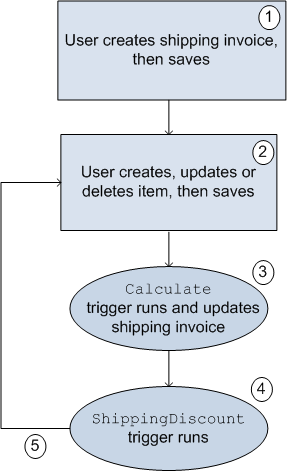
The following is the general flow of user actions and when triggers run:
Flow of user action and triggers for the shopping cart application
User clicks Orders | New, names the shipping invoice and clicks Save.
User clicks New Item, fills out information, and clicks Save.
Calculate trigger runs. Part of the Calculate trigger updates the shipping invoice.
ShippingDiscount trigger runs.
User can then add, delete or change items in the invoice.
In Shipping Invoice Example Code both of the triggers and the test class are listed. The comments in the code explain the functionality.
Testing the Shipping Invoice Application
Before an application can be included as part of a package, 75% of the code must be covered by unit tests. Therefore, one piece of the shipping invoice application is a class used for testing the triggers.
The test class verifies the following actions are completed successfully: