Here are some examples that use the base components to create a Quick Contact action panel.
Let’s say you want to create a Lightning action that enables users to create contacts on an account record. You can do this easily using lightning:recordViewForm and lightning:recordEditForm. If you require granular customization, use force:recordData.
The following examples can each be added as a Lightning action on the account object. Clicking the action’s button on the account layout opens a panel to create a contact.
Create a Lightning Action Using lightning:recordViewForm and lightning:recordEditForm
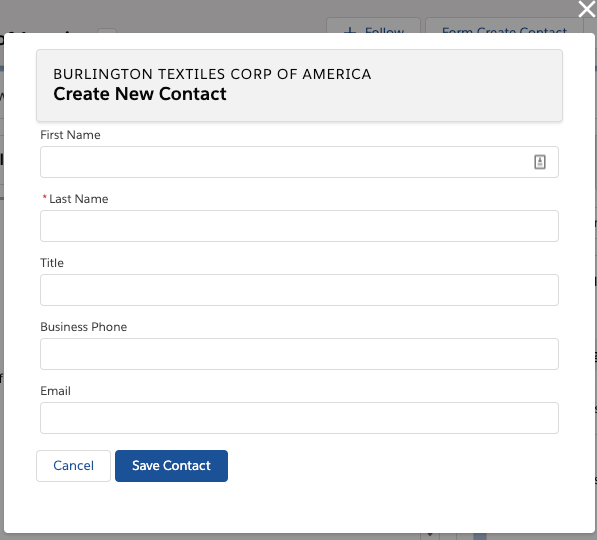
The Quick Contact action panel includes a header with the account name and a form that creates a contact for that account record. Display the account name using lightning:recordViewForm and display the contact form using lightning:recordEditForm.
1({2 handleCancel: function(cmp, event, helper){3 $A.get("e.force:closeQuickAction").fire();4},56 handleSubmit: function(cmp, event, helper){7 event.preventDefault();8 var fields = event.getParam('fields');9 fields.AccountId = cmp.get("v.recordId");10 cmp.find('myform').submit(fields);11},1213 handleSuccess: function(cmp, event, helper){14 // Success! Prepare a toast UI message15 var resultsToast = $A.get("e.force:showToast");16 resultsToast.setParams({17 "title": "Contact Saved",18 "message": "The new contact was created."19});2021 // Update the UI: close panel, show toast, refresh account page22 $A.get("e.force:closeQuickAction").fire();23 resultsToast.fire();2425 // Reload the view26 $A.get("e.force:refreshView").fire(); 27}28})
Using lightning:recordEditForm, you can nest thelightning:inputField components in <div> containers and add custom styling. You also need to provide your own cancel and submit buttons.
Consider the simpler lightning:recordForm component, which provides default Cancel and Save buttons. You can achieve the same result by replacing the lightning:recordEditForm component with the following.
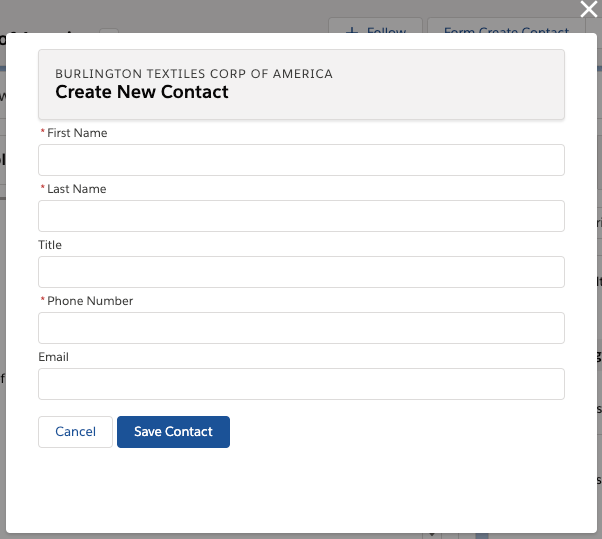
The Quick Contact action panel includes a header with the account name and a form that creates a contact for that account record. Display the account name and display the contact form using two separate instances of force:recordData.
This force:recordData example is similar to the example provided in Configure Components for Record-Specific Actions. Compare the two examples to better understand the differences between using @AuraEnabled Apex controllers and using Lightning Data Service.
ldsQuickContact.cmp
1<aura:component implements="force:lightningQuickActionWithoutHeader,force:hasRecordId">23 <aura:attribute name="account" type="Object"/>4 <aura:attribute name="simpleAccount" type="Object"/>5 <aura:attribute name="accountError" type="String"/>6 <force:recordData aura:id="accountRecordLoader"7 recordId="{!v.recordId}"8 fields="Name,BillingCity,BillingState"9 targetRecord="{!v.account}"10 targetFields="{!v.simpleAccount}"11 targetError="{!v.accountError}"12 />1314 <aura:attribute name="newContact" type="Object" access="private"/>15 <aura:attribute name="simpleNewContact" type="Object" access="private"/>16 <aura:attribute name="newContactError" type="String" access="private"/>17 <force:recordData aura:id="contactRecordCreator"18 layoutType="FULL"19 targetRecord="{!v.newContact}"20 targetFields="{!v.simpleNewContact}"21 targetError="{!v.newContactError}"22 />2324 <aura:handler name="init" value="{!this}" action="{!c.doInit}"/>2526<!-- Display a header with details about the account -->27 <div class="slds-page-header" role="banner">28 <p class="slds-text-heading_label">{!v.simpleAccount.Name}</p>29 <h1 class="slds-page-header__title slds-m-right_small30 slds-truncate slds-align-left">Create New Contact</h1>31 </div>3233<!-- Display Lightning Data Service errors, if any -->34 <aura:if isTrue="{!not(empty(v.accountError))}">35 {!v.accountError}36 </aura:if>37 <aura:if isTrue="{!not(empty(v.newContactError))}">38 {!v.newContactError}39 </aura:if>4041<!-- Display the new contact form -->42 <lightning:input aura:id="contactField" name="firstName" label="First Name"43 value="{!v.simpleNewContact.FirstName}" required="true"/>4445 <lightning:input aura:id="contactField" name="lastname" label="Last Name"46 value="{!v.simpleNewContact.LastName}" required="true"/>4748 <lightning:input aura:id="contactField" name="title" label="Title"49 value="{!v.simpleNewContact.Title}" />5051 <lightning:input aura:id="contactField" type="phone" name="phone" label="Phone Number"52 pattern="^(1?(-?\d{3})-?)?(\d{3})(-?\d{4})$"53 messageWhenPatternMismatch="The phone number must contain 7, 10, or 11 digits. Hyphens are optional."54 value="{!v.simpleNewContact.Phone}" required="true"/>5556 <lightning:input aura:id="contactField" type="email" name="email" label="Email"57 value="{!v.simpleNewContact.Email}" />5859 <lightning:button label="Cancel" onclick="{!c.handleCancel}" class="slds-m-top_medium" />60 <lightning:button label="Save Contact" onclick="{!c.handleSaveContact}"61 variant="brand" class="slds-m-top_medium"/>626364</aura:component>
ldsQuickContactController.js
1({2 doInit: function(component, event, helper){3 component.find("contactRecordCreator").getNewRecord(4 "Contact", // objectApiName5 null, // recordTypeId6 false, // skip cache?7 $A.getCallback(function(){8 var rec = component.get("v.newContact");9 var error = component.get("v.newContactError");10 if(error || (rec === null)){11 console.log("Error initializing record template: " + error);12}13 else{14 console.log("Record template initialized: " + rec.apiName);15}16})17);18},1920 handleSaveContact: function(component, event, helper){21 if(helper.validateContactForm(component)){22 component.set("v.simpleNewContact.AccountId", component.get("v.recordId"));23 component.find("contactRecordCreator").saveRecord(function(saveResult){24 if(saveResult.state === "SUCCESS" || saveResult.state === "DRAFT"){2526 // Success! Prepare a toast UI message27 var resultsToast = $A.get("e.force:showToast");28 resultsToast.setParams({29 "title": "Contact Saved",30 "message": "The new contact was created."31});3233 // Update the UI: close panel, show toast, refresh account page34 $A.get("e.force:closeQuickAction").fire();35 resultsToast.fire();3637 // Reload the view so components not using force:recordData38 // are updated39 $A.get("e.force:refreshView").fire();40}41 else if(saveResult.state === "INCOMPLETE"){42 console.log("User is offline, device doesn't support drafts.");43}44 else if(saveResult.state === "ERROR"){45 console.log('Problem saving contact, error: ' +46 JSON.stringify(saveResult.error));47}48 else{49 console.log('Unknown problem, state: ' + saveResult.state +50 ', error: ' + JSON.stringify(saveResult.error));51}52});53}54},5556 handleCancel: function(component, event, helper){57 $A.get("e.force:closeQuickAction").fire();58},59})
The callback passed to getNewRecord() must be wrapped in $A.getCallback() to ensure correct access context when the callback is invoked. If the callback is passed in without being wrapped in $A.getCallback(), any attempt to access private attributes of your component results in access check failures.
Even if you’re not accessing private attributes, it’s a best practice to always wrap the callback function for getNewRecord() in $A.getCallback(). Never mix (contexts), never worry.
Note
ldsQuickContactHelper.js
1({2 validateContactForm: function(component){3 var validContact = true;45 // Show error messages if required fields are blank6 var allValid = component.find('contactField').reduce(function(validFields, inputCmp){7 inputCmp.showHelpMessageIfInvalid();8 return validFields && inputCmp.get('v.validity').valid;9}, true);1011 if(allValid){12 // Verify we have an account to attach it to13 var account = component.get("v.account");14 if($A.util.isEmpty(account)){15 validContact = false;16 console.log("Quick action context doesn't have a valid account.");17}18 return(validContact);19}20}21})
Usage Differences
Consider the following differences between the previous examples.
Field Labels and Values
lightning:recordViewForm and lightning:recordEditForm obtain labels and the requiredness properties from the object schema. In the first example, the Last Name field is a required field on the contact object. The component provides field-level validation.
With force:recordData, you must provide your own labels and requiredness property for each field. You can also provide your own field-level validation, as shown by the lightning:input component with the pattern and messageWhenPatternMismatch attributes.
Saving the Record
lightning:recordEditForm saves the record automatically when you provide a lightning:button component with the submit type.
With force:recordData, you must call the saveRecord function.
Lightning Data Service Errors
lightning:recordViewForm and lightning:recordEditForm display Lightning Data Service errors automatically using lightning:messages, and provide custom error handling via the onerror event handler.
With force:recordData, you must handle and display the errors on your own.


 j
j