Now that we know the main custom objects involved in an unbundled promotion, let’s step through the different phases of the promotion and check the status of these objects at each phase.
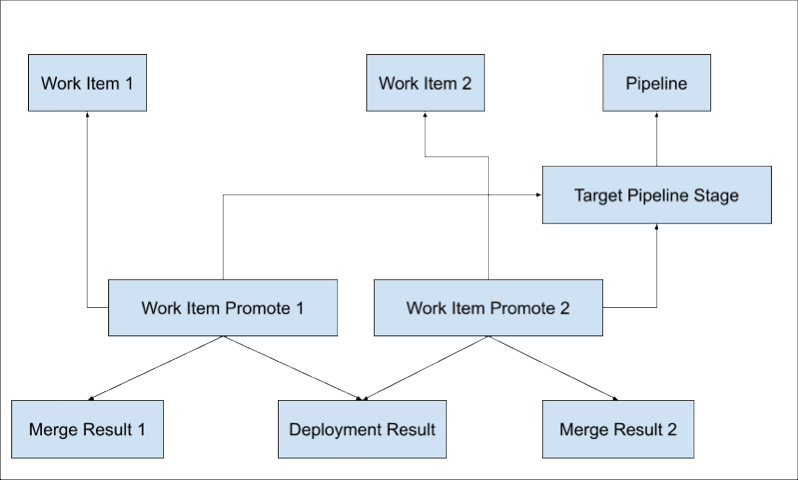
Here’s a graphic that shows an unbundled promotion of two work items and how the associated objects are connected.
When a user initiates an unbundled promotion, DevOps Center creates a record of Work Item Promote for every work item in the promotion. Each work item is still associated with a feature branch in the user’s source control repository, so each of these branches must be merged into the branch associated with the target stage environment. This relationship means that every Work Item Promote record has an associated Merge Result record. But there’s only one metadata deployment for the entire promotion (to the associated stage environment), so each Work Item Promote record points to a shared record of Deployment Result.
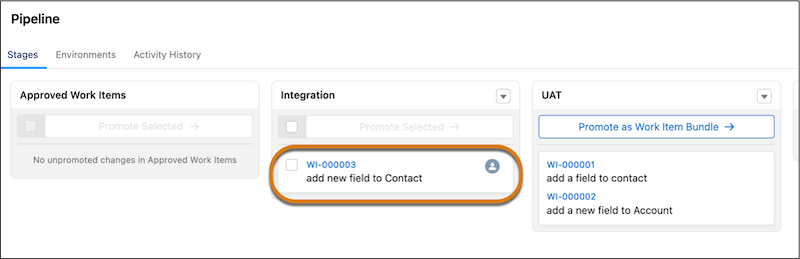
Let’s start! For our example, assume a user promotes a single work item (WI-000003) from the Integration stage to UAT. In this example, the promotion is initiated in the DevOps Center UI.
State Before a Promotion
Here’s WI-000003 in DevOps Center, ready to be promoted.
Here’s the state of the existing custom object records associated with the unbundled promotion before it begins. Not all objects and fields are listed, only the ones that are interesting and relevant.
DevOps Center created this Work Item Promote record when the work item was previously promoted from the Approved Work Item stage to Integration.
Work Item: WI-000003
Pipeline Stage: Integration
Status: A reference to an Async Operation Result record in the Completed status.
State During a Promotion
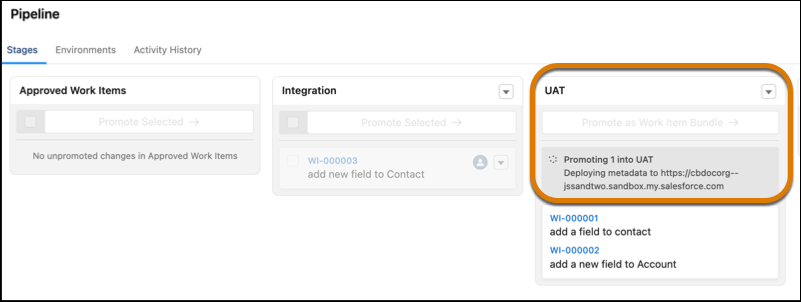
The user now promotes the work item from the Integration stage to the UAT stage by selecting the item and clicking Promote Selected. Here’s the promotion in progress:
Let’s further split this phase into two subphases:
Immediately after a user clicks Promote Selected.
The moment when the Heroku application takes over.
Immediately after the user clicks Promote Selected, DevOps Center queues the promotion and updates the object model.
DevOps Center creates a new Async Operation Result.
Status: In Progress
Operation: AD_HOC_PROMOTE
Message: The asynchronous process regularly updates this field with the current status.
On the existing Work Item, Status is the ID of the new Async Operation Result record.
On the existing Pipeline Stage, Status is the ID of the new Async Operation Result record.
DevOps Center creates a new Work Item Promote for the current promotion from the Integration stage to UAT.
Work Item: WI-000003
Pipeline Stage: UAT
Status: ID of the new Async Operation Result record.
DevOps Center creates a new Deployment Result.
DevOps Center creates a new Merge Result.
Source Branch: The feature branch associated with the work item.
Target Branch: The branch associated with the UAT stage.
DevOps Center then fires off a request to Heroku to perform the async processing, such as deploying metadata to the appropriate environment and merging branches. Here’s what the object model looks like when Heroku takes over.
Async Operation Result:Message contains status messages based on the state of the promotion.
Deployment Result:Deployment Id is the metadata deployment ID for this promotion. DevOps Center sets this value as soon as the user initiates the promotion.
Merge Result
Remote Reference: Merge ID (called a SHA in GitHub) of the merge commit from the feature branch to the target stage’s branch.
Previous Remote Reference: The SHA of the target stage’s branch before this work item was merged.
State When a Promotion Succeeds
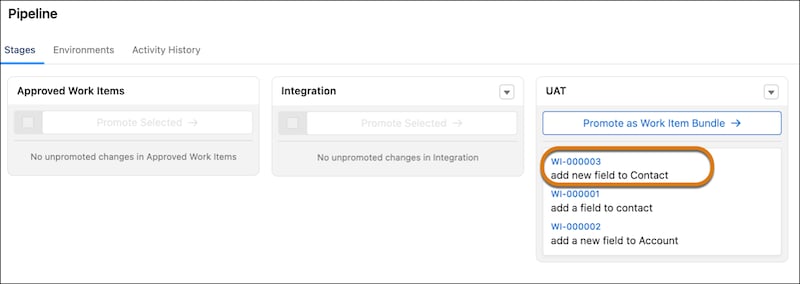
Hurray, the promotion succeeded, and our work item has been promoted to the UAT stage!
Here’s the final state of the objects after a successful promotion.
After a successful promotion, DevOps Center also performs a rebase of the feature branch associated with the work item. This section doesn’t go into detail about rebasing; we plan to provide this information in the future. After a successful promotion, DevOps Center often performs other operations, such as rebasing or deleting feature branches. These details aren’t discussed in this section; stay tuned for more information at a later date.
Note
Async Operation Result
Status: Completed
Message: Promotion Completed
Deployment Result:Completion Date is the date and time when the deployment completed.
Merge Result:Merge Date is the date and time when the merge was completed.
Work Item
Status: NULL
Branch: Updated with start and end SHAs of the branch after it has been rebased.
Rebase Branch: Updated with the start and end SHAs of the feature branch after the initial promotion into the pipeline. This field is only created after the initial promotion.
Pipeline Stage:Status is NULL.
State When a Promotion Fails
Sadly, promotions occasionally encounter an error and fail. Let’s see what the state of the custom objects looks like in this case.
Async Operation Result
Status: ERROR
Message: Error message from the async processing.
Error Details: If available, a stack trace or other detailed error information.
Deployment Result
Deployment Id: NULL
Completion Date: NULL
Merge Result
Merge Date: NULL
Remote Reference: NULL
Previous Remote Reference: NULL
Work Item:Status is NULL.
Pipeline Stage:Status is NULL.
Variation: Multiple Work Items
In the previous unbundled promotion flow, only one work item was promoted. But you can also perform an unbundled promotion of multiple work items at the same time. The resulting flow is similar to the single work item flow, but with these differences:
For each Work Item record, DevOps Center creates a unique Work Item Promote record and a unique Merge Result record.
But all Work Item Promotes records that are being promoted together share a single Deployment Result and Async Operation Result.
Variation: Externally Merged Change Request
In the previous unbundled promotion flow, DevOps Center merged the change request in the source control repository. But a developer can also merge a change request externally, such as through the GitHub UI. The resulting flow is similar to the non-external merge flow, but with a few key differences.
The beginning state of the custom objects, before the promotion, is the same as described in this section. But then the user decides to externally merge the change (pull) request in the source control repository.
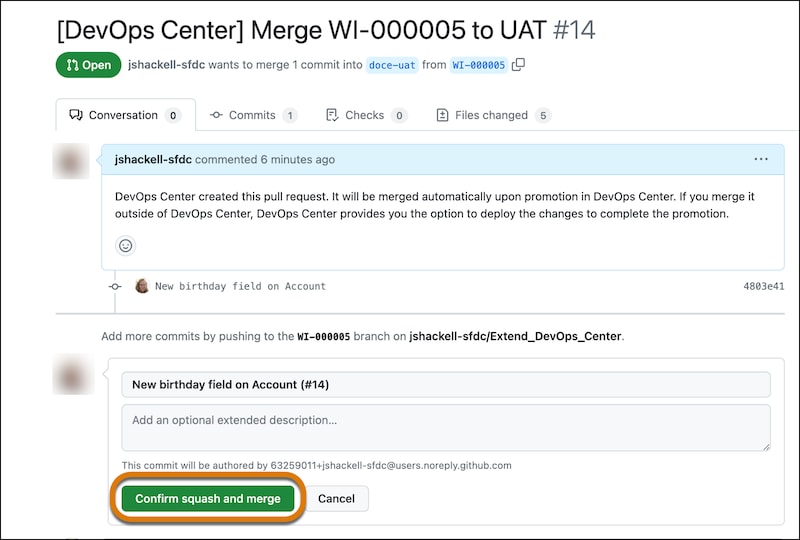
This screenshot shows the user merging changes from the GitHub feature branch for WI-000005 to the doce-uat branch (which is associated with the UAT pipeline stage) using the recommended Squash and Merge option. DevOps Center created this pull request in GitHub when WI-000005 was promoted to the Integration stage.
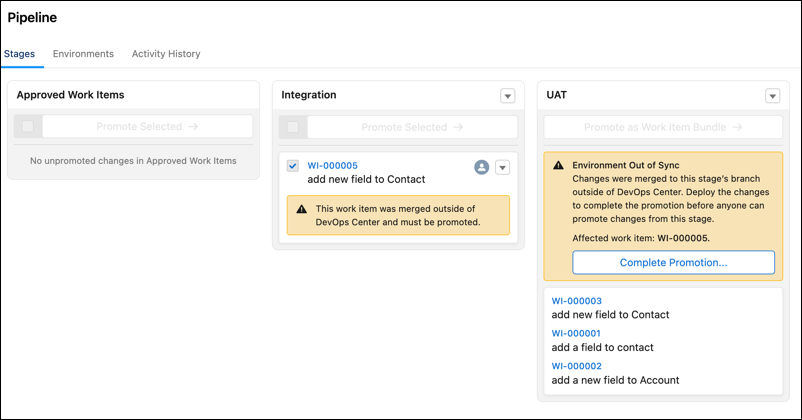
At this point, the changes are in a partially promoted state because they’ve been merged but not yet deployed. DevOps Center alerts the user both in the work item itself and in the pipeline:
Here’s the state of the object model after the external merge but before the user clicks Complete Promotion in DevOps Center. Both records are new.
DevOps Center creates a new Work Item Promote for the current undeployed promotion from the Integration stage to UAT.
Work Item: WI-000005
Pipeline Stage: UAT
DevOps Center creates a new Merge Result.
Source Branch: The feature branch associated with the work item.
Target Branch: The branch associated with the UAT stage.
Remote Reference: Merge ID (called a SHA in GitHub) of the merge commit from the feature branch to the target stage’s branch.
Previous Remote Reference: ID of the commit in the target stage’s branch before the merge happened.
Remote Reference Date: The date the external merge occurred.
After the user clicks Complete Promotion, DevOps Center continues processing as described in State During a Promotion, except that some records exist, such as Work Item Promote and Merge Result. The rest of the promotion is the same.


 j
j