


 j
jWhat are Custom Components?
Defining Custom Components
Custom Component Markup
Using Custom Components in a Visualforce Page
Managing Version Settings for Custom Components
Custom Component Attributes
Custom Component Controllers
Previous Versions
Similar to standard Visualforce pages, custom components can be associated with a controller written in Apex. This association is made by setting the controller attribute on the component to your custom controller. You can use the controller to perform additional logic before returning the component’s markup to the associated page.
To access the value of a custom component attribute in an associated custom component controller:
Define a property in the custom component controller to store the value of the attribute.
Define a getter and setter method for the property. For example:
1public class myComponentController {
2
3  public String controllerValue;
4
5  public void setControllerValue (String s) {
6    controllerValue = s.toUpperCase();
7  }
8
9  public String getControllerValue() {
10    return controllerValue;
11  }
12}
Notice that the setter modifies the value.
In the <apex:attribute> tag in your component definition, use the assignTo attribute to bind the attribute to the class variable you just defined. For example:
1<apex:component controller="myComponentController">
2  <apex:attribute name="componentValue" description="Attribute on the component."
3                  type="String" required="required" assignTo="{!controllerValue}"/>
4    <apex:pageBlock title="My Custom Component">
5      <p>
6        <code>componentValue</code> is "{!componentValue}"
7        <br/>
8        <code>controllerValue</code> is "{!controllerValue}"
9      </p>
10    </apex:pageBlock>
11    Notice that the controllerValue has been upper cased using an Apex method.
12</apex:component>
Note that when using the assignTo attribute, getter and setter methods, or a property with get and set values, must be defined.
Add the component to a page. For example,
1<apex:page>
2  <c:simpleComponent componentValue="Hi there, {!$User.FirstName}"/>
3</apex:page>
The output of the page will look something like the following:
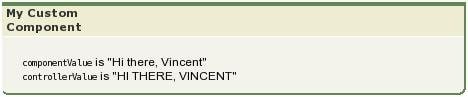
Notice that the Apex controller method changes controllerValue so that it is displayed with uppercase characters.
j