A facet consists of content in an area of a Visualforce component that provides contextual information about the data that is presented in the component. For example, <apex:dataTable> supports facets for the header, footer, and caption of a table, while <apex:column> only supports facets for the header and footer of the column. The <apex:facet> component allows you to override the default facet on a Visualforce component with your own content. Facets only allow a single child within the start and close tags.
When defining an <apex:facet>, it is always used as the child of another Visualforce component. The name attribute on the facet determines which area of the parent component is overridden.
Example: Using Facets with <apex:dataTable>
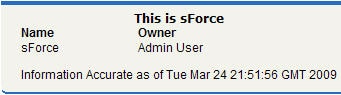
The following markup shows how the <apex:dataTable> component can be modified with <apex:facet>:
1<apex:page standardController="Account">2 <apex:pageBlock>3 <apex:dataTable value="{!account}" var="a">4 <apex:facet name="caption"><h1>This is 5 {!account.name}</h1></apex:facet>6 <apex:facet name="footer"><p>Information 7 Accurate as of {!NOW()}</p></apex:facet>8 <apex:column>9 <apex:facet name="header">Name</apex:facet>10 <apex:outputText value="{!a.name}"/>11 </apex:column>1213 <apex:column>14 <apex:facet 15 name="header">Owner</apex:facet>16 <apex:outputText value="{!a.owner.name}"/>17 </apex:column>18 </apex:dataTable>19 </apex:pageBlock> 20</apex:page>
For this page to display account data, the ID of a valid account record must be specified as a query parameter in the URL for the page. For example:
Another component that can use a facet is <apex:actionStatus>. The <apex:actionStatus> component can be extended to display an indicator whenever a page is being refreshed. For example, you can define a progress wheel with the following markup:



 j
j