


 j
jCreating a Custom Controller with the Messaging Class
Creating an Email Attachment
Previous Versions
At minimum, a custom controller that uses the Apex Messaging namespace needs a subject, a body, and a recipient for the email. You will need a page that acts as a form to fill out the subject and body and deliver the email.
Create a new page called sendEmailPage and use the following code:
1<apex:page controller="sendEmail">
2	<apex:messages />
3	<apex:pageBlock title="Send an Email to Your
4			{!account.name} Representatives">
5		<p>Fill out the fields below to test how you might send an email to a user.</p>
6		<br />
7		<apex:dataTable value="{!account.Contacts}" var="contact" border="1">
8			<apex:column >
9				<apex:facet name="header">Name</apex:facet>
10				{!contact.Name}
11			</apex:column>
12			<apex:column >
13				<apex:facet name="header">Email</apex:facet>
14				{!contact.Email}
15			</apex:column>
16		</apex:dataTable>
17
18		<apex:form >
19		<br /><br />
20			<apex:outputLabel value="Subject" for="Subject"/>:<br />
21			<apex:inputText value="{!subject}" id="Subject" maxlength="80"/>
22			<br /><br />
23			<apex:outputLabel value="Body" for="Body"/>:<br />
24			<apex:inputTextarea value="{!body}" id="Body"  rows="10" cols="80"/>
25			<br /><br /><br />
26			<apex:commandButton value="Send Email" action="{!send}" />
27		</apex:form>
28	</apex:pageBlock>
29</apex:page>
Notice in the page markup that the account ID is retrieved from the URL of the page. For this example to render properly, you must associate the Visualforce page with a valid account record in the URL. For example, if 001D000000IRt53 is the account ID, the resulting URL should be:
1https://MyDomain_login_URL/apex/sendEmailPage?id=001D000000IRt53Displaying Field Values with Visualforce has more information about retrieving the ID of a record.
The following code creates a controller named sendEmail that implements the Messaging.SingleEmailMessage class, and uses the contacts related to an account as recipients:
1public class sendEmail {
2	public String subject { get; set; }
3	public String body { get; set; }
4
5	private final Account account;
6
7	// Create a constructor that populates the Account object
8	public sendEmail() {
9		account = [select Name, (SELECT Contact.Name, Contact.Email FROM Account.Contacts)
10				from Account where id = :ApexPages.currentPage().getParameters().get('id')];
11	}
12
13	public Account getAccount() {
14		return account;
15	}
16
17	public PageReference send() {
18		// Define the email
19		Messaging.SingleEmailMessage email = new Messaging.SingleEmailMessage();
20
21    String addresses;
22    if (account.Contacts[0].Email != null)
23    {
24        addresses = account.Contacts[0].Email;
25        // Loop through the whole list of contacts and their emails
26        for (Integer i = 1; i < account.Contacts.size(); i++)
27        {
28            if (account.Contacts[i].Email != null)
29            {
30                addresses += ':' + account.Contacts[i].Email;
31            }
32        }
33    }
34
35		String[] toAddresses = addresses.split(':', 0);
36
37		// Sets the paramaters of the email
38		email.setSubject( subject );
39		email.setToAddresses( toAddresses );
40		email.setPlainTextBody( body );
41
42		// Sends the email
43		Messaging.SendEmailResult [] r =
44			Messaging.sendEmail(new Messaging.SingleEmailMessage[] {email});
45
46		return null;
47	}
48}
Notice in the controller that:
send(). This name must match the name of the action for the Visualforce button that sends the email.toAddresses[], come from the addresses of the contacts available in an associated account. When compiling a list of recipients from contacts, leads, or other records, it is a good practice to loop through all the records to verify that an email address is defined for each. The account ID is retrieved from the URL of the page.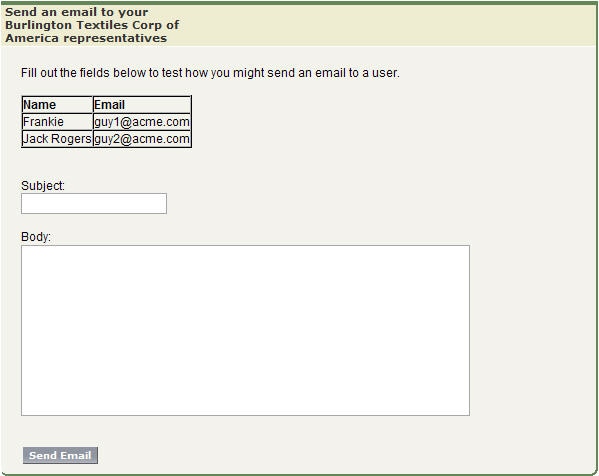
See Also
j