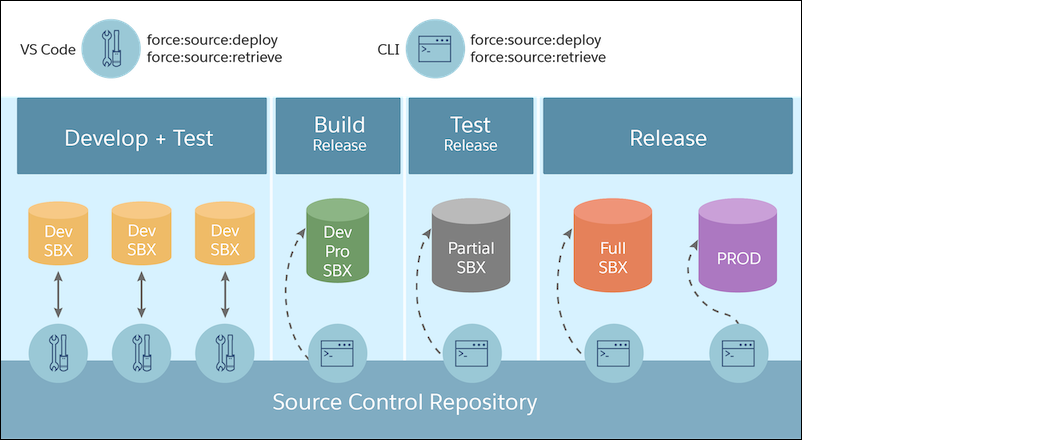
Develop and test your app in your sandboxes. Use Salesforce CLI or Salesforce Extensions for VS Code to retrieve and deploy your source. This development work flow is called the org development model.
Develop and Test in a Sandbox Using the Org Development Model
Similar to change sets, the release artifact is a set of changed metadata to update in the production org. You can develop, test, and deploy your changes using the project deploy commands. If you want to know more about this development model, see the Org Development Model module in Trailhead.
Development and Release Environments
Develop and test: Each team member has their own Developer sandbox to create their assigned customization. Developer sandboxes contain no production data.
Build release: Team members each migrate their customizations from their respective developer sandboxes to a shared Developer Pro sandbox for integration. Developer Pro sandboxes don’t contain production data, but you can seed them with testing data.
Test release: For user-acceptance testing, the team uses a Partial sandbox to create a complete replica of production.
Release: After the release is in production, the team can use the Full sandbox to train users without the risk of altering production data. A Full sandbox includes a copy of production data.
What Tools Do I Need?
Tool
Description
Salesforce DX project
The Salesforce DX project contains the metadata and source files that comprise your changes. A DX project has a specific project structure and source format. In addition to source files, the project contains a configuration file, sfdx-project.json. This file contains project information and enables you to leverage Salesforce DX tools for many of your development tasks.
Deployment artifact
After testing the changes, you create the deployment artifact, a .zip file that contains changed files to deployDeploy the release artifact to the full (staging) sandbox first, and then finally to production. You can think of the deployment artifact as the inbound change set. The changes don’t take effect until they are deployed.
Source control system
All changes are merged and stored in a source control system, which contains the Salesforce DX project.
Salesforce CLI
You can use Salesforce CLI for every phase of the org development life cycle. It improves productivity by providing a single interface for all your development, testing, and automation use cases.
Salesforce Extensions for VS Code
Salesforce Extensions for VS Code is built on top of Salesforce CLI and Visual Studio CodeTogether, they are an integrated development environment for custom development on Lightning Platform. You can run Salesforce CLI commands directly from the command palette or terminal.
Change management mechanisms
It’s still important to capture your changes externally using formal change-tracking tools, such as a change list, a deployment run list, and other project management tools.
Considerations for Deploying Apex Code
To deploy Apex to production, unit tests of your Apex code must meet coverage requirements. Code coverage indicates how many executable lines of code in your classes and triggers are covered by your test methods. Write test methods to test your triggers and classes, and then run those tests to generate code coverage information.
If you don’t specify a test level when initiating a deployment, the default test execution behavior depends on the contents of your deployment package.
If your deployment package contains Apex classes or triggers, when you deploy to production, all tests are executed, except tests that originate from a managed package.
If your package doesn’t contain Apex code, no tests are run by default.
You can run tests for a deployment of non-Apex components. You can override the default test execution behavior by setting the test level in your deployment options. Test levels are enforced regardless of the types of components present in your deployment package. We recommend that you run all local tests in your development environment, such as a sandbox, before deploying to production. Running tests in your development environment reduces the number of tests required in a production deployment.
After your team has finished its development tasks, transition to the build release phase to integrate your changes in a Developer Pro sandbox. Then build the release artifact.


 j
j