
Static, siloed data makes it challenging for financial services organizations and their client relationship managers to accurately, and efficiently develop their annual account plans. Business Relationship Plan (BRP) in Agentforce Financial Services provides a robust data model for continuous account planning, replacing static annual planning cycles. With BRP, organizations can track goals in real time and make faster decisions throughout the year.
Whether adapting to regulatory shifts or launching new products, account teams can use BRP to implement fresh metrics in minutes, surfacing real-time, actionable insights for every client relationship manager. In addition, BRP supports organizational agility by shifting logic ownership from engineering tickets to a simpler admin configuration. Clear extension points enable developers to customize BRP further using Flow, Apex, or Lightning web components.
In this blog post, we’ll walk through the BRP architecture and the core data model. We’ll then demonstrate how admins can configure BRP , and how business users can set up and use the system. Finally, we’ll explore how to extend BRP using Apex business logic and document generation.
What Business Relationship Plan is (and why it matters)
Business Relationship Plan is the layer in Agentforce Financial Services that sits on top of the AccountPlan object in Salesforce. It gives organizations a structure for plan records, objectives, measures, and tasks, and it allows them to extend this model with Flow, Apex, and UI components.
At a high level, BRP connects:
- Plan: Account-level strategy record
- Objectives: Prioritized outcomes with owners
- Measures: Key performance indicators (KPIs) and targets
- Action Plan: Action items tied to objectives
- Visibility: Progress tracking across accounts
When we enable Einstein features, we can also add interaction summaries for better context before meetings.
Account Plans vs. BRP: What to use when
While Account Plans serve standard, linear management needs, Business Relationship Plan delivers a highly extensible architecture specifically engineered for sophisticated, multi-outcome strategies and deep platform integration.
| Topic | Account Plans | Business Relationship Plans |
| Standard objects | Yes | Yes |
| Strategic Tracker component | Yes | Yes |
| Flexcard Selector component for 360 Information | No | Yes |
| Objectives component with measures | Yes (1:1) | Yes (1:N) |
| Einstein summary | No | Yes |
| Action Plans integration | Limited | Yes |
| Omniscript support | No | Yes |
| OOTB prompt templates | No | Yes |
Business Relationship Plan architecture at a glance
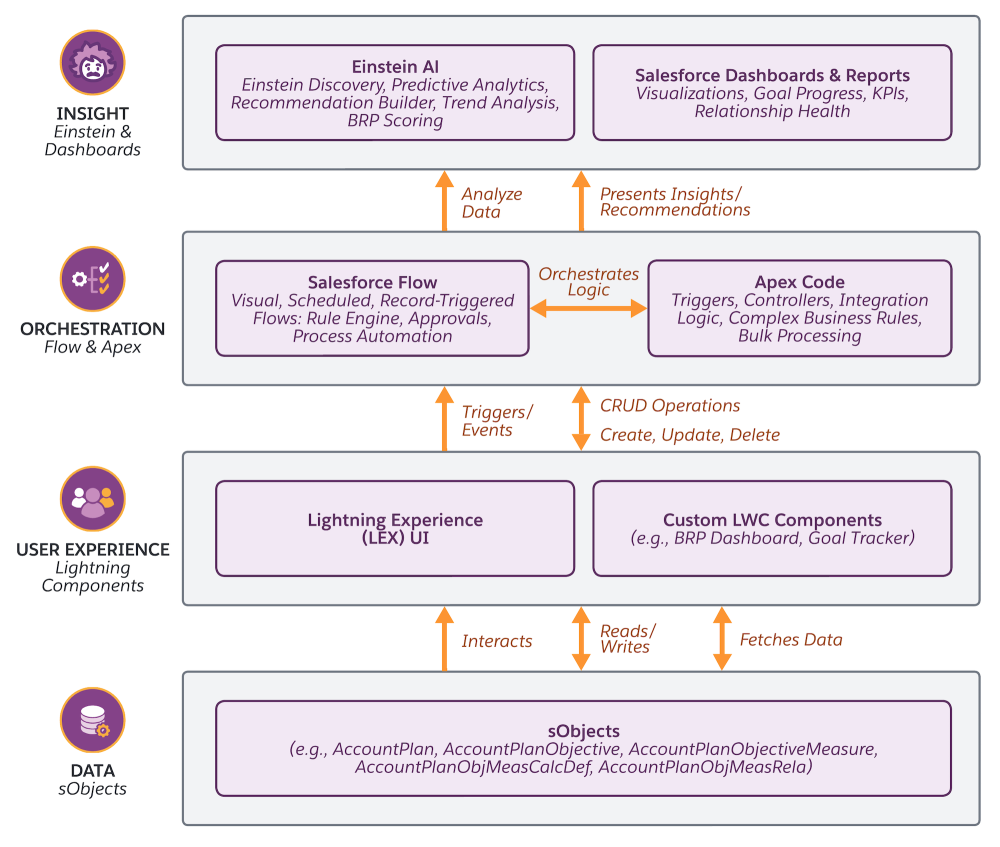
The architecture of Business Relationship Plan spans four layers: Data (Plan, Objective, Measure records), Experience (Lightning pages and Flexcards), Orchestration (Flow, Apex, Omniscript), and Insight (Einstein summaries and analytics).
- Data layer: Plan, Objective, Measure, and Task records with standard and custom fields
- Experience layer: Lightning pages, Flexcards, and Strategic Tracker components
- Orchestration layer: Flow, Omniscript, and Apex automation
- Insight layer: Einstein summaries and dashboard analytics
The diagram below shows how data flows between BRP’s four layers and their components: the Data layer with sObjects, the Experience layer with Lightning components, the Orchestration layer with Flow and Apex, and the Insight layer with Einstein and dashboards.
BRP data model: Core objects and relationships
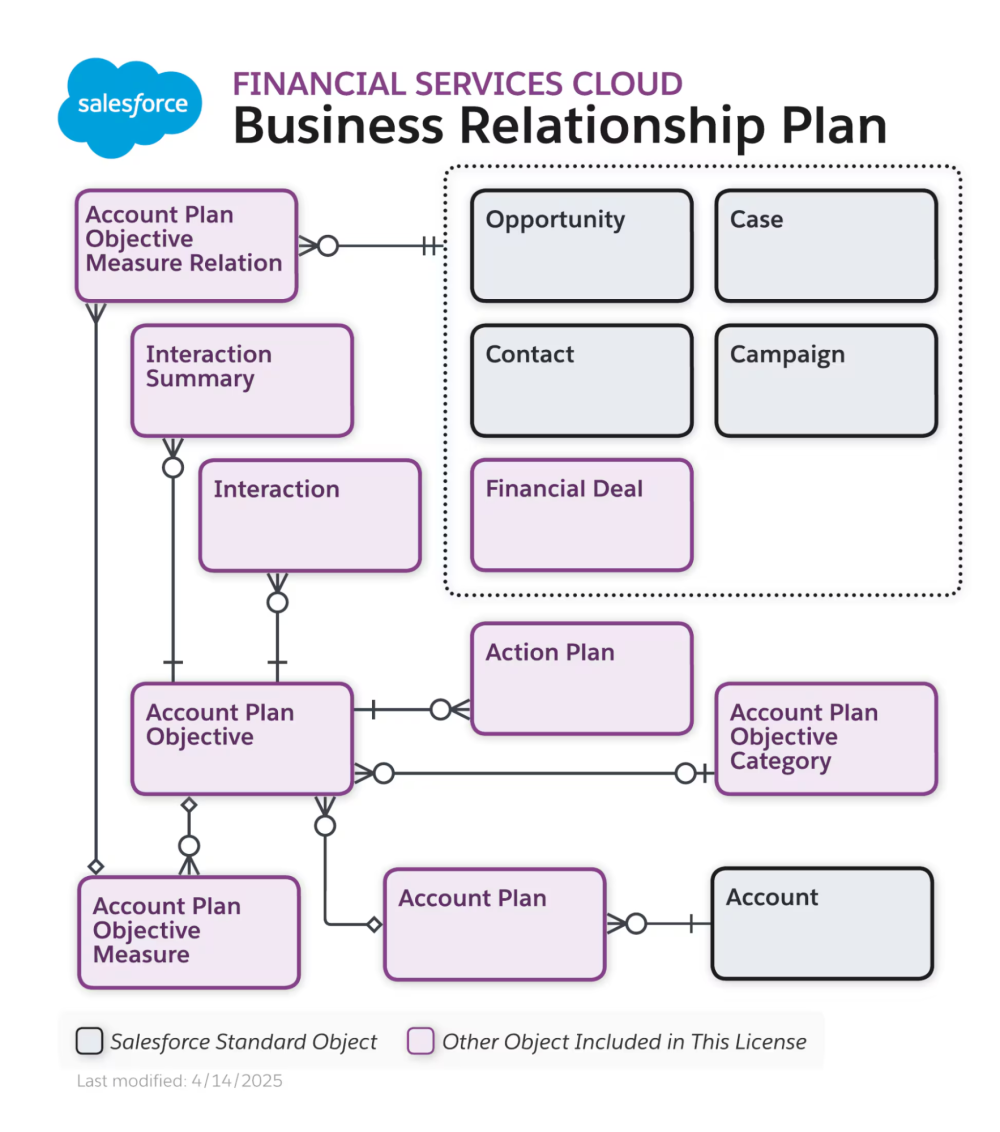
Business Relationship Plan offers a technical structure for Account Plan records, objectives, measures, and action plans, connecting client account goals directly to Financial Deal, Opportunities, Cases, and Contacts within the Salesforce data model.
Core objects
While each of the Account Plan entities contains numerous fields, we’ll focus here on the fundamental fields that are essential across all entities to help you understand the core data structure.
AccountPlan: The root planning object.
- Standard fields:
Name, AccountId, Status, StartDate, EndDate - Key relationships:
Account(lookup),Owner(lookup)
AccountPlanObjectiveCategory: Categories for classifying objectives.
- Standard fields:
Name, Description, StartDate, EndDate, IsActive
AccountPlanObjective: Strategic goals within a plan.
- Standard fields:
Name, AccountPlanId, Priority, Status, Owner, StartDate, EndDate, Description - Key relationships:
AccountPlan(master-detail),Owner(lookup),AccountPlanObjCategory(lookup)
AccountPlanObjectiveMeasure: Quantifiable KPIs tracking objective progress.
- Standard fields:
Name, AccountPlanObjectiveId, ValueType, TargetValue, CurrentValue - Key relationships:
AccountPlanObjective(master-detail),AccountPlanObjMeasCalcDef(lookup)
AccountPlanObjectiveMeasureRela: Links measures to related records.
- Standard fields:
Name, AccountPlanObjectiveMeasureId, ReferenceRecordId - Key relationships:
AccountPlanObjectiveMeasure(master-detail),ReferenceRecord(multi-lookup to Opportunity, Financial Deal, Case, Contact, Campaign, etc.)
ActionPlan: Structured task-based execution plans.
- Standard fields:
Name, ActionPlanType, StartDate, EndDate - Key relationships: Target (multi-lookup)
ActionPlanItem: Individual tasks within an action plan.
- Standard fields:
Name, ActionPlanId, IsRequired, DisplayOrder, DependencyStatus - Key relationships:
ActionPlan(master-detail),ActionPlanItem(multi-lookup)
Task: Action items tied to objectives.
- Standard fields:
Subject, Status, Priority, Due Date, Assigned To - Key relationships: What (lookup to Objective)
Sample SOQL query
The query below retrieves active plans with nested objectives and measures, which is useful for building custom dashboards.
1SELECT Id, Name, Account.Name, Status, StartDate, EndDate,
2      (SELECT Id, Name, Priority, Status, Owner.Name,
3          (SELECT Id, Name, TargetValue, CurrentValue
4           FROM AccountPlanObjectiveMeasures)
5       FROM AccountPlanObjectives
6       ORDER BY Priority, CreatedDate)
7  FROM AccountPlan
8  WHERE Status = 'Active'
9    AND Account.Industry = 'Banking'
10  ORDER BY StartDate DESC
11  LIMIT 100
Calculation definitions in Business Relationship Plan
A Calculation Definition is a core configuration record in BRP that defines the logic for platform-led aggregations. It establishes a technical framework with three fundamental pillars:
- Target object: Identify the specific record type for data aggregation
- Target field: Specify the numeric or currency value to be rolled up
- Rollup type: Define the mathematical operation (Sum, Count, Min, or Max)
Furthermore, users can implement conditional logic to filter the underlying data set, ensuring that only qualifying records contribute to the final metric. Once this setup is complete, client relationship managers can leverage these definitions across multiple Account Plan measures without writing a single line of code.
Summary of roles
| Process Step | Owner | Key Outcome |
| Define logic | Admin | Reusable Calculation Definition |
| Activation | Admin | Availability in Measure UI |
| Plan setup | User | Strategic measure creation |
| Data mapping | User | Associated related records |
| Orchestration | Platform | Automated nightly rollups |
This collaborative framework ensures that while admins govern the formula, the platform manages the data, and users focus on results. That is the power of Calculation Definitions.
Let’s now take a look at the steps an admin would take to set up calculation definitions in Agentforce Financial Services. Once set up, we’ll then look at how a business user would use the system.
The admin experience: Configuring the engine
The initial setup phase creates a reusable asset for the entire organization. Once published, these definitions become standard options for all team members during measure creation.
As an admin, you would follow these steps to configure BRP.
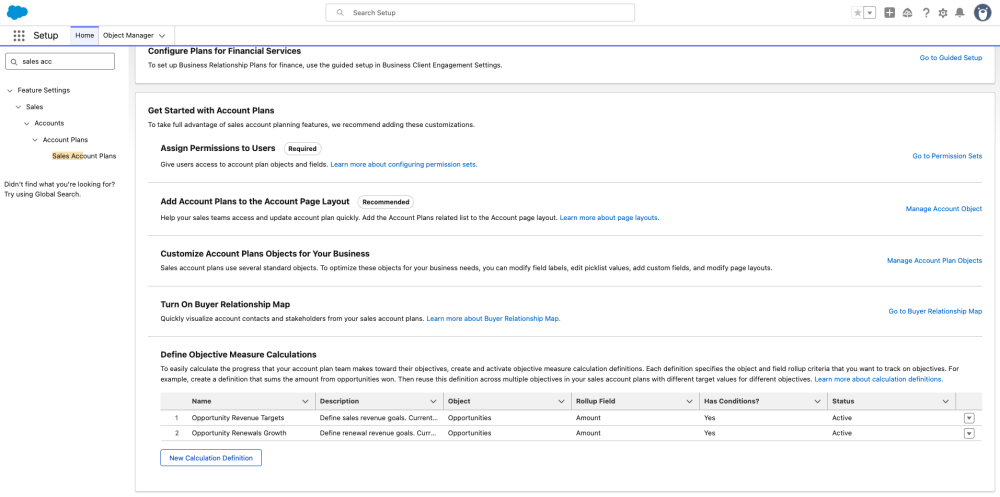
Step 1: Access configuration
Navigate to Setup -> Sales Account Plans and you will see the calculation definition section. You will see both out-of-the-box (OOTB) logic and custom configurations tailored to your specific business requirements.
Step 2: Define the data parameters
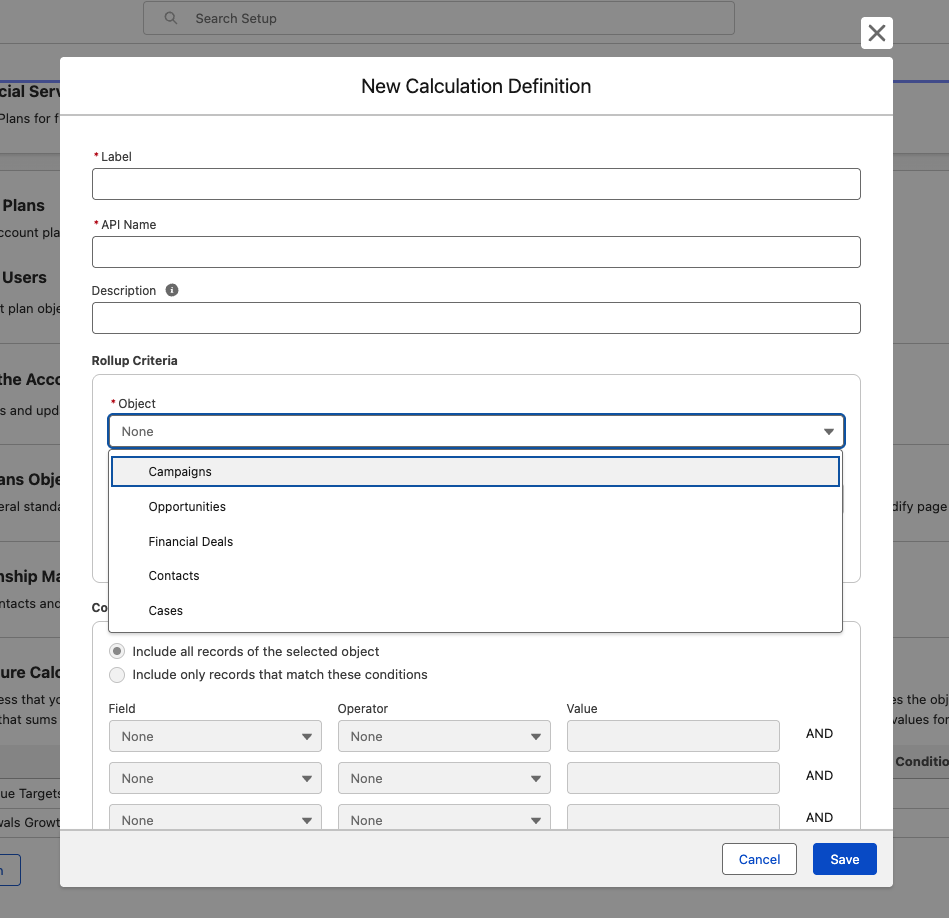
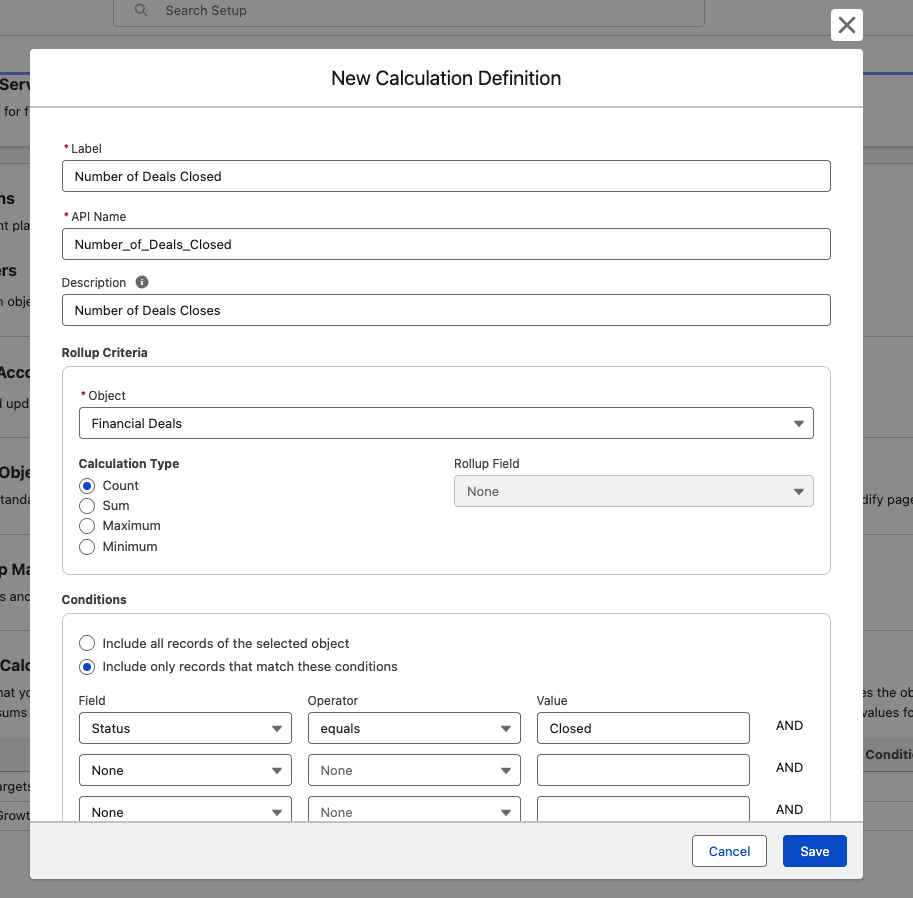
Click on New Calculation Definition and populate the following essential fields:
- Identity: Assign a Name and unique API Name for the definition
- Context: Provide a clear description, so end users understand what the metric represents
- Source: Select the Target Object (e.g., Financial Deal) and the corresponding Target Field
- Logic: Choose the Rollup Type; the platform automatically infers the data type from your field selection
Step 3: Implement conditional filters
Admins can apply up to five conditions to refine the calculation scope. For example, you might exclude records where the status is “Inactive” or filter by specific transaction thresholds to ensure metric accuracy.
Step 4: Lifecycle Management
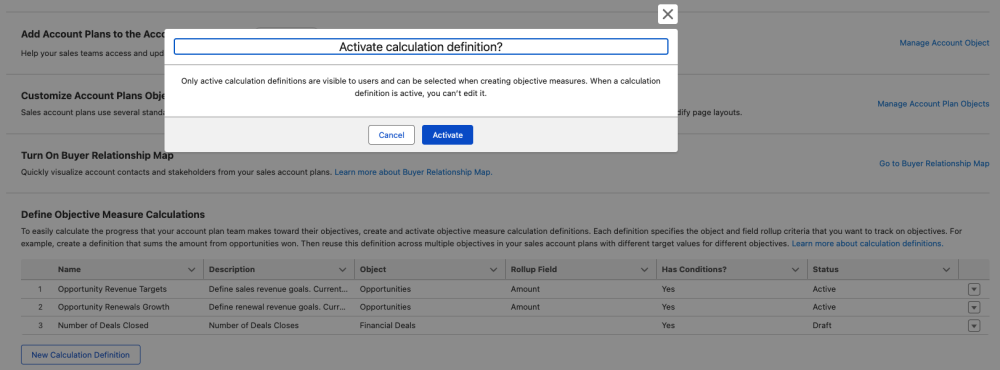
New definitions begin in Draft mode for review. Transitioning to Active status locks the core configuration to prevent unintended changes to live metrics, ensuring consistency across quarterly planning cycles.
The business user experience: Operationalizing strategy
Once activated, these technical definitions are handed off to client relationship managers to drive daily business outcomes.
Business users would follow these steps:
Step 1: Establish the plan hierarchy
Users begin by creating an Account Plan and defining high-level Objectives, such as increasing portfolio retention or growing fee income.
Step 2: Link measures to logic
For each Objective, the user adds a measure. They define the name and target value, then select the appropriate calculation definition from the dropdown to assign the aggregation logic.
Step 3: Associate records
The user manually associates relevant records (e.g., Financial Deals) using the AccountPlanObjectiveMeasureRela records. This flexible mapping allows single records to contribute to multiple plans without limit.
Step 4: Automate orchestration
The platform executes a nightly scheduled job that processes these associations, applies admin-defined conditions, and updates the Current Value field automatically, ensuring that fresh data is available every morning.
Architecting for performance: The daily cadence
Agentforce Financial Services utilizes a batch approach for these calculations to maintain optimal system performance. This design ensures that today’s updates to deals or record associations are consistently reflected in the next day’s planning metrics without creating unnecessary overhead.
Workflow example: Tracking Q3 deal revenue
Consider a scenario where a financial advisor tracks transaction revenue for a high-net-worth client.
Phase 1: Admin configuration
- Admin creates an “Active Deal Transaction Value” definition targeting the Financial Deal object.
- Logic is set to Sum the transaction field with a filter for active status.
Phase 2: Execution
- Monday: The advisor sets up the Account Plan and links eight deals to a new measure.
- Tuesday: The system reflects a $1.45M current value automatically.
- Quarter-End: As new deals close and are associated, the platform tracks the revenue growth until the $2M goal is surpassed.
Extend Business Relationship Plan with Apex
For complex business logic, developers can use Apex to extend BRP functionality. This allows you to implement sophisticated patterns beyond Flow capabilities, such as a nightly scheduled job that computes weighted health scores (on a 0–100 scale) for objectives by analyzing progress from baseline to target. Such automation can programmatically refresh status labels like On Track, At Risk, or Off Track, while utilizing batchable Apex to maintain performance for large-scale deployments exceeding 2,000 records.
Prerequisites
Before implementing Apex extensions for BRP, ensure that your org meets these requirements:
- Salesforce Edition: Enterprise Edition or higher
- Financial Services Cloud license: Active FSC license
- Agentforce Financial Services: Enabled in org settings
- Permission sets:
AccountPlanobject permissions (Read, Create, Edit) assigned to users - Omnistudio runtime: Enabled for Flexcards and Omniscript functionality
- Custom field access: Ability to create custom fields on
AccountPlanObjectiveandAccountPlanObjectiveMeasureobjects
The following example shows how to customize BRP to track objective health scores.
Example: Calculate objective health score
To prepare your organization for the Apex calculation, create these custom fields:
- On
AccountPlanObjectiveMeasure:BaselineValue__c(Text, 255): Stores the starting value for progress calculationWeight__c(Number, 5,2): Defines the relative importance (weight) of the measure in the objective’s health score
- On
AccountPlanObjective:HealthScore__c(Number, 5,2): Stores the calculated weighted health score (0–100)- Status picklist update: To use the
determineHealthStatusmethod, add the values On Track, At Risk, and Off Track to theAccountPlanObjective.Statuspicklist
- ⚠️ Crucial Data Note: Ensure that the
ValueTypefield (Number, Currency, or Percent) is set onAccountPlanObjectiveMeasurerecords beforeTargetValueandCurrentValuecan be persisted.
1/**
2 * Computes a weighted health score per Account Plan Objective from its measures,
3 * then sets HealthScore__c and a text Status from score bands.
4 */
5public class BRPObjectiveHealthCalculator {
6
7    /**
8     * Loads objectives (and related measures), aggregates progress by weight,
9     * and updates objectives that have at least one valid weighted measure.
10     *
11     * @param setOfObjectiveIds Ids of AccountPlanObjective records to recalculate; no-op if null/empty.
12     */
13    public static void calculateHealthScores(Set setOfObjectiveIds) {
14        if (setOfObjectiveIds == null || setOfObjectiveIds.isEmpty()) {
15            return;
16        }
17
18        // Child subquery: FROM clause must be the child relationship API name + __r (verify in object manager).
19        List objectives = [
20            SELECT Id, Name, HealthScore__c, Status,
21                   (SELECT Id,
22                           BaselineValue__c,
23                           TargetValue,
24                           CurrentValue,
25                           Weight__c
26                    FROM AccountPlanObjectiveMeasures)
27            FROM AccountPlanObjective
28            WHERE Id IN :setOfObjectiveIds
29        ];
30
31        // Only objectives we actually change are DML’d to avoid unnecessary updates/triggers.
32        List objectivesToUpdate = new List();
33
34        for (AccountPlanObjective obj : objectives) {
35            // Running totals for weighted average of per-measure progress (0–100 each).
36            Decimal weightedScore = 0;
37            Decimal totalWeight = 0;
38
39            for (AccountPlanObjectiveMeasure measure : obj.AccountPlanObjectiveMeasures) {
40                if (isValidMeasure(measure)) {
41                    Decimal progress = calculateProgress(measure);
42                    // Null weight defaults to 1 so the measure still counts equally if unspecified.
43                    Decimal weight = measure.Weight__c != null ? measure.Weight__c : 1;
44
45                    weightedScore += progress * weight;
46                    totalWeight += weight;
47                }
48            }
49
50            // Skip update when no valid measures contributed weight (avoids divide-by-zero and blank scores).
51            if (totalWeight > 0) {
52                // Weighted average progress, expressed on a 0–100 scale for storage/display.
53                obj.HealthScore__c = (weightedScore / totalWeight);
54                obj.Status = determineHealthStatus(obj.HealthScore__c);
55                objectivesToUpdate.add(obj);
56            }
57        }
58
59        if (!objectivesToUpdate.isEmpty()) {
60            update objectivesToUpdate;
61        }
62    }
63
64    /**
65     * A measure is included only when baseline, target, and current are all present,
66     * so progress and comparisons are well-defined.
67     */
68    private static Boolean isValidMeasure(AccountPlanObjectiveMeasure measure) {
69        return measure.BaselineValue__c != null
70            && measure.TargetValue != null
71            && measure.CurrentValue != null;
72    }
73
74    /**
75     * Linear progress from baseline toward target, as a percentage (0–100).
76     * Values are coerced with Decimal.valueOf in case the fields are numeric types other than Decimal.
77     */
78    private static Decimal calculateProgress(AccountPlanObjectiveMeasure measure) {
79        Decimal baseline = Decimal.valueOf(measure.BaselineValue__c);
80        Decimal target = Decimal.valueOf(measure.TargetValue);
81        Decimal current = Decimal.valueOf(measure.CurrentValue);
82
83        // Degenerate case: no movement defined; treat as fully achieved to avoid division by zero.
84        if (target == baseline) {
85            return 100;
86        }
87
88        // Raw % along the line from baseline to target; can exceed 0–100 before clamping.
89        Decimal progress = ((current - baseline) / (target - baseline)) * 100;
90        // Clamp so a single outlier measure cannot push the aggregate beyond 0–100 contribution.
91        return Math.min(Math.max(progress, 0), 100);
92    }
93
94    /**
95     * Maps stored score to a simple status label for reporting/UI.
96     */
97    private static String determineHealthStatus(Decimal score) {
98        if (score >= 80) {
99            return 'On Track';
100        }
101        if (score >= 60) {
102            return 'At Risk';
103        }
104        return 'Off Track';
105    }
106}Usage: Call this class from a scheduled Apex job to recalculate health scores nightly.
1public class BRPHealthScoreScheduler implements Schedulable {
2    public void execute(SchedulableContext ctx) {
3       Set objectiveIds = new Set();
4
5       for (AccountPlanObjective obj : [
6           SELECT Id
7           FROM AccountPlanObjective
8           WHERE Status = 'In Progress'
9           AND AccountPlan.Status = 'Active'
10       ]) {
11           objectiveIds.add(obj.Id);
12       }
13
14       if (!objectiveIds.isEmpty()) {
15           BRPObjectiveHealthCalculator.calculateHealthScores(objectiveIds);
16       }
17    }
18}
Schedule with: System.schedule('BRP Health Score Calculator', '0 0 2 * * ?', new BRPHealthScoreScheduler());.
Note: For orgs with more than 2,000 active objectives, refactor this into a Database.Batchable class with a batch size of 200. The calculateHealthScores method already accepts a Set<Id>, so the batchable execute() method can pass each batch directly.
1global class ObjectiveHealthScoreBatch implements Database.Batchable {
2
3    global Database.QueryLocator start(Database.BatchableContext bc) {
4        return Database.getQueryLocator(
5            'SELECT Id FROM AccountPlanObjective'
6        );
7    }
8
9    global void execute(Database.BatchableContext bc, List scope) {
10        Set objectiveIds = new Map<Id, SObject>(scope).keySet();
11        calculateHealthScores(objectiveIds); // already accepts Set
12    }
13
14    global void finish(Database.BatchableContext bc) {
15        // optional: send notification, log results
16    }
17}
Extend Business Relationship Plan with Document Generation
Salesforce Document Generation enables organizations to automatically create Word documents and PowerPoint presentations from Account Plan data. By placing the Summary Documents component on the Account Plan record page, developers can allow users to generate documents on-demand from pre-built templates with merge fields and conditional logic. Generated documents pull live data (objectives, measures, activities, related records) and are stored in Salesforce, where they can be:
- Exported: Download as native .docx/.pptx formats or convert to PDF
- Shared: Email as attachments or share via public/private links
- Printed: Download and print for client meetings or internal reviews
- Archived: Store for compliance and audit trails
This simple extension adds a lot of value and can be used for executive summaries, quarterly business reviews, and stakeholder presentations.
Best practices for developers
- Review existing OOTB capabilities first: Before building custom components, check available features like Flexcard Selector, Objectives Component, Action Plans, and Summary Documents for complete out-of-the-box functionality to avoid duplicate development
- Keep objective definitions specific and time-bound: Use validation rules to enforce date ranges and clear naming conventions
- Limit KPIs to meaningful indicators: Avoid measure proliferation; focus on three to five key measures per objective
- Build automation for repetitive tasks: Use Flow for measure reminders and status updates
Conclusion
When essential account data is static and siloed, annual account planning becomes more challenging and can easily fail.Business Relationship Plan gives financial services organizations a technical and operational model that they can run every week. With the right data model, UI, and automation, account teams can track goals in real time, act faster, and be more productive.
For developers, BRP provides a solid foundation with clear extension points. Whether you’re building Flow automation, Apex business logic, or custom LWC components, the platform supports continuous planning workflows that replace static annual planning cycles.
Resources
- Business Relationship Plan Overview
- Enable Business Relationship Plan
- Business Relationship Plan Setup Guide
- Add FlexCard Component
- Configure the Pre-Built Account Plan Lightning Page
- Configure Fields Specific to BRP
- Manage User Access for BRP
- Sales Account Plans Overview
- Account Plans Setup
- Strategic Tracker with Sales Action Plans
- Einstein Summaries for BRP
- Salesforce Developers sample apps on GitHub
About the author
Vignesh Damodharan is a Lead Member of Technical Staff with Agentforce Financial Services, where he leads Salesforce engineering teams building enterprise products on the Salesforce Platform. Follow him on LinkedIn.