Salesforce Multi-Framework is a framework-agnostic runtime on the Headless 360 Platform. Build React apps natively on Salesforce, query records with GraphQL, invoke Apex, and read user context through the UI APIs — no authentication or token management required. You get Salesforce’s security and governance model, plus React’s ecosystem, in one runtime.
Launched in open beta earlier this year, Salesforce Multi-Framework is now generally available. That means it’s production-ready, supported for business-critical workloads, and already enabled in orgs running on Hyperforce.
What’s new in the Salesforce Multi-Framework GA release
Here’s what has changed since the beta release:
- Production org support: You can deploy to production orgs, scratch orgs, Developer Edition orgs, and sandboxes
- Salesforce App domain: Multi-Framework employee-facing apps run on the new
salesforce.appdomain, a dedicated origin that provides hard security boundaries through the browser’s native Same Origin Policy - Data SDK updates: The Data SDK is now generally available with updated interfaces and APIs for querying Salesforce data with GraphQL
CustomApplicationtarget: The beta’sAppLaunchertarget has been deprecated in favor ofCustomApplicationfor employee-facing apps
Deploy to production, sandbox, and scratch orgs
Multi-Framework is now available on all Hyperforce orgs — production, sandbox, developer edition, and scratch — on the Summer ’26 release or later. The old UiBundleSettings scratch configuration setting has been deprecated.
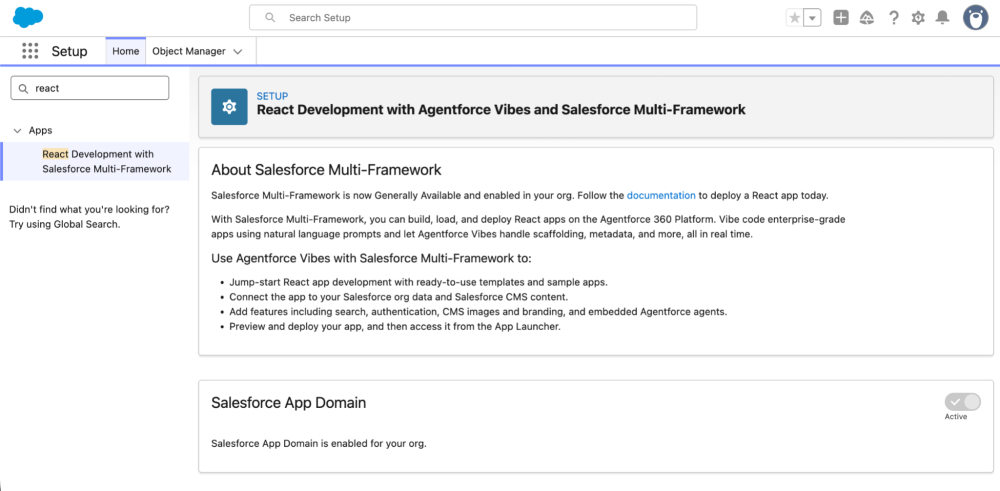
You can confirm your org has Salesforce Multi-Framework support by navigating to React Development with Salesforce Multi-Framework in Salesforce Setup. Enabled orgs show an “About Salesforce Multi-Framework” message with the “Enable Salesforce App Domain” toggle on.
The new salesforce.app domain
The salesforce.app domain is a dedicated web origin for Multi-Framework employee-facing apps. Your app’s URL follows the pattern https://<org>--<namespace>.<instance>.my.salesforce.app/app/c__<bundleName> — for example, https://acme-corp-dev-ed--c.scratch.my.salesforce.app/app/c__myReactApp. Each app runs on its own origin, so the browser’s Same Origin Policy enforces isolation natively. One app can’t read another’s cookies or storage, which means there’s no need for proprietary sandboxing.
Data SDK is GA (with a breaking API change)
The Data SDK (@salesforce/platform-sdk) is a client library that lets React apps query and mutate Salesforce records with GraphQL. It now ships under a new package name and a clearer API surface. Your GraphQL queries and mutations are unchanged, but the client library that wraps them is different.
Queries and mutations are no longer funneled through a single generic graphql() method. You now call .query() for reads and .mutate() for writes, and the parameter key matches the operation type.
The response typing is also stricter: result.data is now modeled as potentially undefined, so you’ll want to optional-chain through it (result?.data?.uiapi) rather than assuming it’s always present.
Before (beta):
1import { createDataSDK, gql } from '@salesforce/sdk-data';
2
3const sdk = await createDataSDK();
4// Queries and mutations both used .graphql() with a `query` key
5const result = await sdk.graphql?.<QueryResponse>({ query: MY_QUERY });
6const mutationResult = await sdk.graphql?.<MutationResponse>({
7  query: MY_MUTATION,
8  variables: { input },
9});
10
11// result.data was assumed present
12const edges = result?.data.uiapi?.query?.Account?.edges;
After (GA):
1import { createDataSDK, gql } from '@salesforce/platform-sdk';
2
3const sdk = await createDataSDK();
4// Reads use .query() with a `query` key
5const result = await sdk.graphql?.query<QueryResponse>({ query: MY_QUERY });
6// Writes use .mutate() with a `mutation` key
7const mutationResult = await sdk.graphql?.mutate<MutationResponse>({
8  mutation: MY_MUTATION,
9  variables: { input },
10});
11
12// result.data is now potentially undefined — optional-chain through it
13const edges = result?.data?.uiapi?.query?.Account?.edges;
UIBundle metadata changes
Multi-Framework apps are now wired into the platform through Custom Application metadata rather than rendering directly from the App Launcher. The <target> element in .uibundle-meta.xml reflects the change: for employee apps, the beta’s AppLauncher value has been deprecated in favor of CustomApplication. The Experience target for customer-facing apps remains unchanged.
If you used AppLauncher during beta, update it to CustomApplication.
1<UIBundle xmlns="http://soap.sforce.com/2006/04/metadata">
2    <masterLabel>My App</masterLabel>
3    <description>A React app on Salesforce.</description>
4    <isActive>true</isActive>
5    <version>1</version>
6    <target>CustomApplication</target>
7</UIBundle>
To make the bundle accessible, you also need a Custom Application that references it. The Custom Application metadata ties your UI Bundle to the App Launcher.
1<CustomApplication xmlns="http://soap.sforce.com/2006/04/metadata">
2    <label>My React App</label>
3    <navType>Standard</navType>
4    <uiBundle>c__myReactApp</uiBundle>
5    <uiType>Lightning</uiType>
6    <formFactors>Large</formFactors>
7</CustomApplication>
Then grant visibility to the application through a permission set.
1<PermissionSet xmlns="http://soap.sforce.com/2006/04/metadata">
2    <applicationVisibilities>
3        <application>myReactApp</application>
4        <visible>true</visible>
5    </applicationVisibilities>
6    <label>My React App Access</label>
7    <hasActivationRequired>false</hasActivationRequired>
8</PermissionSet>
Migrating from beta: The breaking changes
If you built on the beta version of Salesforce Multi-Framework, be sure to make these five changes before deploying on GA:
- Update your import from
@salesforce/sdk-datato@salesforce/platform-sdk. - Split
graphql()calls into.query()(reads) and.mutate()(writes). - Optional-chain through
result?.data— it can now be undefined. - Replace
<target>AppLauncher</target>with<target>CustomApplication</target>in your.uibundle-meta.xml, and add a Custom Application metadata file with a<uiBundle>reference plus a permission set granting visibility. - Remove the deprecated
UiBundleSettingsscratch config — it’s no longer needed.
What’s next on the Multi-Framework roadmap
Here’s what we’re building next:
- Microfrontends: Embed externally hosted React components in Lightning alongside Lightning web components and pass events between them
- Angular support: We’re bringing additional framework support starting with Angular
- Localization: Adapt your Multi-Framework components to your users across languages, locales, and timezones using Translation Workbench or metadata
- Managed packages: Build, test, distribute, and deploy Multi-Framework applications as managed packages
- App management: View and manage basic app details — name, description, URL — from App Manager
Check back with the Salesforce Developer’s blog for updates and news as these features are released.
Resources
- Introducing Salesforce Multi-Framework: Beta announcement with detailed walkthrough
- Multi-Framework documentation: Setup guide, API reference, and best practices
- Salesforce Multi-Framework Recipes: 20+ code samples for React on Salesforce
About the authors
Alice Oh is a Director of Product at Salesforce building foundational products that enable flexible and extensible ways to create, vibe code, and surface apps across the Salesforce ecosystem. In her free time, she bikes around the Bay Area in search of the flakiest croissants. Follow and connect with her on LinkedIn.
Charles Watkins is a self-taught software developer and Lead Developer Advocate at Salesforce. He spends his time blogging, crafting code samples, and finding new places to hike in the Pacific Northwest. You can follow him on LinkedIn.