The Summer ’26 release is rolling out to your sandbox environments through May and June, and is scheduled to go live in production mid-June. Specifically, the key dates for this release are: May 8, 2026 (sandbox preview), and May 15, June 5, June 12, and June 13, 2026 (production rollouts), depending on your instance. Check the maintenance calendar for your specific org.
In this post, we’ll take a look at the highlights for developers across Salesforce Headless 360, Lightning Web Components (LWC), Apex, Agentforce, Data 360, and Agentforce 360 Platform developer tools.
Salesforce Headless 360
Headless 360 makes every major Salesforce capability available as an API, Model Context Protocol (MCP) tool, or CLI command — accessible to any authenticated caller, whether that’s an app, a human, or an autonomous AI agent. It’s the biggest theme of the Summer ’26 release. Headless 360 brings several innovations: hosted MCP servers, new MCP tools, coding skills, and CLI and API enhancements. Let’s dive into the primary developer features related to Headless 360 available in this release.
Salesforce Hosted MCP Servers
Salesforce Hosted MCP Servers let you connect any MCP-compatible AI client, such as Claude, ChatGPT, Cursor, or custom agents, to your Salesforce org and data through the open MCP standard. Every connection uses standard OAuth authentication, so your agents interact with Salesforce data and automation in a secure, governed way. Because Salesforce hosts them, there’s no additional infrastructure to manage.
You get two flavors: pre-built standard servers, and custom servers that you define yourself.
Standard MCP Servers
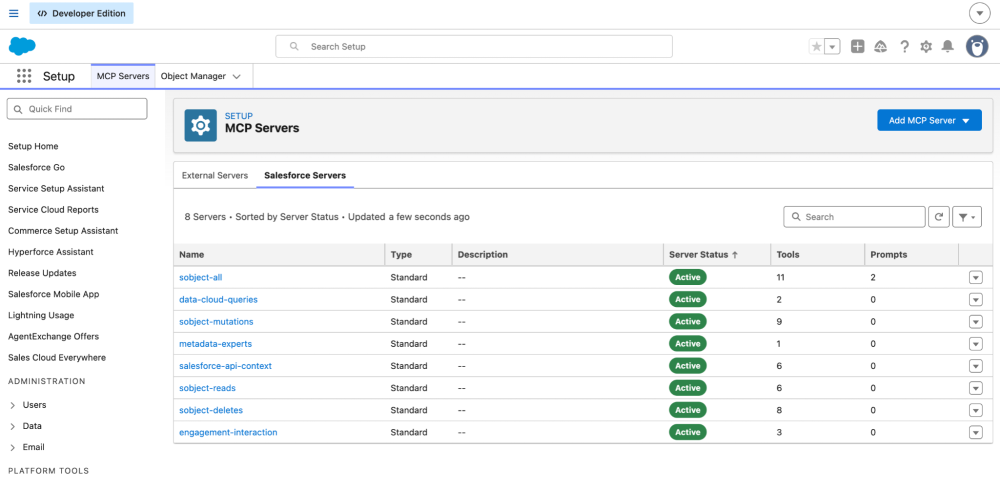
Salesforce Hosted Standard MCP Servers are now generally available. Salesforce provides several pre-built standard hosted MCP servers, including:
- SObject Servers: SObject CRUD, SOQL queries, search
- Data 360: Data 360 queries and graph traversal
- Tableau: Analytics and visualization
Custom MCP Servers
When standard MCP servers aren’t enough, you can build custom MCP servers with granular control over which tools and prompts you expose. Custom MCP servers respect the full sharing and security model you have configured for your Salesforce org. Custom MCP tools can be built from:
- Apex Actions: Expose
@InvocableMethod(see docs) annotated methods as MCP tools - Lightning Flows: Expose autolaunched flows as MCP tools
- Apex REST: Expose custom Apex REST endpoints as MCP tools
- AuraEnabled: Expose
@AuraEnabledannotated Apex methods as MCP tools - Named Query API: Expose parameterized SOQL queries as MCP tools
- Prompt Builder: Expose prompts from Prompt Builder as MCP prompts
- Agentforce: Expose Agentforce agents as MCP tools
- API Catalog: Map Salesforce API Catalog (curated registry of REST API endpoints) to MCP tools
For a complete walkthrough, including OAuth configuration details and connecting Claude Desktop and Claude Code, read Connect Claude with Salesforce Hosted MCP Servers and Expose Custom Apex as a Hosted MCP Tool for Agents.
Developer and designer MCP servers and tools
Developers and designers get a productivity boost from MCP-powered tools that bring AI assistance directly into the IDE and coding agents.
Salesforce DX MCP server (Beta): Two important tools land here. SLDS Guideline tools speeds up UI work with instant Salesforce Lightning Design System (SLDS) styling-hook and component-blueprint guidance. ApexGuru brings Apex code review into your coding agent from your org’s runtime metrics. It flags and fixes anti-patterns inline, such as SOQL or DML inside loops and redundant SOQL, and its Test Case Insights surface inefficient tests that drag down coverage.
Metadata API Context MCP Server (Beta): This server now ships five granular tools instead of one. These tools provide contextual information about Salesforce metadata types to help generate accurate metadata files, with faster responses and more efficient token usage.
Data 360 MCP Server (Developer Preview): This open-source server connects your coding agent to Data 360. Instead of exposing roughly 200 REST operations one by one, it fronts them with three facade tools — search (find a capability by intent), payload_examples (fetch a working request body), and execute (run it) — which keep the coding agent from blowing its context window.
Omnistudio MCP Server (Beta): This server bridges agentic and low-code development. Use your coding agent to turn requirements — plain text, screenshots, or UX mockups — into functional Flexcard templates.
B2C DX MCP Server: Modify your Storefront Next components quickly with the Figma-to-Component tool set, converting design files directly into components.
Marketing Cloud Engagement MCP Server: Securely connect external AI agents to Marketing Cloud Engagement and expose core developer capabilities like data extensions and journeys as natural-language tools.
Agent Skills for coding agents
Agent Skills are a lightweight, open format for extending AI agent capabilities with specialized knowledge and workflows. In this release, we are open-sourcing a library of Salesforce development skills. The skills are optimized to work with the Salesforce coding agent Agentforce Vibes, and are also compatible with any other coding agent, such as Claude Code or Codex.
Skills come pre-packaged with Agentforce Vibes. For any other coding agent, install them using the npx command: npx skills add forcedotcom/sf-skills.
Salesforce CLI updates
Salesforce CLI’s 220+ commands are a core part of Salesforce Headless 360. The CLI keeps shipping every week, and recent releases shipped several updates worth knowing about. We’ll look at the highlights for developers, organized by what they help you build. The emphasis is on Agentforce DX tooling and a major credential security overhaul.
Build agents from a working starting point:
- Agent project scaffolding: Spin up a runnable Agentforce sample instead of starting from scratch. The
agenttemplate generates a Local Info Agent demonstrating Apex, Prompt Template, and Flow subagents.
1sf template generate project --name my-agent --template agent- One-command agent user: Automate the setup of service agent users, eliminating the need for manual provisioning.
1sf org create agent-user --first-name Service --last-name Agent --target-org my-orgTest, preview, and debug agents:
- Agent preview is GA: You can now script interactive test sessions end to end with
agent preview start,send,sessions, andend. - Trace files for diagnosis: Inspect and manage the traces recorded during a preview session to see exactly how your agent routed and acted.
1sf agent trace read --session-id --format detail --dimension actions- Richer evaluations (Beta): Run YAML- or JSON-defined evaluation tests for higher-quality, repeatable agent testing.
1sf agent test run-eval --spec specs/my-agent-testSpec.yaml --target-org my-orgKeep credentials out of your logs:
- Secrets redacted by default: Access tokens, SFDX auth URLs, and passwords are now stripped from commands like
org displayandorg list --json, preventing accidental leaks in continuous integration (CI) and logs. - Deliberate secret retrieval: When you actually need a credential, ask for it explicitly.
1sf org auth show-access-token --target-org my-orgAs always, the deep-dive details for every command and flag live in the Salesforce CLI release notes. Read them to go further.
Salesforce Platform API updates
The platform’s APIs are a big part of Headless 360. Summer ’26 ships API version 67.0, and a few changes are worth knowing about as you build.
Plan now: SOAP login() is being retired
This is the most impactful change in this release for integration owners. SOAP login() in API versions 31.0–64.0 retires in Summer ’27. Any integration that authenticates with a username and password over SOAP will stop working. Move those integrations to OAuth — using external client apps with JWT tokens — well ahead of the cutoff. A new Any API Auth user permission lets you control who can authenticate via SOAP login(), and it’s enforced by default in newly created orgs.
Chain dependent records in one GraphQL request
GraphQL mutations can now reference any field returned by an earlier operation in the same request, not just its record ID. Use @{ref.Record.FieldName.value} for a field value, @{ref.Record.Id} (or shorthand @{ref}) for the ID. This lets you create linked records in a single round trip. Below is an example body for chaining dependent request in one GraphQL
1mutation CreateChain {
2  uiapi(input: { allOrNone: false }) {
3    AccountCreate(input: { Account: { Name: "Headless 360 Test Co" } }) {
4      Record { Id  Name { value } }
5    }
6    ContactCreate(input: { Contact: {
7      LastName: "@{AccountCreate.Record.Name.value}"
8      AccountId: "@{AccountCreate}"   # == AccountCreate.Record.Id
9    }}) { Record { Id  LastName { value } } }
10    OpportunityCreate(input: { Opportunity: {
11      Name: "@{ContactCreate.Record.LastName.value}"
12      AccountId: "@{AccountCreate.Record.Id}"
13      StageName: "Value Proposition"
14      CloseDate: "2026-12-31"
15    }}) { Record { Id } }
16  }
17}
You can use a Beta Salesforce CLI command to execute any GraphQL as shown below.
1sf api request graphql --body --target-org my-orgUse JWT access tokens with SOAP API
SOAP API now accepts JWT-based access tokens from Salesforce OAuth flows in the sessionId header element, reaching parity with REST authentication and making token sharing with external services safer.
Connect REST API rate limits are relaxed
Orgs have been migrated off the restrictive per-user, per-application, per-hour Connect REST API limit and onto the more generous per-org, per-24-hour Salesforce Platform API limit — the same pool that every other API call shares. Only requests that require Chatter keep the old hourly throttle. The identical change applies to Connect in Apex.
User Interface API CSRF token
A new GET /ui-api/session/csrf resource (see docs) returns a token that you can use to protect User Interface API requests from third-party forgeries.
LWC updates
Summer ’26 is a maturity release for LWC. The big themes: cleaner architecture (state finally lives outside your components), a quicker edit-and-preview cycle (real-time previews in the browser and your IDE), better defaults (more virtualization, tighter security), and a new bridge to Agentforce.
Here are the five features most likely to change how you build — each with the problem it solves.
- State Managers (GA): These pull data and its logic out of components into a reusable, testable layer.
- API 67.0 niceties: This includes zero-JS accordions via grouped <details>, plus faster hot reload.
- Secure downloads: LWS now blocks data: URIs, so generate files the right way.
- Dynamic lists (in Developer Preview): This renders thousands of rows smoothly with built-in virtualization.
lightning/accApi: This new module lets your components open and drive the Agentforce panel.
State Managers for LWC
State Managers is the most consequential LWC feature going GA during this release. State managers move data and the logic that mutates it out of components into a dedicated layer. Build one as a plain JS module with the new defineState primitive from @lwc/state, which gives you three building blocks:
atom(value): Reactive state, read through.valuecomputed([deps], fn): A derived value that recomputes when a dependency changessetAtom(atom, value): The only way to update an atom
defineState returns a factory — each call yields a fresh, independent instance. The essential shape: one atom as the source of truth, a derived computed, and an action that mutates via setAtom.
Below is example code that demonstrates a state manager in action, handling a cart:
cartStateManager.js
1import { defineState } from '@lwc/state';
2export default defineState(({ atom, computed, setAtom }) => {
3    const items = atom([]);                       // source of truth
4    const count = computed([items], (l) => l.length); // derived
5    const addItem = (item) =>                       // action
6        setAtom(items, [...items.value, item]);
7    return { items, count, addItem };
8});
A component imports the manager module, calls the factory, then reads reactive state through .value — in JS or the template, which re-renders automatically on change. No data logic, no manual subscription:
cartSummary.js
1import { LightningElement } from 'lwc';
2import createCartStateManager from 'c/cartStateManager';
3export default class CartSummary extends LightningElement {
4    cart = createCartStateManager();
5}
cartSummary.html
1<template><h2>Your Cart ({cart.value.count})</h2><p>
2</p></template>
For complete, runnable examples, see the open-source lwc-recipes repo. Because each instance is isolated, managers are trivially unit-testable.
Salesforce also ships built-in Lightning state managers that wrap Lightning Data Service (LDS) access to the most common UI API data and metadata — for records, object info, page layouts, and related lists (for example, lightning/stateManagerRecord and lightning/stateManagerObjectInfo). They follow the same pattern as the ones you write and participate fully in LDS caching, normalization, and subscriptions, so reach for them before rolling your own.
LWC API version 67.0: Group <details> and faster HMR
To enable the features of this release, update your bundle .js-meta.xml by setting <apiVersion>67.0</apiVersion>.
Two wins by using the 67.0 API version: hot module reloading (HMR) is faster and more memory-efficient, and you can now group native <details> elements with the name attribute for a zero-JavaScript exclusive accordion (it threw a compiler warning before 67.0). Same name = only one open at a time.
faqAccordion.html
1<details key={faq.id} name="summer26-faq">
2    <summary>{faq.question}</summary>
3    <p>{faq.answer}</p></details>
Secure file downloads: LWS blocks data: URIs
Lightning Web Security (LWS) adds a batch of API distortions in this release. The one most likely to break code: HTMLAnchorElement.prototype.href now blocks the data: URI scheme. If you trigger client-side downloads by setting an anchor’s href to a data: URL, that stops working.
The fix is the supported pattern anyway — build a blob in JavaScript and use a blob: object URL (origin-bound, and revoked after use).
secureDownload.js
1// LWS-safe: blob: URL, not data:
2const blob = new Blob([this.content], { type: 'text/plain' });
3const url = URL.createObjectURL(blob);
4anchor.href = url;
5anchor.download = this.fileName;
6anchor.click();
7URL.revokeObjectURL(url); // release memory
Other new distortions include Element.getAttribute, innerHTML/outerHTML getters, MutationObserver.observe, the IndexedDB factory, Promise.then/catch/finally, and more — with matching ESLint rules. Run the updated ESLint package and review the LWS Distortion Viewer before you upgrade the components to this release.
Load large lists dynamically (Developer Preview)
Rendering thousands of rows used to choke the browser, the new lightning-dynamic-list-container (see docs) and lightning-dynamic-list-item (see docs) base components use virtualization. They render only the rows in the viewport and stream the rest in as you scroll, from 50 items to 5,000.
dynamicContactList.html
1<!-- Container needs a bounded height for scroll + virtualization -->
2<div>
3  <lightning-dynamic-list-container
4      list-items={allContacts}
5      onrenderlistitems={handleRenderListItems}
6      onloadmore={handleLoadMore}>
7    <template for:each={visibleContacts} for:item="contact">
8      <lightning-dynamic-list-item
9          key={contact.id} item-id={contact.id}>
10        <div>{contact.name}</div>
11      </lightning-dynamic-list-item>
12    </template>
13  </lightning-dynamic-list-container>
14</div>
The container fires renderlistitems as you scroll (which slice to render) and loadmore near the end:
dynamicContactList.js
1handleRenderListItems(event) {
2    const { listItemsToRender } = event.detail;
3    this.visibleContacts = listItemsToRender;
4}
You also get focus preservation and built-in accessibility (screen readers, Home/End/Arrow nav, Browse-Mode hint).
Here are some recommendations for working with dynamic lists: keep container and item adjacent, give every item a unique item-id, and don’t set overflow: scroll on your own container — the component handles scrolling.
Talk to Agentforce from LWC with new LWC module lightning/accApi
The standout new module is lightning/accApi (see docs) — the Agentforce Conversation Client API. This headless module lets your LWC components drive the native Agentforce side panel in Lightning Experience: open it, close it, point it at a specific Employee Agent, and send natural-language utterances. Think of a “Summarize this record” button, or a context-aware launcher in a console sidebar.
The entire API is three async methods:
| Method | Purpose |
open(botId?) |
Open the side panel, optionally to a specific agent |
close() |
Close the side panel |
execute(utterance, botId) |
Run a natural-language utterance on an agent |
All three return a Promise and are queued, running in sequence. Note execute does not return the reply — the conversation renders in the panel, not your component. Import the methods and call them.
agentforceLauncher.js
1import { open, close, execute } from 'lightning/accApi';
2
3@api botId; // design-time property, set on the page
4
5async handleOpen() {
6    await open(this.botId);
7}
8async handleQuickAction(event) {
9    const { utterance } = event.currentTarget.dataset;
10    await execute(utterance, this.botId); // wrap in try/catch + toast
11}
Expose botId as a design-time property, so admins can wire up the agent without touching code (a <property name="botId" type="String"> entry in the bundle’s .js-meta.xml targetConfig). botId can be obtained from the URL in Agentforce Builder.
Apex updates
API version 67.0 reinforces Apex security with safer defaults, and adds some long-requested ergonomics along the way.
Database operations run in user mode by default
SOQL, SOSL, DML, and Database (see docs) methods now default to user mode instead of system mode, so ever operation enforces the running user’s object permissions, field-level security (FLS), and sharing rules. The platform no longer assumes that the surface in front of it has already filtered the data; elevated access is now something you opt into explicitly.
with sharing is the new default, and WITH SECURITY_ENFORCED is retired
Two changes reinforce the same idea. A class compiled at 67.0 with no sharing keyword now defaults to with sharing (previously without sharing), so bypassing sharing is now a deliberate without sharing declaration. And the old WITH SECURITY_ENFORCED clause no longer compiles.
Here’s the exact error from a 67.0 org:
1// Deploying this class at API 67.0 fails with:
2//   "WITH SECURITY_ENFORCED is no longer supported, use WITH USER_MODE instead."
3[SELECT Id FROM Account WITH SECURITY_ENFORCED LIMIT 1];
WITH USER_MODE isn’t just a rename. It handles polymorphic fields (Owner, Task.whatId), checks the WHERE clause and not just the SELECT list, and reports every FLS violation instead of only the first, which you can read off the QueryException.
1try {
2    List a = [SELECT Id, Name, AnnualRevenue FROM Account WITH USER_MODE LIMIT 1];
3} catch (QueryException e) {
4    // returns Map fieldNames>
5    Map<String, Set> blocked = e.getInaccessibleFields();
6}
Multiline strings and String.template()
Triple single-quotes (''') give you real multiline string literals — no more + '\n' + chains for JSON payloads, email bodies, or SOQL. And String.template() (see docs) does named interpolation with ${variableName} placeholders, replacing the index-juggling of String.format().
Below is example Apex code showing multiline string and templating in action.
1String payload = '''
2{
3    "Account": "${accountName}",
4    "Last Updated": "${date}"
5}'''.template(new Map<String, Object>{
6    'accountName' => 'My Account',
7    'date' => Datetime.newInstance(2018, 11, 15, 8, 0, 0)
8});
Two things to keep in mind when running this:
- The newline right after the opening
'''is trimmed, so the literal above starts with{, not a blank line. String.template()renders aDatetimein GMT usingyyyy-MM-dd HH:mm:ss, not the user’s local time in the way thatString.valueOf()does. Format it yourself if you need a specific zone.
Integration tests for Agentforce and Data 360 (Developer Preview)
Integration tests for Agentforce and Data 360 are currently in Developer Preview and are supported in scratch orgs only. Standard unit tests mock every callout and roll back data, which prevents asserting on real Agentforce or Data 360 interactions. The new @IntegrationTest annotation overcomes these limitations by allowing live callouts and enabling data commits mid-transaction using IntegrationTest.commitTestOnly(), with cleanup handled in a @TearDown method. To enable this, add ‘ApexIntegrationTests‘ to the features array in your scratch org definition file. These tests run asynchronously, one at a time, via the Tooling API’s runTestsAsynchronous resource.
1@IntegrationTest
2public with sharing class MyServiceIntegrationTest {
3    @IntegrationTest
4    public static void testServiceInteraction() {
5        Account a = new Account(Name = 'Integration Test Account');
6        insert as user a;
7        IntegrationTest.commitTestOnly();           // data survives mid-test
8        Account r = [SELECT Name FROM Account WHERE Id = :a.Id WITH USER_MODE];
9        Assert.areEqual('Integration Test Account', r.Name);
10    }
11    @TearDown
12    public static void tearDown() {
13        delete as user [SELECT Id FROM Account WHERE Name = 'Integration Test Account' WITH USER_MODE];
14    }
15}
Elastic limits, trigger system mode, and other Apex changes
- Elastic limits for async jobs (Beta): Enqueue
Queueableand @futurejobs up to twice your licensed daily limit instead of hitting a hard wall; overflow is throttled, not rejected. Track it with the newDailyAsyncApexElasticExecutionsandDailyAsyncApexProcessedentries inSystem.OrgLimits.getMap(). - Apex triggers always run in system mode: Triggers now uniformly bypass sharing/FLS and can’t declare sharing or access modes. Push security-sensitive logic into a handler class where you control the access mode.
- Block anonymous Apex from managed packages: Managed package session IDs can no longer authenticate anonymous Apex. Enforced Summer ’27 — package authors should move to a shared
globalinterface plusType.forName(). - No-arg constructors required for invocable-action parameter classes: Any custom Apex type used as an invocable action input must expose a visible no-argument constructor (public, or global for packaged classes). This applies to Apex at API version 67.0 and beyond.
Agentforce monthly updates
Agentforce enables you to customize pre-built agents, or create and deploy enterprise-ready agents, that work across Salesforce apps, Slack, and third-party platforms. We’re adding some important developer features in the upcoming monthly releases.
Agentforce Builder and Agent Script are Generally Available (GA)
Agent Script — a scripting language for AI agents that gives builders precise control by blending deterministic rules with agentic reasoning — and the new Agentforce Builder are now generally available.
- The new builder is the default: Starting the week of July 13, 2026, the New Agent button no longer opens the legacy builder in Setup. New agents are created only in the new Agentforce Builder.
- One-click upgrade: Upgrading a legacy agent converts all subagents, actions, system messages, data, and connections to Agent Script, then optionally optimizes it for reliability.
- Models are configurable in script: Pin the model for an agent directly in Agent Script rather than relying only on the org-wide model option.
Agent Script is now open source
Salesforce open-sourced the Agent Script toolchain under an Apache 2.0 license: parser, linter, compiler, Language Server Protocol (LSP), and editor integrations.
This lets developers build custom tools. We’re excited to see the community (shout out to Jason Lantz) building new tools with the open-source Agent Script.
Skills for Agentforce development
The sf-skills GitHub repo covered above under “Agent Skills for Coding Agents” also includes skills that teach AI coding assistants to build, test and observe Agentforce.
Agentforce Data Library Connect API (Beta)
Agentforce Data Libraries (ADL) ground an agent in your trusted content. They index Knowledge articles or uploaded files into a vector search index and expose a retriever for retrieval-augmented generation (RAG). Creating one used to be a manual step in Setup; the new ADL Connect API (Beta) makes the whole lifecycle scriptable and ready for continuous integration/continuous delivery (CI/CD). It’s the data half of Headless 360 — grounding itself becomes an API.
All endpoints sit under the base resource: /services/data/v67.0/einstein/data-libraries
There are five steps to provisioning a file-based library and grounding an agent on it:
Step 1: Create the library
A single POST — note sourceType — is nested under groundingSource (SFDRIVE for files, or KNOWLEDGE / RETRIEVER). The response returns the libraryId that every later step needs.
1sf api request rest "/services/data/v67.0/einstein/data-libraries" \
2  --method POST --target-org my-org \
3  --body '{
4    "masterLabel": "Product Docs Library",
5    "developerName": "Product_Docs_Library",
6    "groundingSource": { "sourceType": "SFDRIVE" }
7  }'
8# → { "libraryId": "1JD...", "status": "IN_PROGRESS" }
Step 2: Wait for upload readiness
Poll GET …/{libraryId}/upload-readiness until it reports ready. Data 360 is provisioning the objects that hold your file metadata behind the scenes.
Step 3: Upload the file
Request a pre-signed S3 URL from POST …/{libraryId}/file-upload-urls, then PUT the file straight to that URL (forward the returned headers verbatim, or S3 rejects it with a 403).
Step 4: Index it
Trigger POST …/{libraryId}/indexing to chunk, embed, and build the retriever. Then poll GET …/{libraryId} and treat the library as ready when retrieverId goes non-null — not when the top-level status flips, which lags the retriever by 10–30 minutes.
Step 5: Ground the agent
Wire the finished library into a .agent file’s knowledge: block, then invoke AnswerQuestionsWithKnowledge from a subagent. The rag_feature_config_id is "ARFPC_" + the libraryId — not the raw ID.
1knowledge:
2    rag_feature_config_id: "ARFPC_1JDcf0000024ZZ7GAM"
3    citations_enabled: True
Agentforce Mobile SDK
The Agentforce Mobile SDK (Software Development Kit) embeds your agents in native iOS, Android, and React Native apps, as a pre-built chat UI or headless, where you own the UI. Three things landed for Summer ’26:
React Native: One codebase, both platforms
One TypeScript codebase ships the agent to both iOS and Android. You work through a single object, AgentforceService, and the whole integration is three calls: configure → (optional) add context → launch. First decide which kind of agent you’re embedding, for example:
- Service Agent: Customer-facing and anonymous (no login). Best for support in a public app.
- Employee Agent: Internal and authenticated. The SDK gets OAuth tokens from the Salesforce Mobile SDK.
To integrate the Agentforce Mobile SDK into your React native mobile applications, follow these three steps. These steps are essential to establish a secure, authorized connection between your application and your chosen agent.
Step 1: Configure the agent
First, tell the SDK which agent to connect to. The fields differ slightly by type, so here’s each one:
1import { AgentforceService } from 'react-native-agentforce';
2// Option A — Service Agent (anonymous, customer-facing)
3await AgentforceService.configure({
4    type: 'service',
5    serviceApiURL: 'https://service.salesforce.com',
6    organizationId: '00DWs00000Ip47F',
7    esDeveloperName: 'Order_Support_Agent',        // the agent's API name
8    serviceUISettings: { enableLightningType: true }  // render Custom Lightning Types as cards
9});
10
11// Option B — Employee Agent (internal, authenticated)
12await AgentforceService.configure({
13    type: 'employee',
14    instanceUrl: 'https://your-domain.my.salesforce.com',
15    organizationId: '00DWs00000Ip47F',
16    userId: '005xx0000001234',
17    agentId: '0XxWs000001DTDJK'                       // Bot Id from publishing the agent
18});
Step 2: Add session context (optional)
Pass typed variables that the agent can use to personalize its replies, for example, the identity of the user.
1await AgentforceService.setAdditionalContext({
2    variables: [{ name: 'userId', type: 'Text', value: '005xx0000001234' }]
3});
Step 3: Launch
Open the SDK’s pre-built native chat screen.
1await AgentforceService.launchConversation();Embed the Agentforce as a native iOS chat screen
The SDK gives you a ready-made chat screen to drop into your iOS app. You write a small bit of code that supplies the logged-in user’s access token, then point it at your published agent’s Bot Id (the 18-character ID you get when you publish). The SDK returns a complete native chat view that you present like any other screen. The screenshot below is our Order Support Agent answering live inside that app.
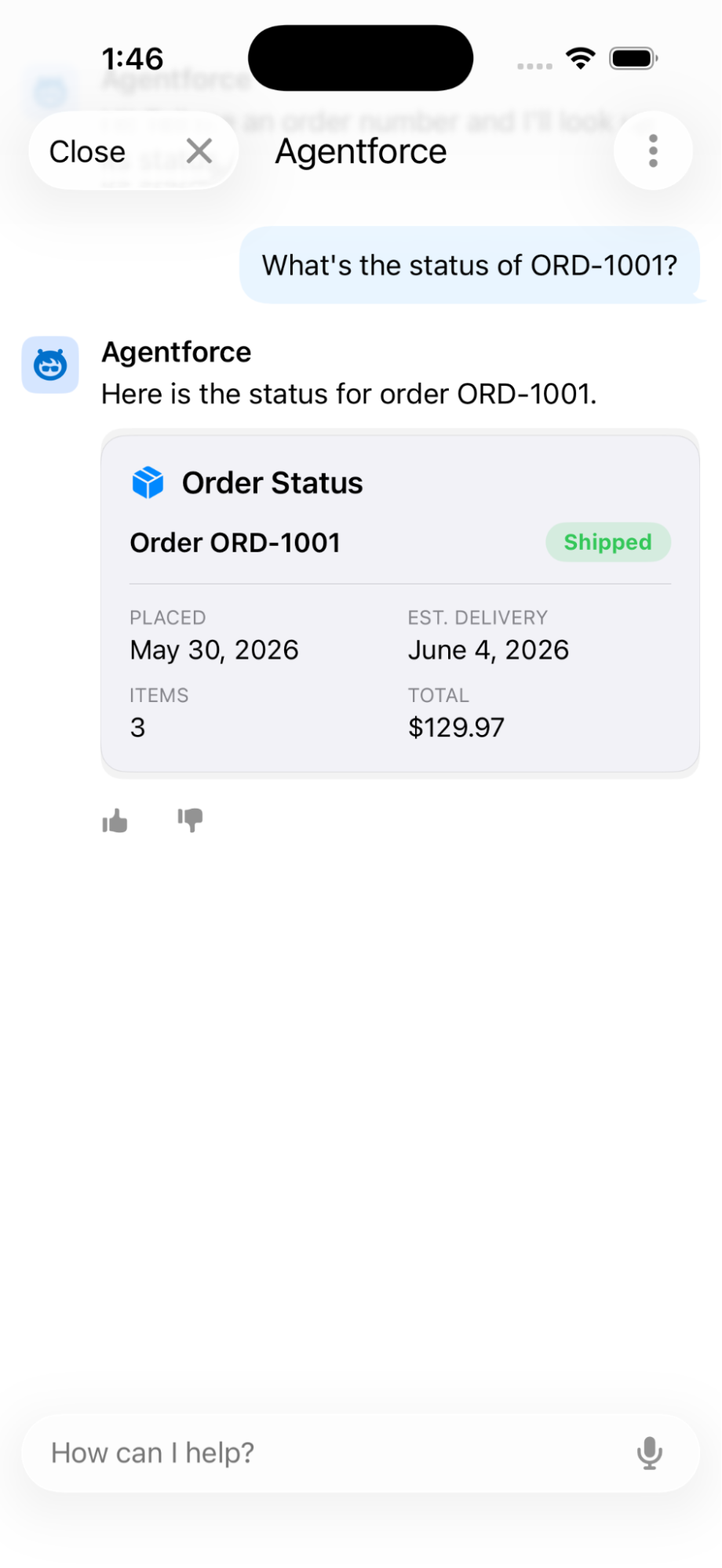
Make agent replies rich, on every surface, with Custom Lightning Types
Notice the reply in the above screenshot is a clean card — an order number, a green Shipped badge, dates, and a total — not a raw list of field names and values. That’s Custom Lightning Types. When an agent action returns structured data, a custom Lightning type lets you attach a purpose-built UI to that data, so the agent shows a designed component instead of plain text.
Note that Custom Lightning Types is a cross-surface feature, not mobile specifically. You define it once against the action’s output, and it renders idiomatically on every surface where the agent runs — a Lightning web component on desktop and web, and the matching native UI in a mobile app.
Multi-Agent Orchestration (Beta)
Real workflows rarely fit a standalone agent. With Multi-Agent Orchestration, an orchestrator agent connects to other specialized agents in your org and presents one unified point of contact, so users handle cross-domain tasks without juggling separate sessions.
In Agentforce Builder, open a draft agent as your orchestrator, then from the Explorer panel click + → Connect Agent as Subagent (Beta) and give each connected subagent a description that governs its behavior. With Agent Router, you add each subagent under Actions Available for Reasoning and reference it with @.
Observability: Custom Scorers (Beta)
Refined Agent Analytics unifies Service Agent and Employee Agent analytics into one view with 40+ metrics. On top of that, Custom Scorers (Beta) lets you grade sessions against your own key performance indicators (KPIs) — Sentiment, Tone of Voice, Product Interest, Escalation Trigger, Politeness — alongside Salesforce’s standard quality metrics.
For developers, the workflow matters most: build scorers with Next Gen Testing in Agentforce Studio or deploy them via the Metadata API (using aiAgentScorerDefinitions), so they live in source control, then activate them from the Scorer Hub to run on live sessions. Custom Scorers require the Agentforce Scorer Beta permission set.
Data 360 monthly updates
Like Agentforce, Data 360 features are released as often as monthly, so check the monthly section of the release notes often. Here are the developer-relevant highlights currently slated for the Summer ’26 timeframe.
Query Data 360 more precisely
Use the new SET OPTIONS clause (see docs) in SOQL queries to specify Data 360 dataspaces and control how NULL and empty string values are handled. When querying Data 360 data lake objects, add the clause at the end of your SOQL query to get more precise results.
1SELECT Id, EmailOptIn__c
2FROM ContactDLO__dlm
3WHERE EmailOptIn__c = ''
4SET OPTIONS (dataspace = 'default', honorEmptyStrings = true)
The clause goes at the very end. Dataspace is required for DLO queries — omit it and the query returns zero records. honorEmptyStrings = true makes Data 360 treat NULL and '' as distinct values; the default, false, collapses them the way Salesforce Platform objects do.
Extend Data 360 with custom code using Code Extension
Code Extension is a Data 360 feature that allows you to deploy custom Python scripts and functions that run on isolated containers on the platform. Currently, code extensions support deploying functions for complex batch data transformations, such as string manipulation, custom computations, or data cleansing, and deploying scripts that implement custom chunking logic on search index creation. In the future, Code Extension will support other Data 360 capabilities and programming languages.
You write and debug Python scripts locally using the project scaffold provided by the Data Custom Code Python SDK and the Salesforce CLI Code Extension plugin, validating them with the Salesforce CLI against a sandbox. Then, you deploy them to the sandbox and run them. There you can monitor them through the new code extensions log DLO. While developers author the code, users with the Data Cloud Architect permission set run and monitor it. We strongly recommend using the new code extension skill in afv-library to automate building, debugging, and deploying, and the new Data 360 MCP Server to run and monitor them.
Watch a demo of how to work with code extensions.
Deploy code extension components using data kits
Use a DevOps data kit to move code extensions or the data transforms built from them, from sandbox to production. When you add such a data transform to your data kit, its associated code extension is automatically included. This enables headless DevOps workflows; your CI/CD pipeline can promote Data 360 logic the same way it promotes Apex and LWC metadata.
Agentforce 360 Platform development tool updates
The Summer ’26 pro-code toolchain picked up a few notable upgrades:
- Agenforce Vibes 2.0 (Developer Preview): The first public pre-release of Agentforce Vibes 2.0 is here. This agentic development environment does far more than generate code. It reasons through complex tasks, builds structured implementation plans, and asks clarifying questions before acting. You stay in control through approvals, permissions, and native VS Code diff reviews. This release gives you a redesigned multi-tab chat experience and Plan Mode for breaking down complex work. You also get deeper Model Context Protocol (MCP) integration, built-in Skills and Rules, live Lightning Web Component previews, and the latest Claude and GPT models in one unified picker.
- Web Console (Beta): This is a full IDE that runs inside your org, right in the browser. Write, debug, and deploy Apex, LWC, and other metadata without leaving Salesforce. You can edit and save classes, run anonymous Apex, and set trace flags and debug log levels in one place. It differs from the Agentforce Vibes (AFV) IDE in three ways: it’s available on every org, it loads faster, and it runs entirely in the browser. The trade-off is that it supports only Salesforce-provided extensions, not custom ones. Reach for it for quick, in-org edits, and use the AFV IDE when you need a richer, extensible environment. Enable it in Setup under Development → Web Console (Beta).
- Live Preview VS Code Extension: This is the renamed Local Dev. See a single Lightning web component update in real time as you edit it, either in the browser or inside VS Code and the Agentforce Web IDE, using the Live Preview extension.
- Metadata Visualizer vs Code Extension: This extension turns raw metadata files into interactive diagrams, so you can see structure and relationships at a glance instead of reading XML. It updates in real time as you edit, and plugs into Agentforce Vibes to visualize AI-generated metadata. This extension is actively developed and currently supports visualizers for objects, permission sets and flexipages (Beta). Additional metadata visualizers are scheduled for delivery.
Conclusion
Summer ’26 is the release that makes Salesforce truly headless. Every major capability — data, automation, grounding, and agents — is now reachable from a CLI, an API, your IDE, or an autonomous AI agent, with security enforced by default. For you, that means less glue code, safer defaults, and quicker feedback as you code — whether you build with Apex, LWC, or Agent Script.
The best way to get ready is to spin up a sandbox, scratch org or a developer edition org and try these features before they reach production. Have questions, or want to share what you’re building? Join the conversation in the Salesforce Developers Trailblazer Community, or connect with us on the Salesforce Developers channels.
More Summer ’26 learning resources
- Read the official release notes
- Join the Salesforce Developers Trailblazer Community group to connect with the global developer community
- Join the Release Readiness Trailblazers Community group to get early access to release information and discuss changes with other developers
About the author
Mohith Shrivastava is a Principal Developer Advocate at Salesforce with 15 years of experience building enterprise-scale products on the Agentforce 360 Platform. Mohith is currently among the lead contributors on Salesforce Stack Exchange, a developer forum where Salesforce Developers can ask questions and share knowledge. You can follow him on LinkedIn.